Why e-paper keeps an image after power is removed
Use a room sign to understand how e-paper retains a picture, why changing it needs energy, and how the rest of the device affects total consumption.
Contents
E-paper needs electrical energy to change an image, but it can retain the completed image after power is removed. A message remaining on screen therefore does not mean the device is still running. To understand its power use, follow three questions: what forms the picture, what changes it, and which other parts of the device keep consuming energy?
Picture a sign outside a room showing the next meeting time. While its program runs, it can replace that message with a new one. If the program stops, the old message may remain perfectly readable. That is useful for a static label, but a live reading such as temperature also needs an indication of its age. We will first explain image retention, then return to this sign to examine power use and stale information.
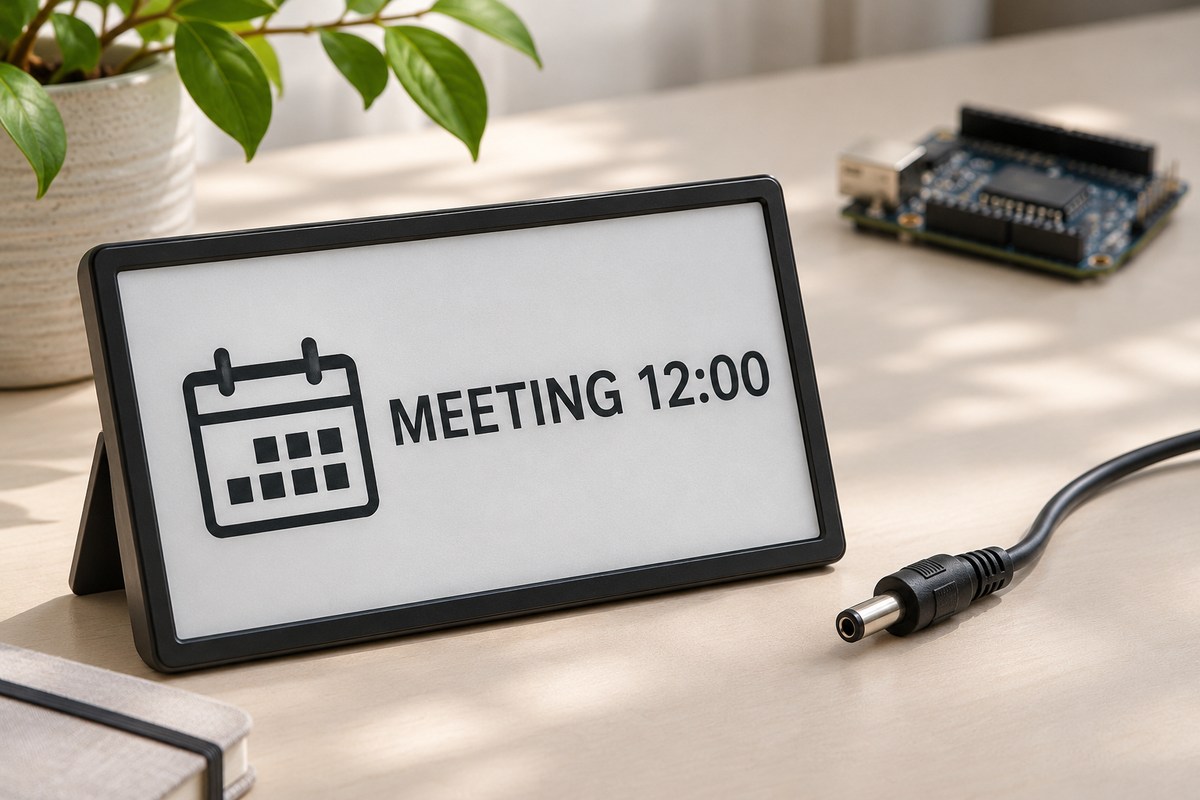
How can an image remain without continuous power?
In the type of e-paper discussed here, tiny pigment particles move within a liquid. In a black-and-white example, bringing light or dark particles toward the viewing surface makes that spot appear white or black. The particles carry electrical charge, so an electric field can move them. This is called an electrophoretic display, as described in E Ink’s explanation of electronic ink. Color systems and other display technologies also exist; a product being called paper-like does not by itself identify its mechanism.
After the particles are positioned and the update finishes, retaining the visible image does not need a continuous energy supply. This property is called bistability; E Ink’s description of bistability concerns holding an image without power. That answers why the picture remains. It does not account for the processor, lighting or other circuits, whose consumption must be considered separately.
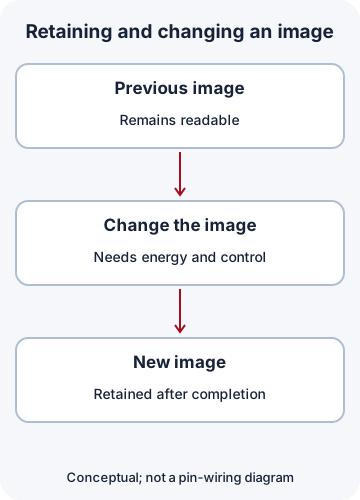
Where does the reading light come from?
This display reflects ambient light, rather like a printed page. Its image-forming layer does not itself provide the illumination needed to read in darkness. Some devices add a front light that illuminates the surface. That light is a separate part of the system and consumes power. “No backlight” does not mean “readable in darkness without a light.”
Many familiar LCDs use a backlight whose passage is controlled by the display layer. Reflective LCDs also exist, so reflection alone does not identify the technology. For motor-induced corrupted text, the LCD and motor-noise troubleshooting lesson addresses that specific problem. Here we are asking how an image is retained and changed.
The panel, driver and host are different roles
Now move from the visible surface to the complete device. The panel is the physical image-forming part. A controller manages image data and commands, while driver circuitry produces the electrical changes that move the particles. A ready-made module may combine these parts beside the screen, but their jobs differ. A bare panel with a flexible cable does not automatically include the power circuitry and documented interface of a complete module.
The host runs the program deciding what to show. It might be a microcontroller, a chip that executes a program and controls inputs and outputs, or a separate computer. A screen, touch input or display controller does not by itself establish a standalone computer with general-purpose applications. The microcontroller selection guide explains that role further.
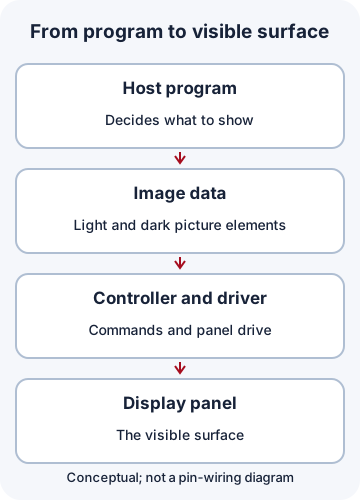
Adafruit’s display-module examples include circuitry and memory alongside the panel. That is one product arrangement, not a guaranteed feature of every panel. For a real connection, check the exact panel and board revision, supply requirements and input voltage levels in their documentation. Do not connect a bare panel cable to microcontroller pins merely because a connector appears to fit.
Transferring an image is not the same as displaying it
To replace the room sign’s message, the program first prepares new image data. A digital image consists of small picture elements called pixels. The program stores their states in temporary memory called an image buffer, then sends those data to the display controller. One step remains: the display circuitry must turn the data into particle movement. “Transfer complete” and “the screen has changed” are different events.
Consider a hypothetical 800-by-480-pixel image with only two states per pixel, light or dark. Storing one bit per pixel, with a row width divisible by eight, gives:
800 × 480 = 384,000 pixels
384,000 bits / 8 = 48,000 bytes
A byte contains eight bits. Those 48,000 bytes cover only one raw two-state image, excluding the program, fonts, communication information and working space. If an update method needs both an old and a new image, two such buffers occupy 96,000 bytes. That is not a universal requirement for every library. Color, gray levels, row layout and compression can change the amount of storage needed.
Full updates, partial updates and ghosting
A full update rewrites the screen using the sequence appropriate to its panel and may visibly flash between light and dark states. A supported partial update can change a region with different behavior. Partial does not universally mean flash-free, equally fast or compatible with every color panel.
A faint remnant of the previous image is called ghosting. Some models need a full update after a series of partial changes. Permitted intervals, counts, temperature conditions and requirements for previous-image data depend on the panel and its drive method. For example, the Waveshare 2.13inch e-Paper V4 specification, revision 4.0, distinguishes update modes and gives model-specific afterimage guidance. Its numbers are not rules for all displays.
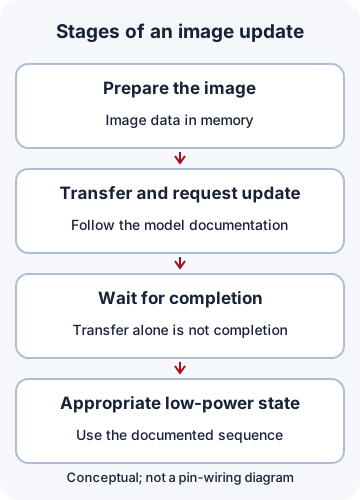
Sleeping circuitry and a retained picture are different
Image retention and updating are separate; sleep adds a third issue. A sleeping circuit reduces or stops some activity to save power. The panel may keep its picture even when the controller’s temporary memory no longer holds the previous data. Before the next update, software must initialize the hardware as required for that model and supply an old image or a full frame when needed. A retained picture does not establish that controller memory survived.
The 2.13inch e-Paper V4 operating flow on page 29 separates writing data to RAM, requesting a display update, waiting for BUSY to finish and entering deep sleep. That sequence is an example for that model; do not transfer command sequences or pin polarity to another panel. Software should use a bounded wait and report an update that does not finish.
Calculate whole-device energy, not just screen updates
Power is the rate of energy use. Watts measure power and joules measure energy: one watt for one second is one joule. The following values are teaching assumptions, not specifications for a real panel. Suppose the display section uses 0.10 W during a two-second update, while the host uses 0.020 W throughout the hour. Set other consumption aside for this example.
Energy per update = 0.10 W × 2 s = 0.20 J
60 updates per hour: 60 × 0.20 = 12 J
Host for one hour: 0.020 W × 3600 s = 72 J
Total: 12 + 72 = 84 J
Updating every half-hour instead of every minute gives two updates per hour: 0.4 J for image changes and 72.4 J including the same host. There are 30 times fewer updates, but whole-device energy use is not reduced by a factor of 30. In this model the host remains the dominant load.
A real budget must also account for the sleeping driver, processor, sensors, radio, memory, front light and supply losses. This simple sum does not establish battery life. Rather than only reducing update frequency, identify which parts remain awake and what work they actually need to do.
Does the displayed value still mean anything?
For the room sign, show “Last updated: 12:00” beside the value. If the host shuts down, that time and value may remain. The timestamp does not announce that the device is currently healthy; it helps a reader assess the age of the last displayed information. Applications that require fresh data need a suitable way to detect stale information or failure.
Before choosing a display, ask how often its image changes, what light it will be read in, what delay is acceptable, and whether an old picture could be mistaken for a live result. Image retention can benefit a label or infrequently changing text. Continuous motion and fast interfaces require a model whose actual update behavior meets the need.
Optional exercise and limits of the examples
The image-size and energy calculation file uses Python 3.10 or later with no additional library. It produces 48,000 bytes for one buffer, 84 J for the first case and 72.4 J for the second. It checks arithmetic; it does not simulate a panel, test hardware or measure a battery. Running it is optional.
python energy_demo.pyThe embedded systems learning path continues the relationship between software, inputs, outputs and power. The conceptual figures use CC BY 4.0; asset credits and licensing accompany the files. No specific panel was operated or measured for this lesson. Numerical examples are hypothetical, and the cited model documents support only their own stated hardware and limits.
Question and answer article
Ask your technical question
Questions and answers are published after moderation. Authors can see their own pending drafts.
No confirmed questions have been registered for this article yet.