Users and operating context | Embedded Engineering in the AI Era, Part 3
Answer Part 2’s exercise, distinguish user and maintenance roles, and develop normal and fault scenarios for the room monitor with explicit assumptions.
Contents
Part 2’s exercise presented six statements about a room-temperature monitor. The answer depends on identifying what each statement represents: a user need, a testable device requirement, a designer’s proposal or a confirmed constraint. For example, “update quickly” does not yet define clear behavior; we need to specify what changes on the display, which event triggers it and how much time is allowed. After answering that exercise, this part examines how the person sees the output and uses it to make a decision in the intended setting.
This is Part 3 of “Embedded Engineering in the AI Era.” The answers and scenarios below are teaching examples for the continuing project; they are not interview findings, reader submissions or device-test results. The exercise brief is in Part 2.
Previous exercise answer: six statements with reasons
- “I want to notice a change in temperature status while at my desk.” This is a need: someone wants information to support a decision. The important change and resulting action remain unclear. Ask what happened the last time they decided to change the room’s conditions.
- “The display must update quickly.” This expectation is ambiguous. “Quickly” has neither a unit nor a starting event. Distinguish sample receipt, display response and the sensor’s response to an actual temperature change. Ask which event starts the permitted delay.
- “I suggest using an ESP32.” The speaker is the designer and has stated no contractual constraint. This is currently a solution proposal. A board name does not become a user need by itself. A later confirmed requirement to use inventory could change its classification; that evidence is absent here.
- “If no valid sample arrives for five seconds, stop showing the previous number.” The number remains a provisional team assumption. This proposes a specific behaviour, but five seconds remains an assumption. Record a proposed requirement with its source, rather than an approved user request. Define validity, the data-age origin and the output-change deadline too.
- “Everything must go on the internet.” No remote viewer has yet been identified. This imposes an unjustified solution. “Must” is not evidence of a need. Ask who needs which information, from where. Until clarified, networking remains an option.
- “The installation location only has the existing five-volt USB output.” This time, the client has confirmed the site constraint. Within the exercise, this is a confirmed installation constraint. Connector type, available power and access still need checking. The presence of 5 V does not establish compatibility with every pin on any board.
A common mistake is classifying by wording alone. Not every “must” is an approved requirement, and not every component name is inappropriate. The speaker, evidence and approval status change the meaning. An assumed number can still support provisional work, provided it stays visible and reviewable.
Turn “quickly” into behaviour that can be checked
To turn “the display must update quickly” into defined behavior, establish the starting event first. In this exercise, the software receives a temperature sample and a flag indicating whether it is valid. Data age runs from receipt of the latest valid sample. Retain Part 2’s numbers: the data is fresh until five seconds have elapsed; at five seconds it becomes stale, and the device must show its invalid status no later than one second after that. These are exercise assumptions, not specifications for a selected sensor or advice about a comfortable room temperature.
Rewrite statement two as: “After receiving a valid, fresh sample, the monitor shall display its value with one decimal place and the °C unit within one second. An invalid or stale state shall take priority and hide the number.” The second starts at sample receipt. This does not specify the total delay from a physical room-temperature change.
Proposed normal test: supply a valid 21.4 sample at time zero and expect 21.4 °C by one second. Proposed boundary test: a 1.00 s response is within the limit; 1.01 s is outside it. Record both input and display-change times. The timing method’s uncertainty matters in a real judgement. Leave actual observations blank: these are test plans.
A local display or a phone message?
The shared need is understanding temperature status at the desk. Candidate solutions are a local display and a phone message. Criterion one is access at the decision location: a display requires presence and adequate visibility; a phone may accompany the person, but notification visibility and availability need clarification. Criterion two is operational dependency: a local display can be designed without networking, whereas a phone message requires a communication path and defined outage behaviour. We have neither measured scores nor an unconditional winner.
For this example, the local display is a more suitable initial candidate to investigate because the stated need is at the desk and remote viewing is unconfirmed. The decision is conditional: if the user rarely looks at it, the paper advantage is insufficient. Accept the hypothetical critique “Separate invalid data from high temperature,” because those states convey different information. Reject “Add internet now for the future” for the time being because its need and dependency cost are unclear. These are teaching critiques; an AI tool is optional for the exercise.
Who uses the device?
The primary user reads the status and decides what to do about the room. Someone installing the monitor or restarting it after a power interruption has a maintenance role. The same person can perform both roles, but the tasks differ. A client can set installation constraints without reading the display every day.
Describe a task for each role. “On returning to the desk, determine whether the data can be trusted” is more useful than “a technology enthusiast.” Do not attach unsupported ages, jobs or preferences to a fictional persona presented as real. Tasks, relevant capabilities, constraints and environment are what can change a design decision.
GOV.UK’s contextual research guidance explains how observing activity in familiar surroundings, with usual equipment and distractions, helps reveal needs and barriers. It concerns services; applying the observation principle to this hardware example is an educational adaptation, not a claim that interviews have occurred.
How do operating conditions change the design?
Create a context sheet with five sections: the person using the device, their task, the location, constraints and the evidence for each claim. Then connect each condition to a design decision. Viewing distance, glare and display angle may make a number difficult to read; readability should then be checked from the relevant position and angle. Background sound or headphones may also affect whether an alert is heard. These are questions to investigate, not established user problems until an observation or answer supports them.
Sensor placement also belongs to the room monitor’s context. A measurement beside a heat source may not represent conditions at the desk where the decision matters. We are not prescribing a numeric error or mounting distance yet: clarify the measurement location and decision location before selecting and evaluating the sensor. Power interruptions, startup and maintenance access can likewise change the required behaviour.
Write a scenario for someone returning to the desk
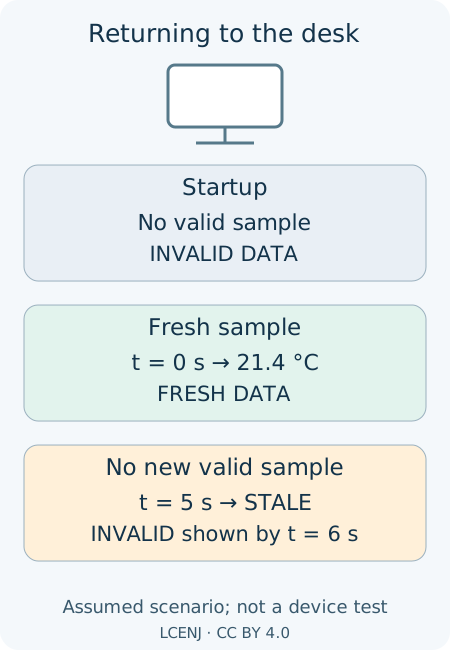
A use scenario describes events in order: the starting situation, the trigger, the person’s action, the device’s response and the decision that follows. In our example, someone returns to the desk after a break to check the temperature status. If an old reading still looks normal, they may interpret it as the current temperature. The software must therefore detect stale data, and the interface must communicate that status in a way the person can interpret correctly.
Walk through three states on paper. At startup, no valid sample exists, so an ordinary numeric reading is absent. After a valid 21.4 sample arrives at time zero, it is fresh and can be displayed. If no further valid sample arrives, it becomes stale at five seconds and the invalid indication must be visible by six seconds. Returning to normal requires a fresh valid sample, rather than merely pressing a button or running another loop iteration. This is a reasoning walkthrough, not a software or hardware test.
NASA’s stakeholder-expectations guidance likewise treats operational scenarios as including human interaction, state transitions and fault behaviour. One clear page is sufficient for our small project; copying a space programme’s administration is unnecessary. The useful distinction is that displaying the correct number alone does not establish that the person can make the intended decision.
A useful question replaces guessing and argument
Instead of “Wouldn’t a larger display be better?”, ask “Where were you, and what was the lighting like, the last time you read the status?” The first question favours a solution; the second seeks context and evidence. In a team, say “We still need viewing distance and attention patterns before choosing the output,” rather than “The user will not understand.” If no observation or answer exists, mark the evidence as unknown.
Ask AI to distinguish supplied information, assumptions and questions: “Use only this exercise brief. Identify the supporting statement for each proposal. Where evidence is absent, propose a question, not a user quotation.” Fluent prose is not interview evidence. Section 2.2 of NIST’s Generative AI Profile describes the risk of confidently presented false content. This exercise needs no personal information or private workplace project material.
Part 3 exercise: a context sheet and two scenarios
The inputs are entirely fictional: the person reads the display from approximately one metre away at the desk; afternoon glare appears on its surface; a maintainer sometimes disconnects USB while moving the cable; network availability is unknown; and the sample-valid flag comes from the exercise interface. These are supplied exercise facts, not our real observations. Provisionally retain the one-second/five-second timing model above. Do not choose a particular component or display yet.
Submit a sheet identifying the primary and maintenance roles, each role’s task and decision, three “condition → design consequence → way to investigate” relationships, and two new assumptions of your own. For each assumption, state the consequence if wrong, the next question and the evidence needed. Write one fresh-sample scenario and one power-interruption/restart scenario. In the latter, do not present the pre-interruption number as normal before the first valid sample arrives.
For a manual interface review, sketch or write the “high temperature” and “invalid data” states so that colour is not their only distinction. Propose an acceptance criterion and an observation method, leaving actual results blank. The English context-and-scenario workbook supports technical documentation practice; a complete exercise response may be in Persian or English.
Self-check: are roles connected to tasks and decisions? Are the source of each fact and your two new assumptions clear? Does the fault scenario cover startup and recovery? Does each relationship include a consequence and an investigation? Have observations remained unfilled? Part 4 will explain an answer to these exact inputs and scenarios, with assumptions and common mistakes, before continuing the topic of making assumptions explicit.
Question and answer article
Ask your technical question
Questions and answers are published after moderation. Authors can see their own pending drafts.
No confirmed questions have been registered for this article yet.