Computer vision and pose estimation: from image to decision
A wrist above a shoulder describes a position, not whether an exercise is performed correctly. Follow an image through body landmarks to a program decision.
Contents
Computer vision extracts information from images, such as an object's location or a body's pose. A pose-estimation model estimates locations such as shoulders and wrists. A separate rule or model then turns those locations into a decision. “The wrist is above the shoulder in this image” is one precise result. It does not establish that an exercise is performed correctly, safely or appropriately for that person.
Imagine a program that lights an on-screen indicator when someone raises a wrist. You do not need to buy a camera to understand the problem. We will follow the path from an image to a decision, then calculate a rule using synthetic coordinates.

What does a camera give the program?
A camera turns light from a scene into image data. Think of a digital image as a grid of small cells called pixels. A typical color image stores numbers for red, green and blue at each cell. Video consists of successive images, called frames. These numbers do not already carry labels such as “shoulder” or “wrist.”
A trained model is one way to locate body parts: a computational method that has learned patterns from training examples. At use time, a new image goes into the model and estimated point locations come out. Running the trained model is called inference; it is different from training it again. Stanford's CS231n introduction explains how image numbers become predictions.
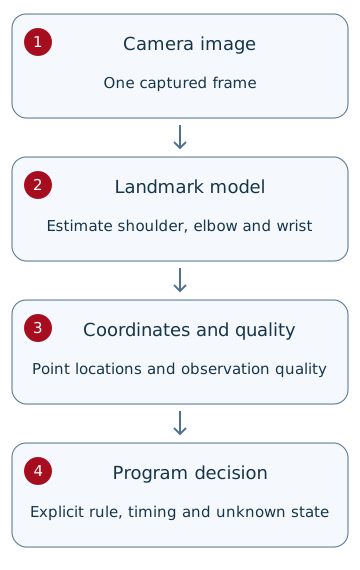
What comes out of pose estimation?
A landmark is an estimated location of a named body part, such as the person's left wrist. Joining several landmarks produces the familiar skeleton-like overlay. It is not an image of the bones or a direct joint measurement. A model may also estimate an obscured point incorrectly.
The landmark layout depends on the model. The documented MediaPipe Pose Landmarker estimates 33 points; Arduino's introduction to Pose Estimation in App Lab 0.11 describes a 17-point skeleton. Do not transfer wrist or elbow indices between models without checking their documentation. We use S for a shoulder and W for a wrist, not model-specific index numbers.
For comparison, a PIR sensor responds to changes in thermal radiation across its viewing area. It does not return wrist and elbow positions. Detecting motion and estimating body pose produce different kinds of information.
A worked example: is the wrist above the shoulder?
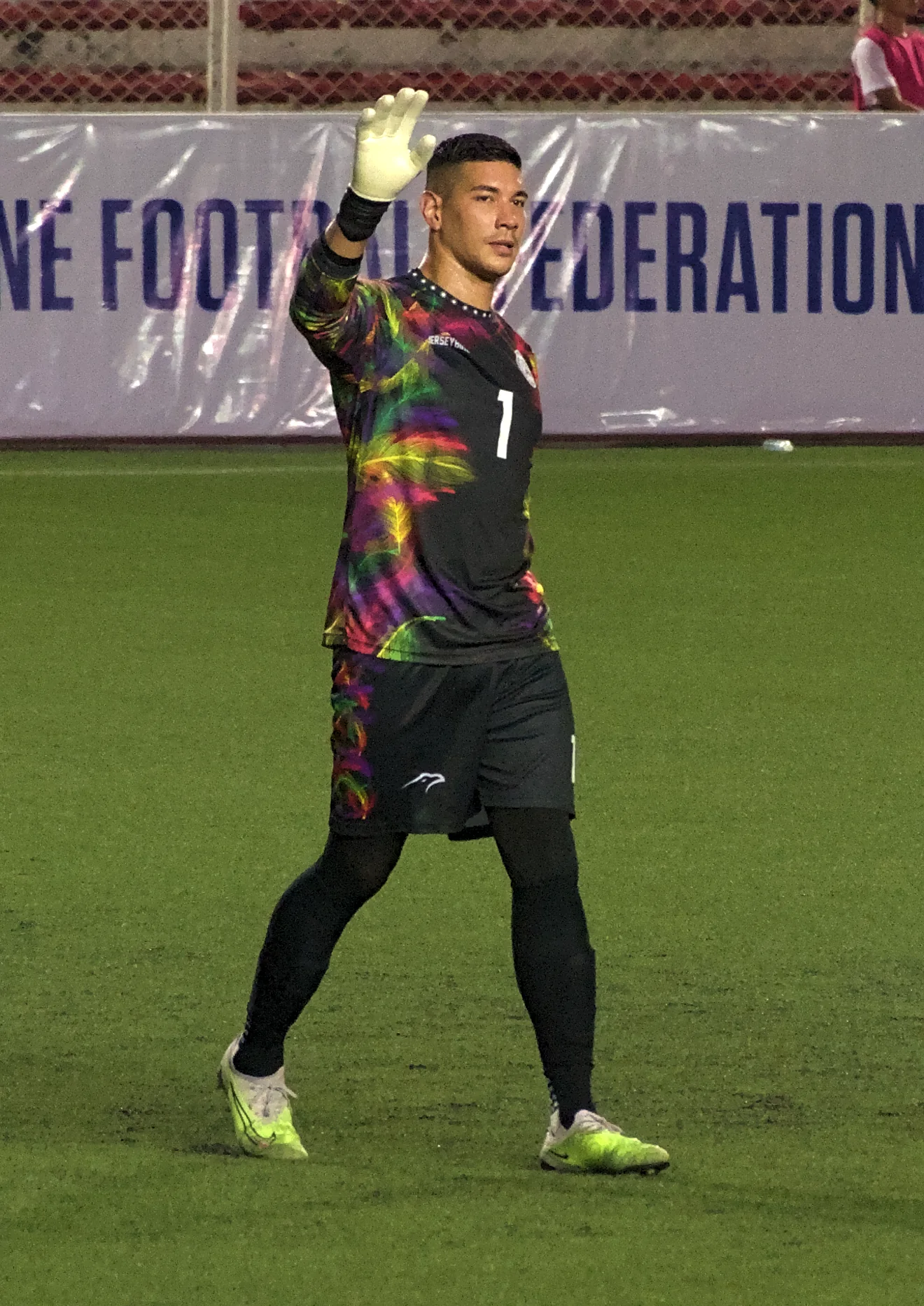
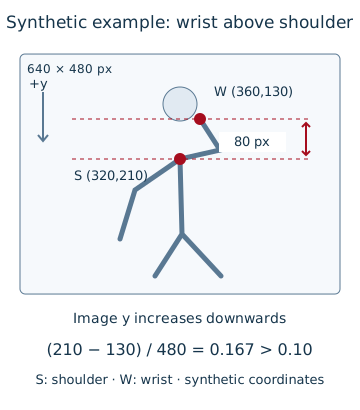
Use a hypothetical image 640 pixels wide and 480 pixels high. Put its coordinate origin at the top-left corner: x increases to the right and y increases downwards. A smaller y value therefore means a higher position in the image. All coordinates below are invented; they were not extracted from the photograph above.
| Synthetic point | x in pixels | y in pixels | y divided by image height |
|---|---|---|---|
| Shoulder S | 320 | 210 | 210 / 480 = 0.4375 |
| Wrist W | 360 | 130 | 130 / 480 ≈ 0.2708 |
Dividing a coordinate by the corresponding image width or height produces a unitless normalized coordinate. This reduces dependence on pixel count; it does not compensate for a different camera angle or person-to-camera distance. The MediaPipe guide documents its normalized outputs.
vertical_gap = (210 - 130) / 480
             = 80 / 480
             ≈ 0.1667

teaching_rule: vertical_gap > 0.10
The wrist is about 16.7% of the image height above the shoulder, so it passes our hypothetical greater-than-10% rule. The margin prevents two nearly level points from immediately being labeled “above.” It is a teaching choice, not a medical standard or a universally optimal camera setting.
An unseen wrist does not mean a lowered hand
The wrist might be behind the head, obscured or outside the frame. Coordinates alone are insufficient; check the quality of the observations too. Some models, including the documented MediaPipe output, provide landmark visibility scores. Do not treat a score as a calibrated percentage of decision accuracy without evaluating it.
Our exercise requires both points to be inside the image with a hypothetical visibility score of at least 0.7. An invalid point produces “unknown.” Valid points that do not exceed the gap threshold produce “condition not met.” That includes a wrist slightly above the shoulder with too little separation. The visibility threshold is another teaching choice, not a value tuned on real camera data.
Why does our indicator wait for several observations?
A predicted wrist can move slightly between images. For our indicator, require the condition to persist for at least 200 milliseconds through valid, closely spaced observations. A millisecond is one thousandth of a second. At a hypothetical 10 frames per second, samples at 1000, 1100 and 1200 milliseconds span 200 milliseconds; three samples do not mean 300 milliseconds have elapsed.
This hold adds roughly 200 milliseconds of decision delay. In the exercise, a gap longer than 150 milliseconds restarts the hold. If fresh images stop arriving, a real application must expire the old result. Silence from the camera does not mean the body has stayed in place.
Why “wrist above shoulder” does not establish correct movement
Our rule measures a relationship between two points in one image. The person could have bent an elbow, moved closer or rotated. Evaluating a sporting movement requires a defined movement and criteria appropriate to that application. Two coordinates are insufficient.
Even a model's three-dimensional output is an estimate. It does not by itself validate a true joint angle or certify a movement as safe. This article's rule is for an educational indicator, not treatment advice, athlete grading or a protective system.
What should a real prototype check?
| Condition | Possible failure | Useful check |
|---|---|---|
| Low light or strong backlighting | Unstable point estimates | Compare results under the intended lighting and background. |
| Occluded or out-of-frame wrist | A guessed point treated as a valid observation | Exercise the unknown state; do not label it as a lowered hand. |
| Body rotation or camera tilt | A different 2D relationship for a similar movement | Define the installation angle and supported movement range. |
| Several people or people changing places | Mixing one person's shoulder with another's wrist, or switching identities | Take points from one body at one time and handle lost tracking. |
| Slow processing or old frames | A decision about the past | Track capture time and result age; do not rely on advertised model speed alone. |
Keep evaluation examples of passing the gap threshold, failing the condition and unknown observations separate from the examples used to tune thresholds. Suppose that, across 20 labeled examples, the indicator activates incorrectly twice and misses three intended activations. Record both error types. “15 of 20 correct” alone does not explain the failures or establish performance in another environment. These are hypothetical counts, not results from a camera test.
Privacy starts with choosing the input
Practice with synthetic coordinates or images carrying suitable permission and consent. For a camera installation, people should know about image capture and its purpose. Limit the viewing area, retention and access. A stored skeleton is not necessarily anonymous: time, location or a linked account can reveal information about a person.
Running a model on the device can reduce the need to transmit images to a server, another computer that receives the data. It does not establish that the complete application neither stores data nor uses the network. Check that application's actual data path and settings.
An optional exercise with synthetic coordinates
If you can run Python, download the exercise file and use Python 3.10 or later. It needs no additional libraries and accesses no camera, network or pose model. It checks landmark validity and the vertical gap, then applies the hold time.
python pose_rule.py

PASS synthetic_above
...
15 synthetic checks passed; no camera or pose model was run.
Expect 15 software checks to pass, including a lower wrist, a missing point, low visibility, invalid coordinates, a time gap and a duplicate timestamp. Passing validates this rule on specified inputs, not the accuracy of a model or camera. The file handles incoming samples only; expiring a result when input stops is the real application's responsibility.
Continue with the embedded systems learning path to connect processing, timing and testing in a device design. Start with a measurable requirement: exactly when should the indicator turn on, turn off or show unknown?
Sources
Question and answer article
Ask your technical question
Questions and answers are published after moderation. Authors can see their own pending drafts.
No confirmed questions have been registered for this article yet.