Linux, Kernels and Drivers: Following a Temperature Reading
A device can start Linux while its sensor still fails. A warehouse temperature monitor shows what the application, kernel and driver each do, and where to investigate a missing reading.
Contents
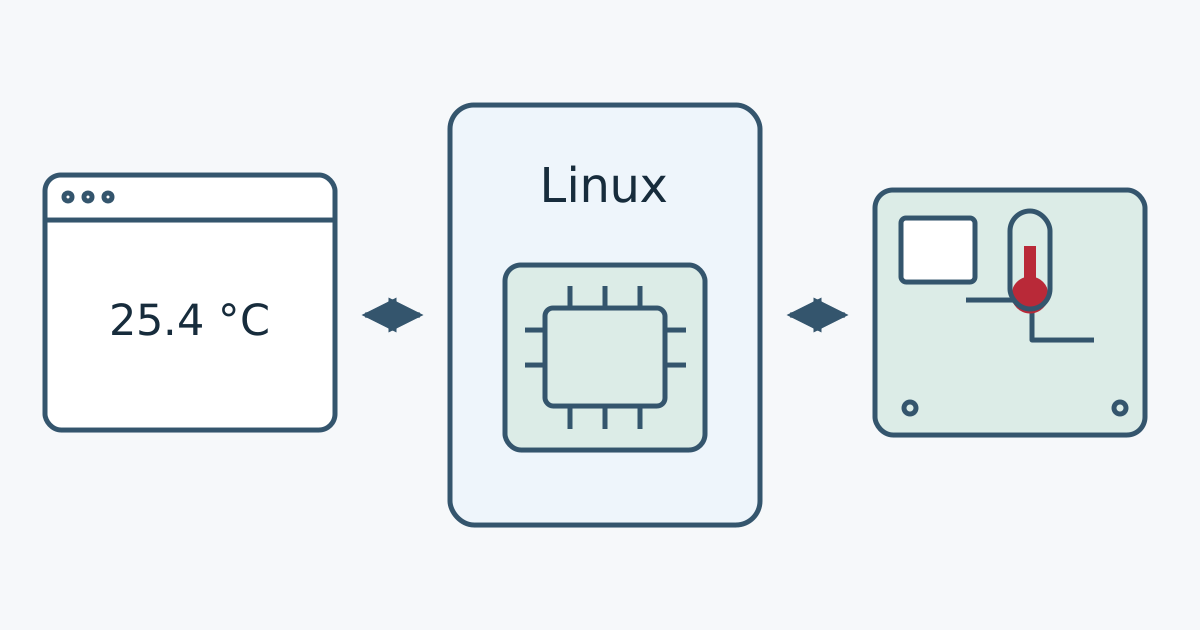
Linux helps a device's programs use its processor, memory and connected equipment. The kernel manages those resources; a driver provides the details needed to work with a particular device. A temperature monitor can therefore start Linux and open its display application while still failing to read its sensor. A successful boot does not prove that every component works.
Consider an imaginary warehouse monitor that reads and displays room temperature. A sensor turns temperature into a value the electronics can read. A board holds electronic components and their connections. Its processor carries out program instructions. This is an embedded system: a computer built into a product to do a particular job. You do not need to buy a board or run code to follow the example.
Operating system, kernel and application
An operating system is the software that lets programs run and use a device's resources. Its central part, the kernel, manages when programs run, the memory available to them and their access to hardware. Hardware means the physical components, including the processor, memory and sensor.
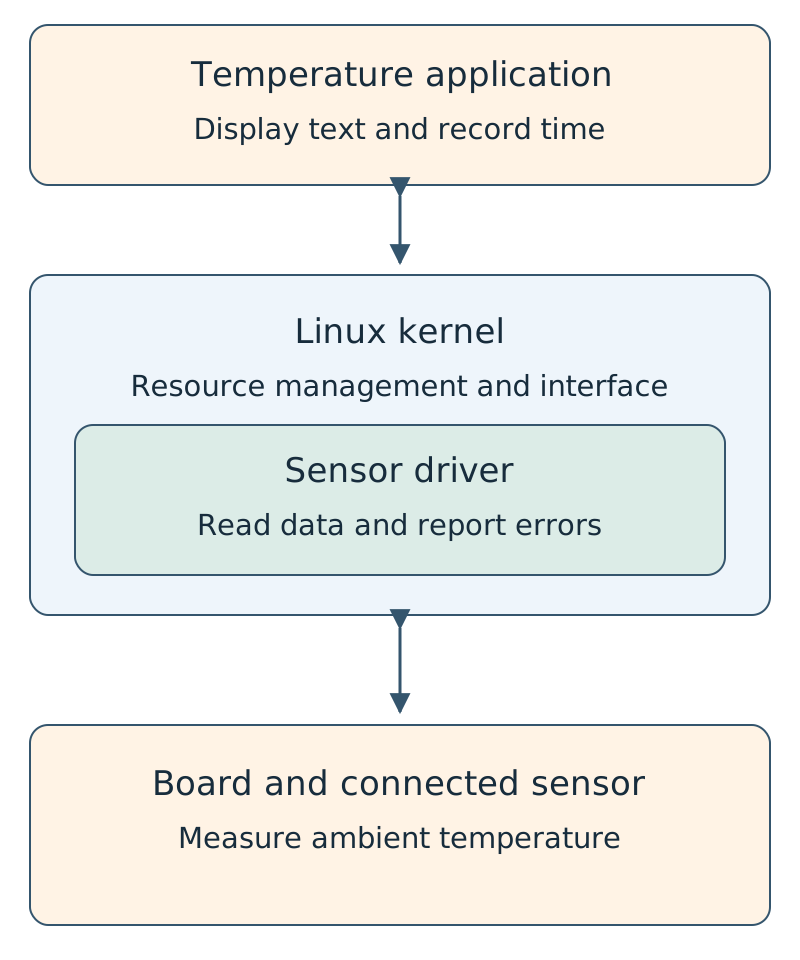
People use “Linux” both for the kernel itself and for a complete system built around it. A working system needs files and programs as well as the kernel. Our temperature display is one application within that system. It chooses what to show, records times and handles results; it does not need to manage every detail of every electronic component directly.
What does a driver actually do?
A driver is software that knows how to work with a device or a family of devices. For our sensor, it can prepare the device, read its data and expose a result or error through a defined interface. Drivers are not always separate installations: some are built into the kernel, while others are loaded as modules, which are additional pieces of kernel code.
Having a driver file is not enough. It must suit the running kernel and its configuration, and it must be associated with the correct device. Linux has a matching and initialization process, described in its driver binding documentation. Nor should a module built for a different kernel be assumed compatible just because its file can be copied: building an external module depends on the target kernel's build information.
If the sensor uses I²C, that name describes the communication method over its connection. Both sensor support and support for the board's I²C controller matter along the read path. Our I²C, SPI and UART comparison explains the differences between these common connections. Having a port does not imply support for every device that could connect to it.
A worked example: turning 25400 into 25.4 degrees
Assume our imaginary sensor driver exposes temperature through Linux's hardware monitoring interface, hwmon. This interface presents some sensor information as readable files. Reading such a file asks the kernel for data; it is not a document into which someone typed a temperature.
For this example, the specific driver's documentation confirms that its temperature value uses millidegrees Celsius: one thousand units make one degree. The calculation is:
25400 / 1000 = 25.4 °C
25600 / 1000 = 25.6 °C
(25.4 + 25.6) / 2 = 25.5 °C
We have two successful readings, with a mean of 25.5 °C. If a third read fails, we do not have three valid measurements. An honest report for this example is “mean of two valid readings: 25.5 °C; one read failed.” Replacing the failure with zero and dividing by three would produce 17 °C, a value neither successful reading supplied.
An actual temperature of zero is different from missing data. The application needs to preserve the read status and time as well as the value. An old reading should not be presented as the current temperature without its time. Averaging is a display choice here; it does not establish sensor accuracy or make a temperature controller safe.
These numbers are hypothetical. On a real device, check sensor identity, placement, units and fault status against its driver's documentation. Not all sensors use hwmon. Some temperature inputs in that interface even report voltage and need a different conversion. The official hwmon documentation describes this exception: dividing an arbitrary sensor value by a thousand is not a universal temperature-reading procedure.
When no temperature appears, where should you look?
“The thermometer doesn't work” describes the symptom, not the cause. For our warehouse monitor, the following sequence helps narrow the investigation:
| Observation | Next check | What it does not yet prove |
|---|---|---|
| The application does not open | Application startup, required files and access permissions | The sensor or driver has not yet been shown to be faulty. |
| The application runs but cannot find its sensor input | The expected interface, enabled device support and device identification | A missing input alone does not prove physical sensor failure. |
| The input exists, but a read fails | The exact error, power and connections according to the board guide, and the relevant driver messages | Reinstalling the application will not necessarily fix a connection problem. |
| A read succeeds, but the number looks wrong | Sensor and channel identity, units, conversion, placement and the last reading's time | A displayed number does not establish a correct measurement. |
This is an investigation path, not a remote diagnosis. A failed read can have several causes. Record the previous state and complete error before changing settings, so the effect of each change remains traceable.
Why a new kernel is not a ready image for every board
Source code is the editable instructions written by developers. To run a kernel, that code must be turned into executable files with suitable settings; this is compilation. The official kernel build guide treats configuration as part of that process. A board's bootable system image normally contains more than a kernel.
- Bootloader: early software that prepares the path to starting the operating system. U-Boot is one example, though not every board uses it. Its boot overview explains how selecting boot files fits into that process.
- Hardware description: on many boards, a Device Tree supplies the kernel with information about components and their connections. It does not replace a driver or repair incorrect wiring. The Device Tree usage model describes its role.
- System files and programs: the monitor needs an environment from which its temperature application and dependencies can run.
- Firmware needed by some devices: certain components need another software file loaded onto the component itself, in addition to the driver. This use of “firmware” differs from using the word for an entire embedded product's software. The Linux firmware introduction gives examples of these needs.
Mainline is the main kernel development tree. A release from that tree is not a test report for your product. The kernel.org release explanation distinguishes mainline, stable updates and long-term maintenance. Choose with the board vendor's support, security fixes, required drivers and a recovery route in mind; a larger version number is not enough.
What should an upgrade demonstrate?
For the imaginary monitor, first record the existing board model, system version, configuration and required files. Then use a test unit to check startup, correct sensor identification, temperature units and clear error reporting when data is unavailable. Restarting, power cycling and the product's required operating duration also belong in the actual test plan. Successful compilation establishes that the build step passed; it does not replace those checks.
Not every embedded device needs Linux. A small controller can run a dedicated program, while a device with several applications and more extensive facilities may use Linux. Start with the job the product must do. Continue with the Embedded Systems Tutorials learning path. For the difference between a displayable number and a trustworthy measurement, see sensor accuracy, resolution and calibration.
Question and answer article
Ask your technical question
Questions and answers are published after moderation. Authors can see their own pending drafts.
No confirmed questions have been registered for this article yet.