Arduino Uno Button Input: Pull-Up and Bounded Debounce
Wire a switch from Uno D2 to ground, understand active-low input and implement a bounded debounce state machine with downloadable, compiled and tested source.
Contents
To read a normally-open button on an Arduino Uno R3, connect it between board pin D2 and GND and select INPUT_PULLUP. Released reads HIGH; pressed reads LOW. Count a press only after a new sampled level has qualified for the debounce interval, rather than counting every LOW reading. This exercise implements that rule with a state machine that also reports an input that fails to settle.
The target is the 5 V, ATmega328P-based Uno R3, compiled as arduino:avr:uno. It is a local pushbutton exercise. The same wiring and electrical assumptions should not be transferred to a 3.3 V ESP32 or an Uno R4 without checking that board's documentation. Start with the embedded systems learning guide if GPIO, a polling loop or a state machine is new to you.
Parts and buying links
You need one Uno R3, a normally-open momentary switch, two short jumper wires and the appropriate USB data cable. The example uses the onboard LED, so no external LED is needed. No particular switch MPN or physical pin arrangement is assumed.
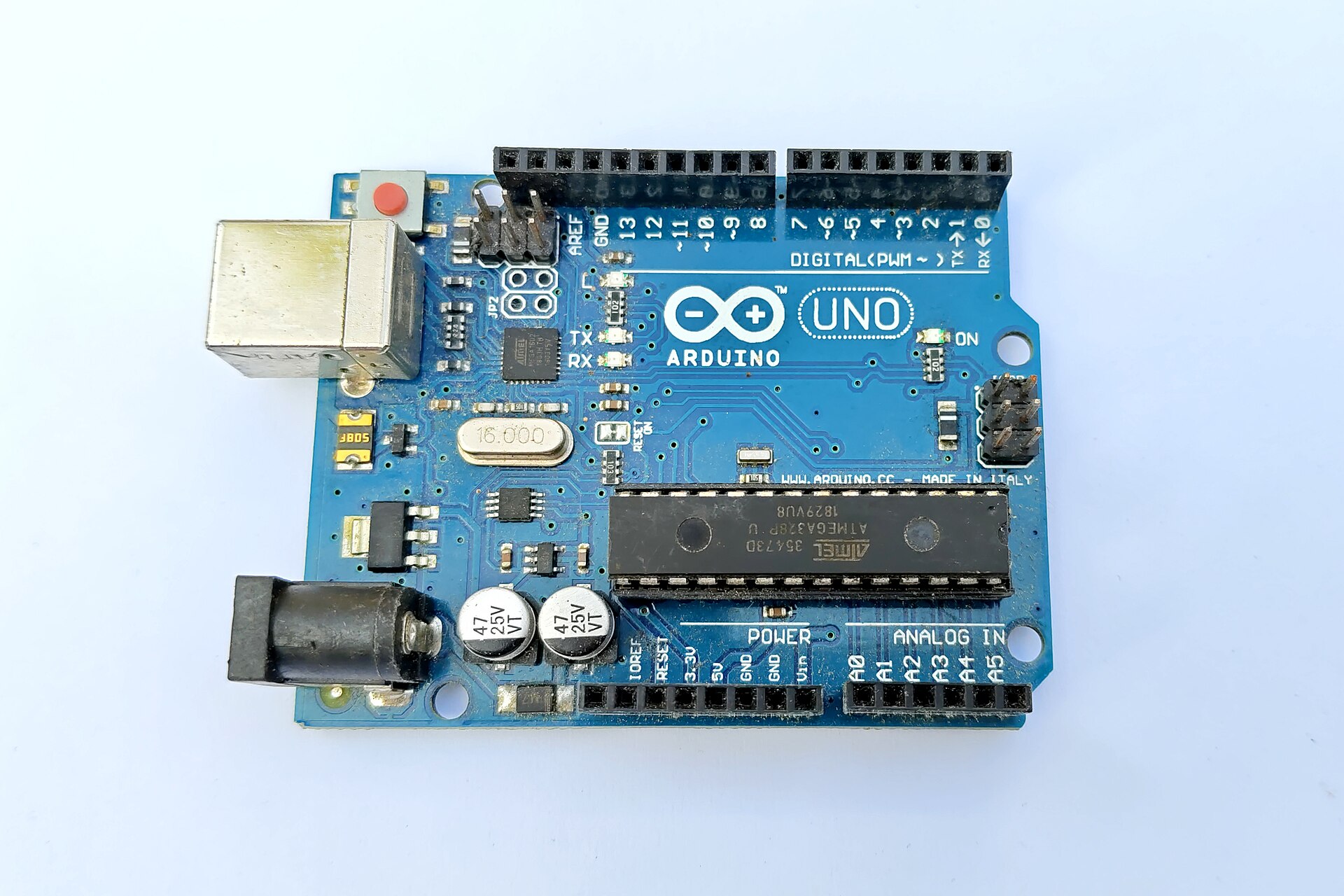
- International reference board: Arduino's direct Uno Rev3 (A000066) product page. This is the reference board, not a bare ATmega328P chip.
- Iran, regional alternative: ECA's Uno CH340 product listing. This is a compatible-board listing with a different USB interface, not proof of an original Arduino Uno R3. The page showed an add-to-cart option when checked on 19 October 2026. Exact MCU marking, component package, stock and electrical equivalence were not independently verified. Check the supplied board before using the example.
These are direct product links, not a guarantee of stock or authenticity. Availability can change after the check date. No price is needed for this exercise.
.jpg)
1. Understand the input before adding debounce
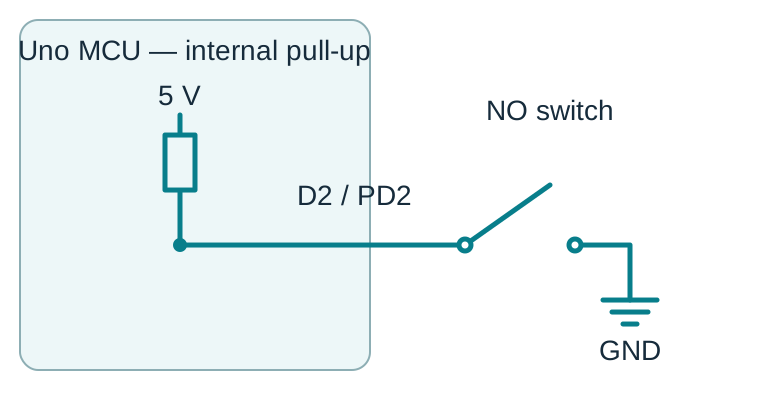
A GPIO configured as an input senses a voltage; it does not automatically provide a defined level for an open switch. In the AVR core, INPUT_PULLUP selects input direction and enables the port's internal pull-up. With the switch open, the pull-up biases the input toward the supply. Closing the switch provides a path to GND. Therefore the useful software variable is rawPressed = digitalRead(2) == LOW: a true value means pressed even though the electrical level is low. This convention is called active-low.
The pull-up establishes the released level; it does not eliminate contact bounce. A mechanical contact can change state several times during one physical action. An edge is a transition from an accepted released state to an accepted pressed state, or the reverse. A level is the current accepted state. Incrementing a counter on every LOW sample would count one held button repeatedly.
2. Wire the two-terminal switch
- Disconnect USB power while wiring. Connect one switch contact to the header marked 2 and the other to a header marked GND.
- Do not connect this switch to 5 V. It closes only between D2 and ground. In this program D2 must remain an input with pull-up.
- For a four-legged tactile switch, identify the internally common pairs using the part's drawing or an unpowered continuity test. The diagram represents two electrical contacts, not a universal four-leg footprint.
- Check the board labels. Arduino D2 is the board's digital pin 2, mapped to PD2; it is not pin 2 of the DIP microcontroller package. The onboard LED uses D13 on the reference Uno variant.
3. Choose explicit timing assumptions
This example uses a 30 ms sampled settling interval and a 200 ms maximum unsettled episode. These values are teaching choices, not measured bounce specifications for every switch. Each observed raw change restarts the 30 ms interval. It does not restart the 200 ms deadline. The code samples in loop() without delay(); other tasks must still leave enough time for regular sampling.
For an illustrative loop with a maximum sample gap of 5 ms, the first observation of a physical change may be up to 5 ms late, and the qualification call may be another 5 ms late. An otherwise steady transition can therefore be reported roughly 30–40 ms after it occurs. This is a calculated sampling budget, not a measured Uno latency. Unobserved changes between samples remain invisible. Serial logging, long computations or other blocking work can invalidate the assumed gap.
A pulse that returns to the original level after only 29 ms of sampled candidate time is deliberately discarded. That is useful for a human button and unsuitable for a pulse counter. Increasing debounce trades responsiveness for filtering. A long noisy cable may require a stronger external bias, input protection or hardware filtering after an electrical design review; software cannot make an out-of-range input safe.
4. Follow the bounded state machine
| State | Meaning and exit |
|---|---|
| Startup | No accepted baseline. After 30 ms with one sampled candidate, emit Ready and adopt its level; do not invent an edge. |
| StableReleased / StablePressed | Keep the accepted level. An opposite raw sample starts VerifyPress or VerifyRelease and the fixed episode deadline. |
| VerifyPress / VerifyRelease | Reset candidate time on every raw change. After 30 ms unchanged, accept an actual change once, or return silently to the original state. |
| Fault | At 200 ms of an unsettled episode, emit UnstableFault once and invalidate the output. Require a fresh 30 ms settling window after fault entry; then emit Recovered and adopt a baseline without an edge. |
The deadline takes priority if qualification and timeout are both observed on the same call. Timeout is checked on the next call to update(), not by an interrupt at exactly 200 ms. A delayed loop can thus cause a fault even without observed chatter. During verification the previous accepted level remains valid; this does not guarantee the present raw level. During Startup or Fault, callers must check valid() before acting on stablePressed().
If the button is held during power-up, Ready establishes a pressed baseline and the LED turns on, but the press counter stays at zero. Recovery also avoids guessing which edges occurred during the invalid interval. This is an explicit event policy, not a claim that the physical button was released.
5. Download and compile the exact example
Download the source exercise ZIP. It contains BoundedButton.ino, BoundedDebounce.h, native tests and bilingual instructions. Keep the header beside the sketch inside the BoundedButton folder. Choose Arduino Uno in the IDE, or compile from the code directory with:
arduino-cli compile --fqbn arduino:avr:uno --warnings all BoundedButtonThe sketch reports accepted edges at 115200 baud and uses the onboard LED as a state indicator. A held press generates one press event; a qualified release generates one release event. The unsigned press counter wraps after 2³² accepted presses and is not stored across resets.
Both complete source files are below; the download includes TEST-RESULTS.json.
BoundedDebounce.h
// SPDX-License-Identifier: MIT
// LCENJ educational example. Sampled input; not a safety-rated controller.
#ifndef LCENJ_BOUNDED_DEBOUNCE_H
#define LCENJ_BOUNDED_DEBOUNCE_H
#include <stdint.h>

class BoundedDebounce {
public:
  enum State { Startup, StableReleased, VerifyPress, StablePressed,
               VerifyRelease, Fault };
  enum Event { None, Ready, Pressed, Released, UnstableFault, Recovered };

  bool begin(bool rawPressed, uint32_t now, uint32_t debounceMs = 30,
             uint32_t deadlineMs = 200) {
    configured_ = debounceMs > 0 && deadlineMs > debounceMs &&
                  deadlineMs < UINT32_C(0x80000000);
    debounceMs_ = debounceMs;
    deadlineMs_ = deadlineMs;
    candidate_ = rawPressed;
    stable_ = false;
    valid_ = false;
    candidateSince_ = episodeSince_ = now;
    state_ = Startup;
    return configured_;
  }

  Event update(bool rawPressed, uint32_t now) {
    if (!configured_) return None;
    if (state_ == StableReleased || state_ == StablePressed) {
      if (rawPressed == stable_) return None;
      candidate_ = rawPressed;
      candidateSince_ = episodeSince_ = now;
      state_ = stable_ ? VerifyRelease : VerifyPress;
      return None;
    }
    if (rawPressed != candidate_) {
      candidate_ = rawPressed;
      candidateSince_ = now;
    }
    // An unsettled episode has a fixed deadline, not extended by chatter.
    // Deadline has priority if both conditions are observed on the same call.
    if (state_ != Fault && elapsed(now, episodeSince_) >= deadlineMs_) {
      state_ = Fault;
      valid_ = false;
      candidateSince_ = now; // Recovery requires a fresh settling window.
      return UnstableFault;
    }
    if (elapsed(now, candidateSince_) < debounceMs_) return None;
    const State previousState = state_;
    const bool changed = candidate_ != stable_;
    stable_ = candidate_;
    valid_ = true;
    state_ = stable_ ? StablePressed : StableReleased;
    if (previousState == Startup) return Ready;
    if (previousState == Fault) return Recovered;
    if (!changed) return None;
    return stable_ ? Pressed : Released;
  }

  bool valid() const { return configured_ && valid_; }
  bool stablePressed() const { return stable_; }
  State state() const { return state_; }

private:
  static uint32_t elapsed(uint32_t now, uint32_t since) {
    return uint32_t(now - since);
  }
  bool configured_ = false, candidate_ = false, stable_ = false, valid_ = false;
  uint32_t debounceMs_ = 30, deadlineMs_ = 200;
  uint32_t candidateSince_ = 0, episodeSince_ = 0;
  State state_ = Startup;
};
#endif
BoundedButton.ino
// SPDX-License-Identifier: MIT
// Target: Arduino Uno R3 / arduino:avr:uno (ATmega328P, 16 MHz).
// Normally-open switch: board D2 -> switch -> GND. No external supply.
#include "BoundedDebounce.h"

const uint8_t BUTTON_PIN = 2;
BoundedDebounce button;
uint32_t pressCount = 0;

void setup() {
  pinMode(BUTTON_PIN, INPUT_PULLUP);
  pinMode(LED_BUILTIN, OUTPUT);
  digitalWrite(LED_BUILTIN, LOW);
  Serial.begin(115200);
  button.begin(digitalRead(BUTTON_PIN) == LOW, uint32_t(millis()), 30, 200);
}

void loop() {
  const uint32_t now = uint32_t(millis());
  const BoundedDebounce::Event event =
      button.update(digitalRead(BUTTON_PIN) == LOW, now);
  // State indicator: held at boot lights LED after Ready, but counts no press.
  digitalWrite(LED_BUILTIN,
               button.valid() && button.stablePressed() ? HIGH : LOW);
  if (event == BoundedDebounce::Pressed) {
    ++pressCount; // Unsigned counter wraps after 2^32 accepted presses.
    Serial.print(F("pressed count="));
    Serial.println(pressCount);
  } else if (event == BoundedDebounce::Released) {
    Serial.println(F("released"));
  } else if (event == BoundedDebounce::Ready) {
    Serial.println(F("ready: baseline only"));
  } else if (event == BoundedDebounce::UnstableFault) {
    Serial.println(F("fault: input unsettled or polling delayed"));
  } else if (event == BoundedDebounce::Recovered) {
    Serial.println(F("recovered: baseline only"));
  }
  // No delay(). Serial logging can block; this is not a hard real-time loop.
}
6. Why subtraction survives the timer rollover
The helper computes elapsed time as uint32_t(now - since). For example, if since = 4,294,967,280 and the wrapped clock reads 14, the unsigned result is 30 ms. A direct comparison such as now >= since + 30 can fail around wrap. A 32-bit millisecond clock spans approximately 49.71 days: 2^32 / (1000 × 60 × 60 × 24).
The helper rejects zero debounce, a deadline no greater than debounce, or a deadline at least 2³¹ ms. Call it in chronological order with gaps far below that half-range, and do not expect it to reconstruct time after a complete timer cycle without observations. The native tests exercise modulo arithmetic; they do not measure the accuracy of the Uno oscillator or replace the AVR timer implementation.
7. What was tested, and what you should check on a board
The downloadable helper is the same file used by both the Uno build and the executable native tests. The tests have a hand-authored bounce trace with expected events, exact 29/30 ms boundaries, held startup, held press, release/repress, a short pulse, chatter timeout, recovery, invalid configuration and timer rollover. A further 1,000 deterministic time translations check that shifting the trace around the 32-bit clock and repeating same-time samples does not change accepted events.
On 18 October 2026, all 12 native test groups passed with 29,679 assertions. The actual Uno AVR build passed using Arduino CLI 1.5.1 and Arduino AVR core 1.8.8: 2,986 bytes of flash and 214 bytes of global RAM. Global RAM is not a measurement of peak stack use. The core emitted unused-parameter warnings on the initial uncached build. Native compilation used Zig 0.14.1 as a C++11 compiler. The downloadable test record identifies the source hashes and commands. These results establish source compatibility and logical behavior for the tested inputs. No physical button, oscilloscope trace, electrical noise test, upload or on-board timing measurement was performed for this article.
- On your board, first verify released HIGH and pressed LOW with the intended wiring.
- Perform deliberate presses and releases. Each qualified press should increment once; holding should not repeat. Reset with the button held and confirm the baseline policy.
- Measure the worst loop gap under your actual workload. Observe contact bounce with suitable instrumentation before selecting production timing.
- Test wiring faults and environmental noise separately. A stuck-low wire looks like a held button; a stuck-high wire looks like a released button. Debounce alone does not diagnose either fault.
Common mistakes and the next exercise
A floating input indicates missing bias or wiring trouble, while repeated counts during a hold indicate a level/edge mistake. A four-leg switch connected across two internally common legs remains shorted regardless of pressing. A program that uses long delays may miss presses or report a polling fault. Always diagnose the electrical level before changing the debounce time.
As a next exercise, add a non-blocking periodic status task without changing the button helper, then measure whether the loop still meets your sampling assumption. The millis scheduling tutorial explains the periodic task; this exercise adds input qualification and its event policy. The embedded systems guide connects this to state machines; the electronics guide covers bias, current paths and measurement. Avoid adding a relay or mains load to this first GPIO exercise.
Technical sources
- Arduino Uno R3 board datasheet, A000066 and official Uno Rev3 pinout.
- ATmega328P manufacturer datasheet hosted by Arduino, I/O port configuration. It describes the MCU, not every compatible board sold as Uno.
- Arduino AVR core 1.8.8: pinMode and digitalRead, Uno pin mapping and millis implementation.
- Arduino InputPullupSerial example and Arduino debounce example. The bounded helper and its tests here are original example code.
Question and answer article
Ask your technical question
Questions and answers are published after moderation. Authors can see their own pending drafts.
No confirmed questions have been registered for this article yet.