PIR Motion Detection with HC-SR501, ESP32 and Arduino
HC-SR501 manual with ESP32 and Arduino; Safe wiring, H/L jumper, sitting time, motion detection code, false stimulation removal and purchase link in Iran.
Contents
Motion detection • HC-SR501 • ESP32 / Arduino
Build a motion detector, not a human counter
The PIR module is a simple way to record activity in a range. But the lighting of its output does not mean a definite human identification, and its turning off does not prove that the room is empty. In this project, we read the HC-SR501, bypass the startup outputs, and keep a low-power LED on with software timing.
The focus of the tutorial is on safe setup, the difference between H and L jumpers and finding the cause of false triggering. The test circuit works only at low DC voltage and is not a substitute for an approved protection system.
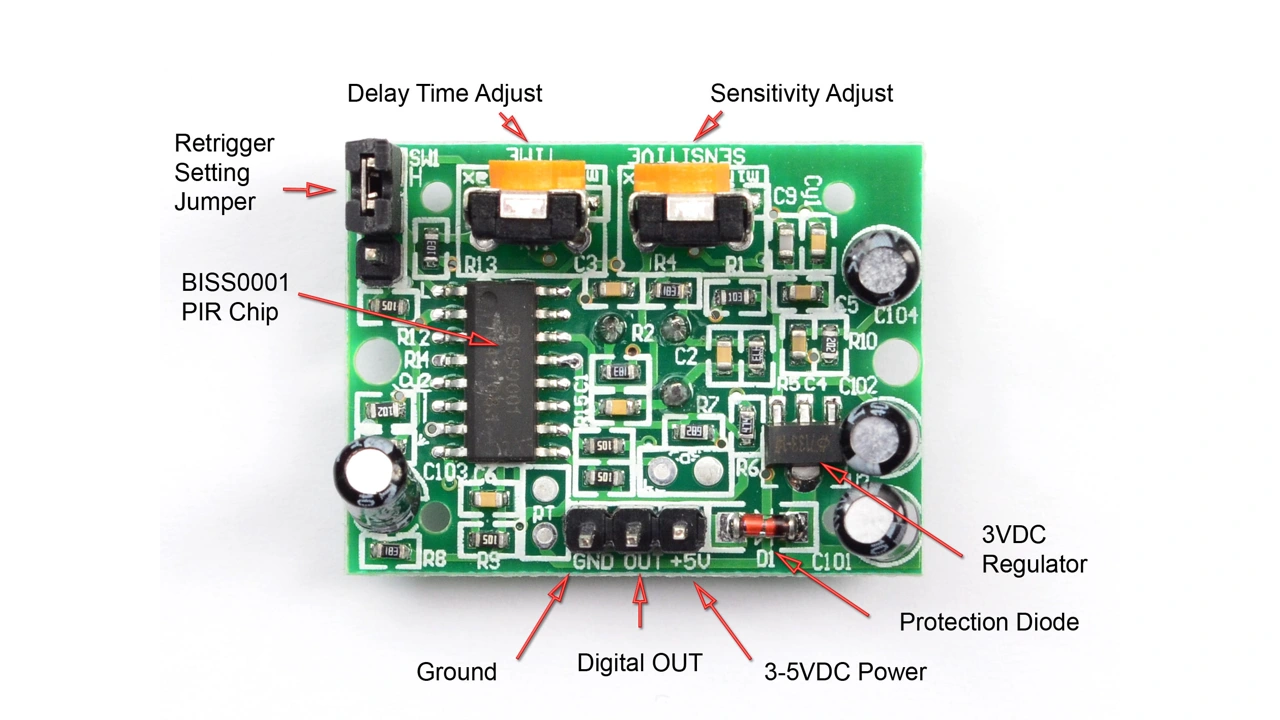
1. Why HC-SR501 is the application of the Iranian market?
Notifying movement on the test table, turning on the indicator when passing, and logging activity time are good applications to start with. In a review on the article's filing date, ECA showed the same module as available and had buyer-labeled questions about mounting and mounts. Aftab Computer also has a page of the same model, although it was not available when I checked. This evidence represents actual use and known supply, not sales figures or customer guarantees.
To start, write the requirement precisely: "After the output is activated, the LED stays on for a few seconds" is testable; "Every human being always detected" cannot be guaranteed by a simple module. See the topic path Motion and Position to select the appropriate sensor for the problem.
2. How does PIR sense motion?
PIR stands for passive infrared; Unlike an infrared transmitter, it does not shine light on the target for detection. The pyroelectric element responds to the change in thermal radiation and the Fresnel lens divides the field of view into sections. The movement of a hot source between these areas can activate the output of the circuit.
So this module is not a camera, distance meter or thermometer. From an output of zero and one, it is not possible to extract the number of people, identity, exact distance or direction of movement. The mechanism is explained in the Adafruit main manual.
3. Read the component datasheet separately from the module specifications
The name HC-SR501 appears on many boards; The quality of the parts, the timing circuit and even the arrangement of the bases of the samples may differ. The information on the BISS0001 chip alone does not determine the allowable power supply range of the entire board. For wiring, you need to put together the actual module document and the same board's entries.
| parameter | Documentary reference | Correct perception |
|---|---|---|
| Joy-IT version power supply SEN-HC-SR501 | 5 volts DC | In the example, we use a 5V regulated source and compatible module. |
| Joy-IT version output logic | 3 volts on the manufacturer's plate | The supply voltage of the module is not the same as the OUT level; Check out the real sample. |
| The declared field of view of the same version | The maximum range is 7 meters, the angle is less than 120 degrees | These are product introduction limits, not guaranteed to cover all rooms. |
| settings | Sensitivity, retention time and single/repeated stimulation | Don't confuse hardware timing with program latency. |
Reference: Joy-IT official page and Manufacturer's manual, version 16 April 2024. These values belong to the documented version; The stores below the article do not necessarily sell the same brand.
4. Motion detection is different from static presence detection
A person may stand still in the room and the PIR output will go down. The animal, rapid change in thermal conditions or improper positioning can also change the result. Behind ordinary glass, do not rely on this method to see humans. A small temperature difference between the target and the background can also make detection more difficult.
These are general limitations of PIR technology, not brand-specific specifications. Panasonic Technical Questions Explains the effect of glass, ambient temperature and installation conditions. For constant attendance or pass counting, another suitable architecture and sensor is required.
5. Components required for low-risk testing
- An HC-SR501 module with recognized pins and valid power information.
- Classic ESP32 or Arduino Uno, USB cable and short wires.
- Normal indicator LED, 1 kOhm series resistor and 100 kOhm pull-down resistor.
- 5V regulated supply with board and multimeter to control OUT level.
The 5V base of some expansion boards is input, and sometimes USB has power output; Before connecting an external source and USB at the same time, check your board's documentation to avoid accidentally connecting two sources together.
6. Wiring HC-SR501 to ESP32 and Uno
| Connection | Classic ESP32 in the example | Arduino Uno in the example | Tip |
|---|---|---|---|
| VCC module | 5V regulated, only for compatible module | Don't guess the voltage range from the similar appearance of the board. | |
| Module GND | GND | GND | The source ground and the microcontroller must be common. |
| OUT module | GPIO27 | D2 | For ESP32 only output with 3.3V compatible level. |
| Input Pooldown | 100 kOhm resistance from PIR input to GND | When the wire is disconnected, the inlet floats less; Failure diagnosis is not certain. | |
| External LED | GPIO26 → series resistance → LED anode | D8 → series resistance → LED anode | LED cathode to GND; 1 kiloohm series resistance. |
The number of bases is the choice of this example. Do not copy them without checking for ESP32-C3, ESP32-S3 or a board that uses these pins. The Espressif's Official GPIO guide also emphasizes the limit of pins and checking the board map.
Measure OUT first with respect to GND without connecting to ESP32 and check the specification of the version. 5V output or pull-up to 5V is not allowed for ESP32. Do not determine the left and right order of the pins from the internet photo or the color of the cable.
7. What do H and L jumpers, sensitivity and time do?
On boards labeled H/L according to the Adafruit manual, H mode allows re-triggering: fresh movement can extend output activation. In the L state, non-excitable behavior is re-selected; The circuit determines the length of the pulse and the distance between the pulses. So a long HIGH does not necessarily mean a crash or multiple people.
The TIME potentiometer changes the output holding time; The sensitivity potentiometer affects the response rate. Take the direction of rotation from the document of the same board: even the guides of different samples are not the same in this detail. Turn off the board, make a small change and test again with the same pass scenario.
Choose a short hardware time and medium sensitivity to start; These are starting points for testing, not universally optimized settings. The two modes are described in PIR testing at Adafruit.
8. Step-by-step setup
- With power off, check pin names and ground and LED connections.
- Run the raw detection program; Serial Monitor should be on 115200.
- After turning on, observe the sensor's settling time. Adafruit's manual recommends waiting about 30 to 60 seconds for its sample; The exact number depends on the version and conditions.
- With a quiet environment, see the bottom output; Then traverse the viewport width and record the output change.
- Load the main program. This program ignores the first 60 seconds and then requires a continuous LOW second to arm.
- Change the jumper and hardware timing and measure the difference between the raw signal and the final LED.
The numbers 60 seconds and 1 second are in the educational design selection program; If the module is not stable after this time, do not hide the problem by removing the wait. In H mode and with continuous movement, it is normal for the program to wait for LOW.
9. Practical code with non-blocking scheduling
No additional library is required. Place each example in the folder of the same name as its own ino file. The main code registers signal events, has a short software acknowledgment, and keeps the LED on for a while after the signal goes low.
#include <Arduino.h>

#if defined(ARDUINO_ARCH_ESP32)
const uint8_t PIR_PIN = 27, LED_PIN = 26; // classic ESP32; check your board
#else
const uint8_t PIR_PIN = 2, LED_PIN = 8;   // Arduino Uno
#endif

// Application choices, NOT guaranteed sensor specifications.
const uint32_t WARMUP_MS = 60000;
const uint32_t ARM_LOW_MS = 1000;
const uint32_t FILTER_MS = 50;
const uint32_t HOLD_MS = 5000;

enum Phase { WARMUP, WAIT_LOW, ARMED };
Phase phase = WARMUP;
uint32_t bootAt, lowSince, rawChangedAt, lastHighAt;
uint32_t eventCount = 0;
bool timingLow = false, rawState = false, stableState = false;
bool haveActivity = false, ledOn = false;

void setup() {
  Serial.begin(115200);
  pinMode(PIR_PIN, INPUT); // External 100k pulldown to GND, no 5V pullup.
  digitalWrite(LED_PIN, LOW);
  pinMode(LED_PIN, OUTPUT);
  bootAt = millis();
  Serial.println(F("Warmup 60 s: output ignored, LED off."));
}

void loop() {
  uint32_t now = millis();
  bool sample = digitalRead(PIR_PIN) == HIGH;

  if (phase == WARMUP) {
    if ((uint32_t)(now - bootAt) >= WARMUP_MS) {
      phase = WAIT_LOW;
      Serial.println(F("Waiting for 1 s of LOW; leave detection area."));
    }
  } else if (phase == WAIT_LOW) {
    if (sample) timingLow = false;
    else {
      if (!timingLow) { timingLow = true; lowSince = now; }
      if ((uint32_t)(now - lowSince) >= ARM_LOW_MS) {
        phase = ARMED;
        rawState = stableState = false;
        rawChangedAt = now;
        Serial.println(F("ARMED: monitoring PIR signal, not counting people."));
      }
    }
  } else {
    if (sample != rawState) {
      rawState = sample;
      rawChangedAt = now;
    }
    if (rawState != stableState &&
        (uint32_t)(now - rawChangedAt) >= FILTER_MS) {
      stableState = rawState;
      if (stableState) {
        haveActivity = true;
        ++eventCount;
        Serial.print(F("PIR_HIGH event=")); Serial.println(eventCount);
      } else Serial.println(F("PIR_LOW: no active signal; NOT proof of empty room."));
    }
    if (stableState) lastHighAt = now;
    bool nextLed = haveActivity &&
                   (stableState || (uint32_t)(now - lastHighAt) < HOLD_MS);
    if (nextLed != ledOn) {
      ledOn = nextLed;
      digitalWrite(LED_PIN, ledOn ? HIGH : LOW);
      Serial.println(ledOn ? F("LED_ON") : F("LED_OFF"));
    }
    // Clear activity after the tail; prevents rollover from reviving an old event.
    if (!nextLed && !stableState) haveActivity = false;
  }
  delay(1); // Cooperative yield, not the warmup or hold timer.
}
Download the main program, raw diagnostics and connection guide. Codes are compiled for Arduino Uno and ESP32 Classic; The test is not done on the physical sensor. Showing the event in the series alone does not prove the correctness of the final installation.
10. code analysis; Do not confuse the three different tenses
WARMUP_MScovers startup only. After passing this step, the timer overflow should not cause the program to enter the warm-up again.FILTER_MS= 50ms is the software choice to accept stable input change; It is not a definitive treatment for noise or human diagnosis.HOLD_MSequals 5 seconds, additional LED hold after signal drop is confirmed. This time is in addition to the hardware TIME, not replacing it.
In each round, the unsigned difference between the current time and the recorded time is checked. Therefore, it is not necessary to stop the whole loop with a delay of several seconds. delay(1) is just a very short loop pause. This pattern is compatible with the idea of Blink Without Delay in Arduino.
The eventCount counter counts the number of confirmed signal edges, not the number of individuals. The PIR_LOW message is also intentionally not interpreted to mean that the room is empty.
11. Repeatable test program
| test | What to record? | What conclusion should not be taken? |
|---|---|---|
| No motion environment after power on | The duration of instability and the time to reach LOW | A startup pulse is not proof of a person's presence. |
| A few similar passes across the range | The number of successful detections in the specified number of tests | Success a few times does not guarantee permanent coverage. |
| Standing still after crossing | OUT drop time and LED turn off | Turning off does not mean the absence of a person. |
| H and L with the same TIME | Pulse shape and duration in raw program | Do not count each pulse as an independent pass. |
| Activation of another consumer in the circuit | Synchronization of unwanted excitation with power loss or switching | Do not consider the electrical cause resolved as the delay increases. |
The raw program prints the time since start and the input status every 100 milliseconds. This rate is chosen for the educational observation of pulses and does not take the place of an oscilloscope to see very short pulses.
12. Troubleshooting false triggering or static output
| sign | Suggested review |
|---|---|
| Always zero | Control VCC/GND/OUT, selected pin, supply and raw output; Only LED should not be the criterion. |
| always one | Check long TIME, H mode, continuous motion, wiring and actual OUT level. |
| It remains in WAIT_LOW | Go out of range and wait for hardware pulse time; This wait is to prevent the initial HIGH from being accepted. |
| It is triggered when the load is switched on | Check power and ground path, long wire and proximity to switching path separately. |
| It loses the person sitting | Consider the limitation of thermal change detection; Merely increasing the sensitivity does not make the presence sensor accurate. |
| LED turns off slowly | A hardware HIGH duration and a five second program hold are both effective. |
13. Project installation and development tips
Mount the sensor firmly, leave a clear line of sight, and avoid placing it in front of variable heat sources or hot and cold air currents. Keep the signal and ground cables short and repeat the test under real light, temperature and traffic conditions. Do not change the installation location at the same time as increasing the sensitivity so that the cause of improvement or deterioration is known.
For dark-dependent lighting, you can add an ambient light condition with the BH1750. If you need to measure distance, the VL53L0X is a different route; PIR output is not distance. For posting events, see BLE Beginner Projects. Sending or storing people's attendance data must be done with proper information and consent.
14. shopping in Iran; Inventory with a specific date
Check in done We do not list fixed prices and the status below is not a guarantee of future stock. Both link to the HC-SR501 module, not the raw PIR element, single lens or city power ready relay.
- Buy HC-SR501 from ECA — code 3011007005
When checking out: Available in stock and available to add to cart. Buyers' questions about bases and installation are evidence of the practical use of this product family.
- Page HC-SR501 at Aftab Computer — Warehouse Code 74-77-1014
When checking: Not available. This option is for tracking inventory and comparing the same model, not an immediate purchase offer of an existing item.
Before ordering, confirm the image of the sent version, the label of the bases, the presence of jumpers and potentiometers, and the supply and output voltage. The photo of Adafruit at the beginning of the tutorial is not the product image of these stores. Market descriptions from stores and technical tips are taken from primary sources below.
15. Frequently asked questions
Does the HC-SR501 always detect a stationary person?
no PIR responds to changing thermal radiation and low output does not prove that the room is empty.
Can the OUT module be directly connected to ESP32?
Only when the output level of the same version is compatible with the 3.3V input. 5V power supply of the module does not mean 5V output or its permission for ESP32.
What is the difference between H and L jumper?
In boards conforming to this labeling, H enables re-excitation and extension of output activation; L is the non-restorable state. The exact timing depends on the circuit of the same module.
Why is the app still waiting after a minute?
The program requests a continuous LOW second after the initial wait. Long hardware time or continuous motion in H mode can delay this condition.
Is the number of PIR events the same as the number of people?
no One person may make several pulses or several people can be seen in one pulse; The example counter records only confirmed signal changes.
16. Summary and original sources
A useful PIR setup starts with recognizing the limitation: check the pins and voltage level, isolate the start-up and the two types of timing, then measure the raw output in the real environment. To review the learning path, Guide to sensors and Course of sensors in 7 steps are available
- Joy-IT SEN-HC-SR501: Document version specifications and manufacturer files.
- Joy-IT Official Manual: Settings and connection of base names.
- Adafruit PIR Motion Sensor: mechanism, settling time and re-stimulation.
- Panasonic PIR FAQs: General limitations of detection.
- Espressif GPIO API and Arduino Blink Without Delay: Digital input and program timing.
Text and educational example: LCENJ. Test status: software compilation; No testing on physical hardware. Different model sources are used to describe the same specific segment, not generalizing all specifications to all market boards.
Question and answer article
Ask your technical question
Questions and answers are published after moderation. Authors can see their own pending drafts.
No confirmed questions have been registered for this article yet.