VL53L0X Time-of-Flight Sensor with ESP32 and Arduino
VL53L0X distance meter project-oriented guide; Datasheet, Time-of-Flight, Pins, I2C Address, Wiring, ESP32 and Arduino Code, RangeStatus and Troubleshooting.
Contents
Time-of-flight distance sensor training
Setting up VL53L0X with ESP32 and Arduino; From datasheet to project
In this project-oriented guide, we will go through step-by-step how to measure the time-of-flight of light, the difference between the raw chip and the ready board, the pins, I2C address, wiring, coding and troubleshooting of the VL53L0X. All technical numbers are adapted to Rev.6 datasheet and official ST API guide.
0x29 seven-bitWhat is VL53L0X and how is it different from ultrasonic sensor?
The VL53L0X is a single-circuit distance sensor from STMicroelectronics. Wavelength invisible infrared VCSEL transmitter 940nm sends and the SPAD array receives the returning photons. The internal circuit reports the absolute distance in millimeters by measuring the time of flight of light; Therefore, the output is not obtained only from the light reflection intensity.
Collision avoidance robot, presence detection, hand approach control, line-of-sight compatible tank level measurement, and pass counting are common applications. Field of view of the system according to the datasheet 25 degrees is So the object must cover a sufficient part of this cone. The measurement result depends on the distance, surface reflectance, ambient infrared light, coating on the sensor and API settings.
Appropriate and inappropriate uses
Robot and obstacle
It measures the distance directly in front of the robot without the need for sound pulse. For a narrow or angled obstacle, field of view coverage and true reflection should be tested.
Proximity detection
It is suitable for activating the display, light or user interface by approaching the hand; The RangeStatus validity condition must be included in the project logic.
Tank level
It can be checked for a surface that reflects enough light, but steam, dust, protective coating and tank wall can create cross-talk or reflection error.
Bright open space
Infrared light reduces ambient range. The datasheet for the gray target reports 17% in the sample outdoor conditions, much shorter numbers than the indoor white target.
How to read the VL53L0X datasheet correctly?
The number "up to 2 meters" on the product page is a ceiling capability under the right conditions, not a guarantee for every purpose and every light. Table 12 of the data sheet, without cover glass, in 23°C and 2.8V And with a time budget 33ms is written For an 88% indoor white target, a typical value with the Long Range profile is over 200 cm; But at least the same row is 120 cm. For a 17% gray target in defined open space, a typical value is 50 and a minimum of 40 cm.
| Datasheet parameter | amount | Practical result |
|---|---|---|
| AVDD raw chip | 2.6 to 3.5V | Do not confuse the input limit of the ready board with the specifications of the same board. |
| Normal working temperature | -20 to +70°C | Operation outside of this range is not guaranteed within specifications. |
| I2C speed | Max 400kbit/s | Start at 100kHz for board and long wire. |
| Boot time | Max 1.2ms | XSHUT only goes up after AVDD is connected. |
| Typical Active Flow | 19mA | The peak including VCSEL can be 40mA reach |
| Default time budget | 33ms | More time usually gives more measurement time but lowers the rate. |
| System field of view | 25° | A small target or the edge of the frame can change the result. |
In the accuracy table, read the test conditions along with the number. For example, a gray target outdoors at a distance of 40cm with a budget of 33ms has a dispersion of 12%; Increasing the budget to 66ms in the same row brings the value to 9%. These numbers should not be generalized to all surfaces and lights.
The difference between the raw VL53L0X chip and the ready module
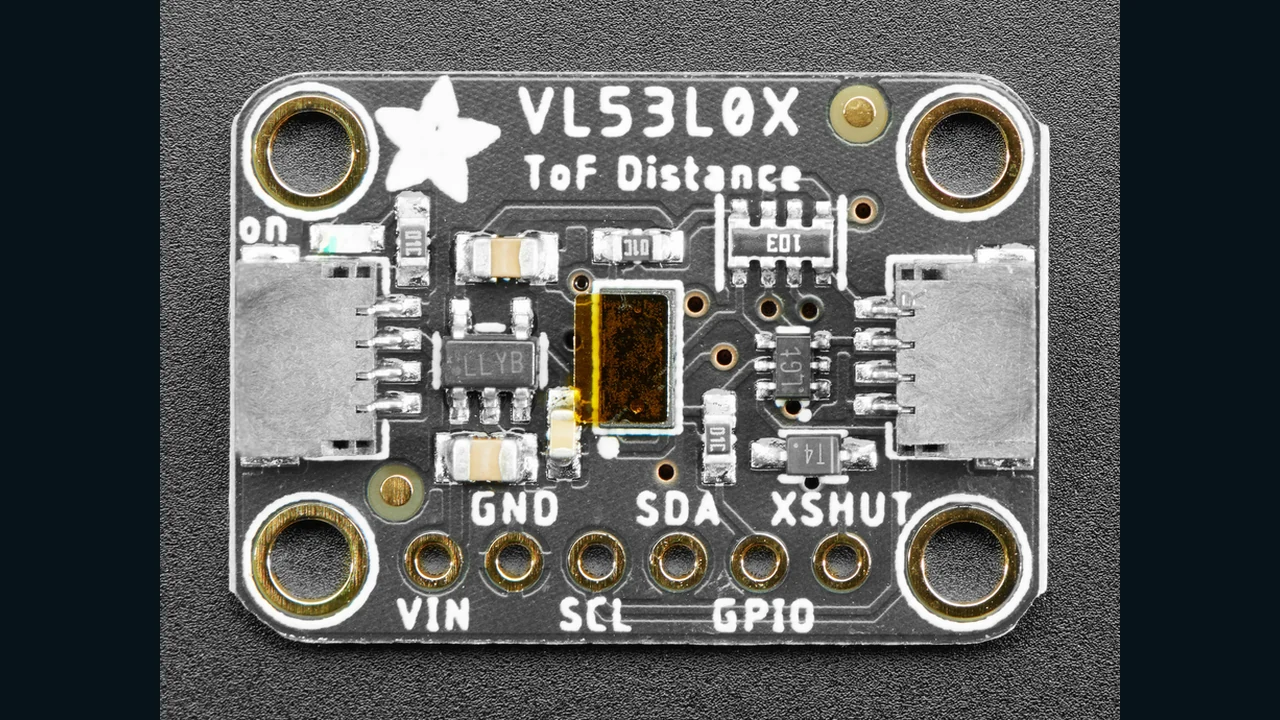
limit 2.6 to 3.5V It is related to the raw chip. The Adafruit board pictured has a regulator and level shifter, and according to its manual, it uses a 3-5V power supply and logic. Unknown modules may not have the same circuit; Before connecting 5V, check the schematic and part number of the same module.
In the raw chip design, ST capacitors 100nF and 4.7µF shows near nutrition. For a 400kHz bus and an AVDD of 2.8V, a typical pull-up of 1.5 to 2 kOhms is suggested, but the final value should be calculated with the total bus capacity and host specifications. GPIO1 is open-drain output and XSHUT is active-low input.
Bases and difference of address 0x52 with 0x29
| Adafruit board base | Application | Design tip |
|---|---|---|
| VIN | Board power input | For this reason, the 3 to 5 V document board; The raw chip has a maximum operating voltage of 3.5V. |
| GND | common land | The source ground and the microcontroller must be common. |
| SCL | I2C clock | Connect to the SCL of the host board. |
| SDA | I2C data | Connect to the SDA of the host board. |
| GPIO | Notification of data availability | In the GPIO1 chip, the output is open-drain; Not used in the base code. |
| XSHUT | Hardware shutdown, Active-low | It is useful for several co-addressing sensors and reducing consumption. |
The ST datasheet writes the default address as 0x52; This eight-bit representation includes the Read/Write bit. Arduino libraries and scanners require a seven-bit address, so the correct value is 0x29. Because 0x29 << 1 = 0x52, these two numbers do not contradict.
Wiring the VL53L0X with ESP32 and Arduino Uno
| Adafruit VL53L0X board | General ESP32 | Arduino Uno |
|---|---|---|
| VIN | 3V3 | 5V or 3.3V |
| GND | GND | GND |
| SDA | GPIO21 in Generic ESP32 | A4 / SDA |
| SCL | GPIO22 in Generic ESP32 | A5 / SCL |
| XSHUT | optional; A GPIO output | optional; A digital base |
GPIO21 and GPIO22 are just common choices for Generic ESP32; Refer to the SDA/SCL label or manufacturer's documentation on other boards. If the board has a ready pull-up, the additional parallel resistance can make the effective resistance too low. First test with a short wire and a 100kHz clock.
API, measurement modes and why we don't guess about registers
Unlike some sensors, the VL53L0X datasheet does not provide a simple table for manually setting up all the registers. ST in the UM2039 explicitly introduces a high-level API as a solution to manage multiple registry accesses and calibration within the driver layer. Therefore, in this project, we use a library that contains the official ST API, and we do not write any test or guess register addresses.
| Profile | Time budget sample datasheet | Application |
|---|---|---|
| Default | 30ms | General balance of speed and accuracy |
| High Accuracy | 200ms | more accurate measurement; Typical accuracy less than ±3% under table conditions |
| Long Range | 33ms | Long range in dark conditions and suitable target |
| High Speed | 20ms | More speed when accuracy is not a top priority |
The sensor has Single, Continuous and Continuous Timed modes. In the simple project, we use the library's single-measurement call so that the error handling is transparent. For fast sampling, select Continuous with data readiness checks and rate limiting.
Step-by-step setup in Arduino IDE
- Select the correct ESP32 or Arduino board and port.
- In the Library Manager, install the Adafruit VL53L0X library and its recommended dependencies.
- Do the I2C and common ground wiring and check the allowable voltage of the same module.
- First run the
i2c-scanner.inofile inside the package; The seven-bit address0x29should be seen. - Upload the original code and turn on Serial Monitor 115200 baud open
- Start with an opaque white target at a known distance and then test the surface and actual lighting of the project.
VL53L0X practical code for ESP32 and Arduino
#include <Wire.h>
#include <Adafruit_VL53L0X.h>

#if defined(ESP32)
constexpr int SDA_PIN = 21;  // Generic ESP32 only
constexpr int SCL_PIN = 22;  // Generic ESP32 only
#endif

constexpr uint8_t VL53L0X_ADDRESS = 0x29;
Adafruit_VL53L0X sensor;

void setup() {
  Serial.begin(115200);

#if defined(ESP32)
  Wire.begin(SDA_PIN, SCL_PIN);
#else
  Wire.begin();
#endif
  Wire.setClock(100000);

  if (!sensor.begin(VL53L0X_ADDRESS, false, &Wire)) {
    Serial.println(F("VL53L0X not found; check power, wiring and 0x29"));
    while (true) delay(10);
  }
}

void loop() {
  VL53L0X_RangingMeasurementData_t measurement;
  sensor.rangingTest(&measurement, false);

  if (measurement.RangeStatus == 0) {
    Serial.print(F("Distance: "));
    Serial.print(measurement.RangeMilliMeter);
    Serial.println(F(" mm"));
  } else {
    Serial.print(F("Invalid measurement; RangeStatus="));
    Serial.println(measurement.RangeStatus);
  }

  delay(100);
}
Code analysis
- The condition
#if defined(ESP32)on the ESP32 sets the example pins explicitly, and on the Uno it uses Wire hardware pins. Wire.setClock(100000)selects a conservative 100kHz clock; This value is less than the ceiling of 400kHz datasheet.sensor.begin(0x29, false, &Wire)gives the seven-bit address and the same I2C bus to the library.rangingTestperforms a full API measurement and puts the result into a formal structure.- Only valid
RangeStatus == 0will be printed. The official ST UM2046 defines the zero state as Range Valid; The space number in invalid state should not be entered into the robot control.
VL53L0X common errors and troubleshooting
| sign | probable cause | Suggested review |
|---|---|---|
| Address 0x29 is not visible | SDA/SCL shift, ground not shared, XSHUT low or improper power supply | Measure the voltage, XSHUT up and run the I2C scanner again. |
| The datasheet says 0x52 | The difference between 8-bit and 7-bit display | On Arduino use 0x29; 0x52 is its shifted form. |
| Fixed or invalid number | Protective coating on sensor, target out of field of view or low reflection | Remove the carrying case and test with a white matte target at a known distance. |
| The range is reduced in sunlight | Ambient infrared noise | Reduce direct light and measure performance in real product conditions. |
| Multiple sensors are not responding at the same time | All are woken up at address 0x29 | Turn on XSHUT one by one and set unique addresses in each boot. |
| After installing behind the glass, there is a lot of error | Cross-talk or inappropriate window geometry | Run the AN5231 manual and the Offset/Cross-talk calibration on the UM2039. |
| Random reset when measuring | Weak power supply or momentary drop | Check the 40mA peak, close capacitor and power path quality. |
PCB design tips and mechanical installation
- Do not cover the optical transmitter and receiver with frame, glue, flux or dust and remove the carrying case before testing.
- If you have a protective window, design the geometry according to AN5231 and calibrate the offset and cross-talk for the final product.
- According to the datasheet, XSHUT is only high when AVDD is connected. If the host is unknown at startup, consider pull-up.
- GPIO1 can remain open when not in use; If used, pay attention to the nature of open-drain and pull-up.
- The target object must cover the field of view sufficiently; A frame edge or angled glossy surface may create unwanted reflections.
- Calibrate on the final board and frame, not just the open module on the table.
- For robot safety control, don't assume the invalid state is "too far"; Consider it a separate error or safe mode.
conclusion
The VL53L0X performs best when considering I2C address, RangeStatus, field of view, ambient light and mechanical calibration simultaneously. For the prototype, the Adafruit board and official library provide a simple path; For the final product, the power limit of the raw chip, the current peak, the guard window and the test on the actual target are decisive.
Frequently asked questions
The correct address of VL53L0X in Arduino is 0x29 or 0x52?
In Arduino and most I2C APIs, use the seven-bit address 0x29. The number 0x52 in the datasheet is the eight-bit representation of the write address and is obtained by shifting 0x29 to the left.
Can the VL53L0X chip be connected directly to 5V?
No; The operating power supply of the raw chip is 2.6 to 3.5 V. Only power a ready-made board with 5 volts that the manufacturer of the same board has documented the presence of a regulator and a level switch.
Why does the distance decrease in daylight?
Ambient infrared light adds noise to photon reception. The datasheet also reports a shorter range for outdoor conditions and a low-reflective target; Test the result in real project light.
Is it possible to put multiple VL53L0X on one I2C bus?
Yes, but they all start at address 0x29. wake them up one by one with XSHUT bases and give a unique software address each time they are turned on; Change of address is not permanent.
Is the RangeMilliMeter number always valid?
no You should check the RangeStatus before using the range. In the official API, a state of zero means Range Valid, and other states should be handled as invalid measurements.
Detailed sources and follow-up
- ST Official Datasheet, VL53L0X, DS11555 Rev.6
- Official API Manual, UM2039 Document Rev.2.0
- Official AN5231 Application Note for the window protector
- VL53L0X official product page
- Adafruit VL53L0X Board Official Guide
- Official BSD-licensed Adafruit VL53L0X library
- Photo credit, Kattni Rembor, license CC BY-SA 3.0
- Learning BMP280 with ESP32 and Arduino
- Free course of sensors in 7 steps
- distance and level training category
- Sensors Learning Center at LCENJ
Raw chip specifications are derived from DS11555 Rev.6 and API behavior is derived from UM2039 Rev.2.0. The 3-5V specification only applies to the Adafruit documentation board. No unsourced registers, circuits, or functional values are included in the article.
Question and answer article
Ask your technical question
Questions and answers are published after moderation. Authors can see their own pending drafts.
No confirmed questions have been registered for this article yet.