BMP280 Pressure Sensor with ESP32 and Arduino
BMP280 project-oriented guide; Datasheet reading, chip and module differences, pins, I2C, registers, oversampling, filtering, ESP32 and Arduino code, and altitude troubleshooting.
Contents
Barometric pressure sensor training
BMP280 setup with ESP32 and Arduino from datasheet to project
In this project-oriented guide, we'll take apart the BMP280 chip and module, read the important Bosch datasheet tables, wire up I2C, get compensated pressure and temperature with the official Adafruit library, and troubleshoot elevation, noise, and mechanical installation errors.
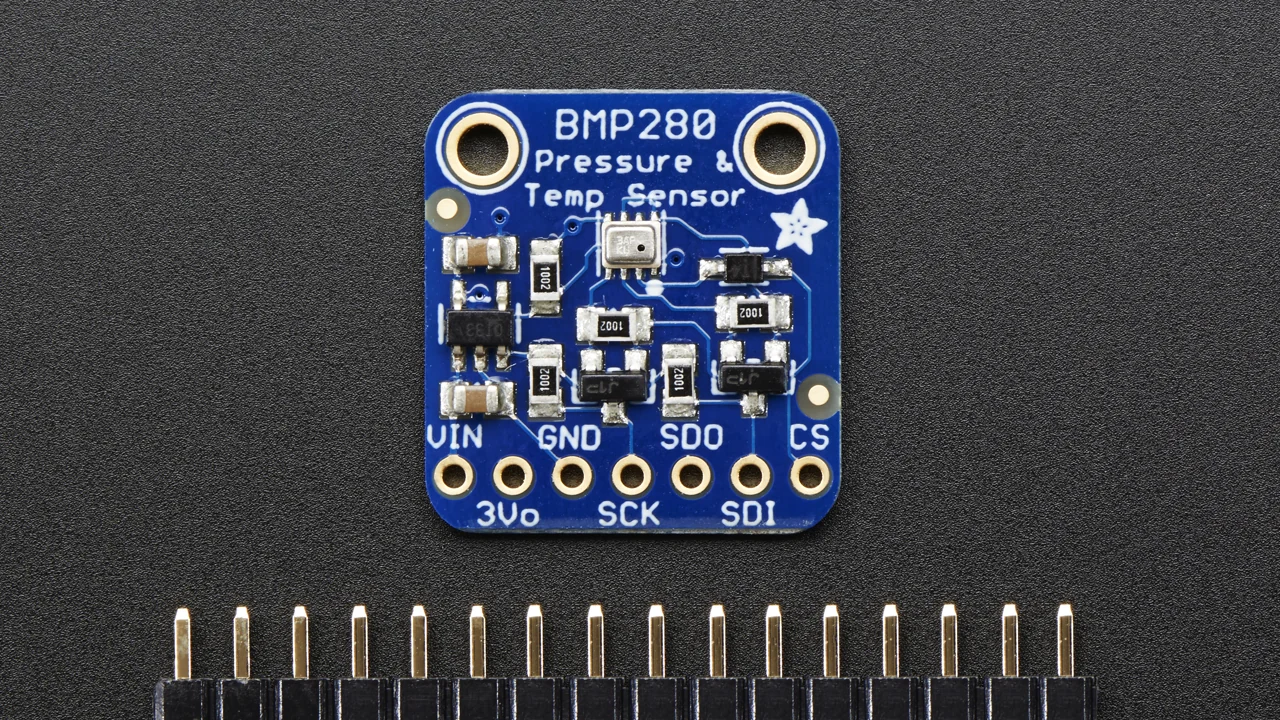
What is BMP280 and in what projects is it used?
The BMP280 is a barometric absolute pressure sensor from Bosch Sensortec. The pressure piezoresistive element and the signal processing circuit inside the chip provide the raw value of pressure and temperature and the calibration coefficients specific to the same part from the digital interface. To reach the real value, the raw data must be compensated with the coefficients stored in the sensor memory; The library we use in this article performs this step.
Prediction of pressure changes, meteorological station, registration of relative height, detection of moving between floors and improvement of navigation are the main applications. The temperature of the BMP280 is measured primarily for pressure compensation and is dependent on the temperature of the chip and PCB itself; So don't replace it with an accurate ambient thermometer without checking the placement.
How to read the BMP280 datasheet correctly?
Operating range
Full pressure range 300 to 1100 hPa and temperature range -40 to +85°C is The expression "full accuracy" for temperature to interval 0 to +65°C limited; Therefore, next to each number, read the condition of the test.
Accuracy and Resolution
Absolute pressure accuracy over the full range specified for 0 to 65°C equal to ±1 hPa is, while the output resolution in Ultra High Resolution mode is 0.0016 hPa it arrives Fine resolution does not mean absolute accuracy.
Relative accuracy
Typical relative accuracy ±0.12 hPa In the conditions listed in the datasheet, it is almost equivalent ±1 m Change in height. This number should not be equated with the absolute accuracy of altitude in any weather.
Typical and Maximum
Typical sleep state flow 0.1 µA and max 0.3 µA mentioned, but the peak current of the pressure measurement is up to 1.12 mA it arrives The power supply and bypass capacitor must also cover the peak.
| Datasheet parameter | amount | Practical result |
|---|---|---|
| VDD raw chip | 1.71 to 3.6V | Do not connect the raw chip directly to 5V. |
| Raw chip VDDIO | 1.2 to 3.6V | The pull-up of the I2C bus must be consistent with the allowed logic range. |
| Pressure range with full accuracy | 300 to 1100 hPa | Suitable for atmospheric pressure and relative altitude, not liquid pressure measurement. |
| Chip ID | Register 0xD0, value 0x58 | Before starting, confirm the part model by reading the ID. |
| Startup time | 2 ms | Immediately after feeding, wait a little before the first intercourse. |
| I2C / SPI | until 3.4 MHz / to 10 MHz | Don't assume that the allowed speed of the chip is the same as the appropriate speed of the module and wiring. |
The difference between the raw chip and the BMP280 module
The limit of high voltages is related to the chip itself. The Adafruit BMP280 board pictured has a regulator and level shifter circuit, and according to the manufacturer's manual, works with 3-5V input and logic. Not all market modules have such a circuit; Having a base with a VIN or similar appearance is not sufficient proof. Before connecting 5V, check the schematic of the same board or parts of the regulator and Level Shifter.
In design with raw chip, Bosch for VDD and VDDIO capacitor 100 nF It is recommended near the bases. The CSB pin must be connected to VDDIO to select I2C. If CSB is detected Low at startup, the interface is locked in SPI mode until the next Power-on Reset.
Pins, I2C address and wiring with ESP32 and Arduino
| Adafruit module base | General ESP32 | Arduino Uno | explanation |
|---|---|---|---|
| VIN | 3V3 | 5V or 3.3V | This selection is only documented for the Adafruit board with the Regulator/Level Shifter. |
| GND | GND | GND | Power and data common ground |
| SCK | GPIO22 / SCL board | A5 / SCL | In I2C mode, it is the same as SCL line. |
| SDI | GPIO21 / SDA board | A4 / SDA | In I2C mode, it is the same as SDA line. |
| CS and SDO | According to the module | According to the module | On the Adafruit board for I2C they are left with no external connection; In the raw chip, their role is different. |
The Arduino-ESP32 documentation says the default pin depends on the board; GPIO21 for SDA and GPIO22 for SCL are just the defaults of the Generic ESP32 board. In the code, specify the bases explicitly with Wire.begin(SDA_PIN, SCL_PIN). I2C lines require pull-up; Ready board may have these resistors.
On the raw chip, SDO gives GND the seven-bit address 0x76 and SDO gives VDDIO the address 0x77 and should not be left floating. Many libraries default to an address; If the sensor is not found, scan both.
Registers, Oversampling, Filter and Working Modes
| Register | address | Application |
|---|---|---|
| id | 0xD0 | Chip ID; Expected value 0x58 |
| reset | 0xE0 | Write 0xB6 for Soft Reset |
| status | 0xF3 | NVM data conversion and copy enable bits |
| ctrl_meas | 0xF4 | Oversampling pressure and temperature and Mode selection |
| config | 0xF5 | Standby time, IIR coefficient and three-wire SPI |
| press / temp | 0xF7 تا 0xFC | 20-bit raw data of pressure and temperature |
No conversion is done in Sleep. Forced measures once and then automatically returns to Sleep; This mode is suitable for battery-consuming data loggers. Normal repeats the measurement cycle and Standby. Oversampling reduces more noise but increases conversion time and consumption. The built-in IIR filter is useful for removing short changes caused by wind or door closing, but it also slows down the actual response to rapid pressure changes.
Step-by-step setup in Arduino IDE
- Select the correct ESP32 or Arduino board and port.
- Install the Adafruit BMP280 Library and its recommended dependencies from the Library Manager.
- Do the I2C wiring with common ground and check the allowable voltage of the same module.
- First, run the I2C scanner inside the download package and see the presence of
0x76or0x77. - Upload the original code and turn on Serial Monitor 115200 baud open
- Calibrate sea level pressure for project location and time; A generic constant value does not produce an exact height.
BMP280 practical code for ESP32 and Arduino
#include <Wire.h>
#include <Adafruit_BMP280.h>

#if defined(ESP32)
constexpr int SDA_PIN = 21;   // Generic ESP32 only
constexpr int SCL_PIN = 22;   // Generic ESP32 only
#endif
constexpr uint8_t BMP280_ADDRESS = 0x76;
constexpr float SEA_LEVEL_HPA = 1013.25f; // Replace with a local value

Adafruit_BMP280 bmp;

void setup() {
  Serial.begin(115200);
#if defined(ESP32)
  Wire.begin(SDA_PIN, SCL_PIN);
#else
  Wire.begin();
#endif
  Wire.setClock(100000);

  if (!bmp.begin(BMP280_ADDRESS, 0x58)) {
    Serial.println("BMP280 not found; check 0x76/0x77 and wiring");
    while (true) delay(10);
  }

  bmp.setSampling(
    Adafruit_BMP280::MODE_NORMAL,
    Adafruit_BMP280::SAMPLING_X2,
    Adafruit_BMP280::SAMPLING_X16,
    Adafruit_BMP280::FILTER_X16,
    Adafruit_BMP280::STANDBY_MS_500
  );
}

void loop() {
  const float temperatureC = bmp.readTemperature();
  const float pressurePa = bmp.readPressure();
  const float pressureHpa = pressurePa / 100.0f;
  const float altitudeM = bmp.readAltitude(SEA_LEVEL_HPA);

  Serial.print(F("T="));
  Serial.print(temperatureC, 2);
  Serial.print(F(" C | P="));
  Serial.print(pressureHpa, 2);
  Serial.print(F(" hPa | altitude="));
  Serial.print(altitudeM, 2);
  Serial.println(F(" m"));
  delay(1000);
}
Compile condition #if defined(ESP32) makes this file use explicit pins on ESP32 and I2C hardware pins, namely SDA/A4 and SCL/A5, on Arduino Uno. The serial output is also written with Serial.print so as not to depend on Serial.printf for some kernels.
Code Analysis: What does each section do?
Wire.beginon the ESP32 starts the I2C bus with explicit pins and on the Uno with hardware pins;setClock(100000)also selects a conservative rate of 100kHz.bmp.begin(..., 0x58)specifies both the address and the expected identifier of the BMP280 control; In this way, BME280 or wrong fragment is not silently accepted.setSamplingsets Normal, Oversampling and IIR modes according to the library's official sample.readPressurereturns the compensated pressure in pascals; Dividing by 100 converts it to hectopascals.readAltitudeEstimates altitude from the ratio of current pressure to sea level pressure. EntrySEA_LEVEL_HPAshould be updated with local data.
Why is the height wrong and how to calibrate it?
Air pressure is not only a function of altitude; The weather changes it too. number 1013.25 hPa A standard reference pressure, not the actual pressure of all locations and days. For absolute altitude, enter the corrected sea level pressure from the local weather reference and the time. To measure short-term elevation change, you can take a reference at the starting point and report the difference.
If you know the location reference altitude accurately, the seaLevelForAltitude function in the Adafruit library can calculate sea level equivalent pressure from the measured pressure and known altitude. Perform the calibration after the system warms up and away from direct wind.
BMP280 common errors and troubleshooting
| sign | Possible causes | Suggested review |
|---|---|---|
| No address found | SDA/SCL toggled, no common ground, improper power supply, CSB in SPI mode | Measure the voltage, run the I2C scanner and Power Cycle. |
| There is an address but begin fails | Wrong 0x76/0x77 address or BME280 chip/other part | Read the ID register at 0xD0; BMP280 should be 0x58. |
| The pressure is noisy | Oversampling or low IIR, noisy feed, direct wind | Adjust filter and sampling accordingly and check capacitors and placement. |
| The height is a few meters wrong | Constant or old sea level pressure, climate change | Give simultaneous local reference or report relative altitude. |
| The temperature is higher than the ambient | MCU/regulator heat and the PCB itself | Move the sensor away from heat sources and do not unnecessarily increase the sampling rate. |
| Random error on the cable | Improper pull-up, bass capacitance or EMI | Check cable short, speed low and SDA/SCL waveform with oscilloscope. |
PCB design tips and mechanical installation
- Do not block the metal hole of the sensor with glue, protective cover or product body, and consider a ventilation path to reach the ambient pressure.
- According to the datasheet, at least 0.1 mm The empty space above the metal cap should be maintained and the liquid should not be in direct contact with the part.
- Strong light can affect the measurement; Keep the sensor port away from strong light source.
- Keep the sensor away from the regulator, processor, display, and high-current paths that generate heat or mechanical stress.
- capacitors 100 nF Place the recommended near VDD and VDDIO and keep the ground path short.
- For the new product, in addition to the technical specifications, record the status of Not recommended for new designs and replace BMP390 in the BOM.
Frequently asked questions
What is the correct address of BMP280; 0x76 or 0x77?
Both are possible. In raw chip, SDO=GND gives address 0x76 and SDO=VDDIO gives address 0x77. Identify the connection on the ready module with the I2C scanner.
Does the BMP280 also measure humidity?
no The BMP280 measures internal pressure and temperature. For humidity, choose BME280 or separate humidity sensor according to the actual part number.
Can the BMP280 module be connected to 5V?
Only if the manufacturer of the same module has documented the presence of the regulator and the change of the 5V level. The BMP280 chip itself has a maximum working power supply of 3.6V.
Why is 1013.25 not enough for exact height?
This is the standard reference number. Sea level pressure changes with weather and time; For a better altitude, you should enter the corrected and updated local pressure.
Is it better for forced or normal battery?
Forced allows a measurement to be taken and the sensor automatically returns to Sleep; It is usually a better choice for quiet sampling. The final adjustment should be weighed against the rate, noise and power budget of the project.
Detailed sources and follow-up
- Bosch BMP280 Official Datasheet, Revision 1.26
- BMP280 official product page and life cycle status
- Official MIT Licensed Adafruit BMP280 Library
- Adafruit BMP280 Board Official Guide
- Official documentation for I2C on Arduino-ESP32
- module photo source, lady ada, license CC BY-SA 3.0
- SHT31 training with ESP32 and Arduino
- DS18B20 training with ESP32 and Arduino
- Free course of sensors in 7 steps
- Sensors Learning Center at LCENJ
All technical numbers are adapted from Datasheet BMP280, Document BST-BMP280-DS001-26, Revision 1.26 (October 2021). Ready board specifications are only stated for Adafruit's documented model and do not extend to anonymous modules.
Question and answer article
Ask your technical question
Questions and answers are published after moderation. Authors can see their own pending drafts.
No confirmed questions have been registered for this article yet.