Build a Scale with a Load Cell, HX711 and ESP32 or Arduino
Making a scale with load cell and HX711: ESP32 and Arduino wiring, calibration with known mass, sample code, troubleshooting and purchase link in Iran.
Contents
Weighing project • Load cell and HX711 • ESP32 / Arduino
From changing the shape of the load cell to the weight number
To build a bench scale, reading the raw number is not enough: the mechanical installation, bridge wiring, power supply and calibration must all be right together. In this tutorial, we read a four-wire load cell with the HX711, determine the zero and conversion factor with a reference mass, and isolate common errors step by step.
This project is for scale prototyping, material quantity monitoring and instrumentation training; Not guaranteed accuracy or commercial scale verification.
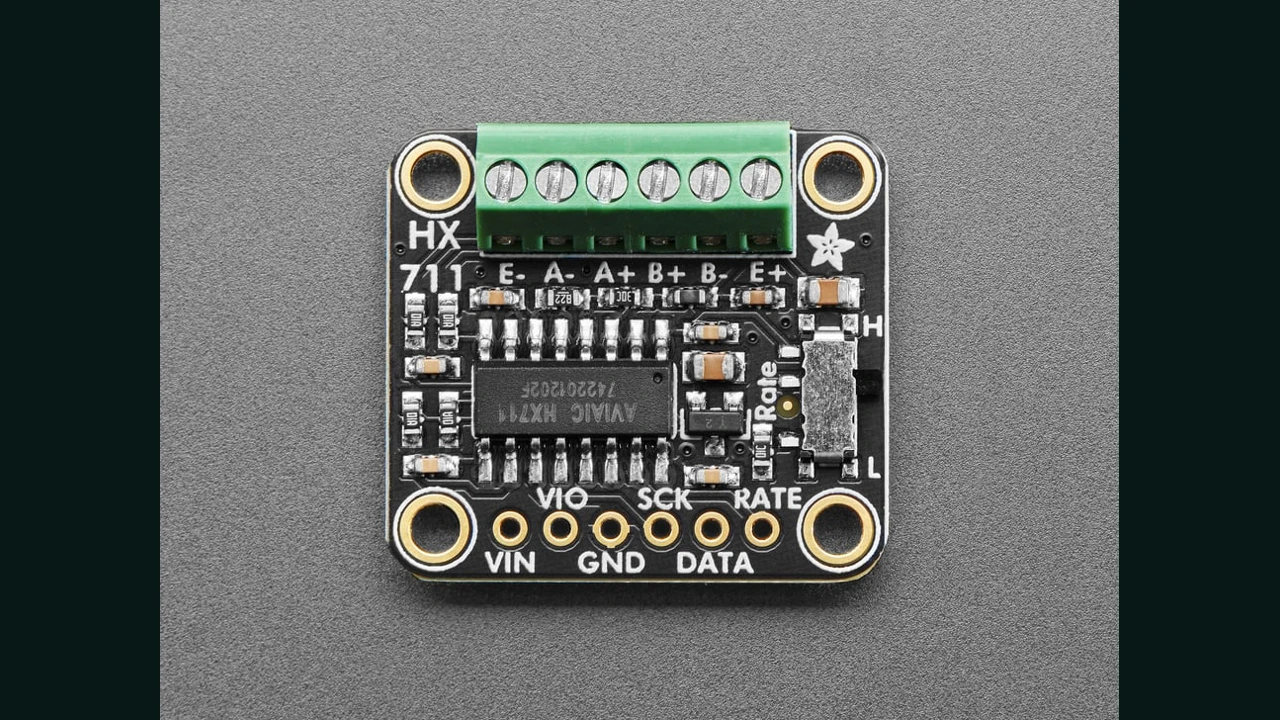
1. Where is this project used?
A prototype could record the mass of small parts on a tray, the change in the amount of material inside a light container, or the repeatability of a weighing mechanism. If the purpose is to sell the product, first specify the load range, allowable error, temperature conditions and installation method; Then select the capacity of the load cell. Adding a few decimal places to the display does not replace this step.
The reason for choosing this topic for the Iranian market is not just the familiar name: the HX711 module and the complementary load cell are available in ECA, and the module page has buyer-marked questions about setting up with ESP32. This is an indication of usage and demand, not sales figures or customer guarantees. The exact link and date of review is at the bottom of the article.
2. What is the difference between load cell and HX711?
The load cell converts the mechanical deformation into a change in the electrical signal of the bridge. HX711 is not a weight sensor itself; It is an amplifier and analog to digital converter for small signal reading. Its output is first a raw number and we need zero and calibration coefficient to convert it to grams.
The project chain is: load on structure → load cell → HX711 differential input → raw number → calibration → estimated mass. Failure or error in any step can change the final result. See the category Pressure, Weight and Flow to continue this path.
3. Some essential features of the datasheet
| Chip specification | amount | Result for the project |
|---|---|---|
| ADC output | 24 signed bits | The number of bits is not the guaranteed accuracy of the scale. |
| Input gain | A: 128 or 64; B: 32 | The code of this article uses channel A and gain 128. |
| Output rate with internal oscillator | 10 or 80 samples per second | The base RATE is decisive; Not all modules have keys. |
| Exit meeting time | 400 ms at 10 SPS; 50 x 80 SPS | After switching on or changing settings, the output is not immediately stable. |
Reference: Datasheet HX711, AVIA Corporation, Version 2, Tables 1 to 3. Don't confuse the chip specifications with the capacity and accuracy of the load cell or the quality of the store board.
4. Necessary equipment and capacity selection
- An ESP32 or Arduino Uno board, an HX711 module and short wires.
- Four wire load cell with full bridge, suitable capacity and valid wiring information.
- Strong base and tray, screws and spacers according to the sensor's mechanical drawing.
- Known reference mass for calibration and several other masses to control the result.
- Multimeter to check connections and voltages before connecting data pins.
The weight of the tray itself is part of the mechanical load; Software zeroing does not remove it from physical capacity. This text does not specify a new capacity or overload limit for the sensor. The three-wire half-bridge load cell should not be assumed as a four-wire model without building a proper bridge.
5. nutrition; The most sensitive point of connection to ESP32
First, check the schematic and the writings of the same module. For a 3.3V compatible example, keep the HX711 power supply and logic level with the ESP32. In Uno, you can use a module compatible with 5V. In boards with separate analog and digital power supply, each pin has its own task; VIN, VCC and VIO are not necessarily synonymous.
On some common boards, the load cell excitation regulator does not reach its rated voltage with a 3.3V input. Therefore, control both the voltage E+ relative to E− and its compatibility with the load cell. The Adafruit Version Pinouts guide is a documented example, not a map of every board on the market.
6. HX711 wiring to load cell and microcontroller
| module base | ESP32 in this code | Arduino Uno in this code | Tip |
|---|---|---|---|
| VCC / VIN | 3V3 for compatible module | 5V for compatible module | Check the conditions of the nutrition section first. |
| GND | GND | GND | common land |
| DOUT / DT / DATA | GPIO19 | D2 | Data output from HX711 |
| PD_SCK / SCK | GPIO18 | D3 | Clock from microcontroller |
| E+ and E− | Positive and negative stimulation of the load cell | According to the same sensor document | |
| A+ and A− | Positive and negative signal output of the bridge | The channel used by this program | |
These numbers are software selection examples; On ESP32-S3, special boards or boards that use pins differently, select the appropriate free pin and modify the constants at the beginning of the code. The color of wires is not a universal standard. If your only guide is a similar photo, find the actual model information before turning it on.
7. HX711 is not I2C
The two lines DATA and SCK do not mean I2C; This chip does not have an I2C address and the I2C scanner will not find it. Its proprietary protocol has 24-bit output and channel and gain selection pulses. PD_SCK staying high for more than 60 microseconds puts the chip into low-power mode; Writing drivers regardless of timing can disrupt reads.
In this project, we use the bogde/HX711 version 0.7.5 library. Before each read, we check for data readiness with a finite timeout, so that the absence of a module does not lead to an endless wait in the preparation phase. Only this program loop should be responsible for reading the ADC.
8. Mechanical installation before calibration
For single-point pole load cell, according to the manufacturer's drawing, one side is attached to the base and the other side to the tray, and the deformation zone must be left free. Do not generalize this method to all load cell shapes. Tray-to-body contact, a stretched cable, an improper screw, or an out-of-place load can divert some of the force from the sensor's path.
Perform the initial test with a low and controlled load; Safe capacity cannot be determined by hand pressure or impact. Disconnect the power before changing the wiring. If the module gets hot, it is not suitable to continue the test with repeated power on and off; Check for short circuit and power supply polarity.
9. Zero and calibration with known mass
- Close the structure completely and observe the stability of the raw number without load.
- Send the command
twith an empty tray. The raw mean is recorded as zero. - Put the known reference mass and send a command like
c 500after it stops; Only if the reference mass is really 500 grams. - remove the mass; Check back to zero. Then measure the error with other masses and several times of lifting and placing.
countsPerGram = (rawKnown - rawZero) / knownMassGrams
massGrams = (rawNow - rawZero) / countsPerGram
A negative coefficient is not necessarily an error; The direction of the bridge signal can change sign. Do not copy the Internet sample coefficient. Zeroing does not correct coefficient error, and single-point calibration alone does not prove full-range linearity.
10. Calibration code and weight reading
Install HX711 library with bogde author; The base version of this example is 0.7.5. Set Serial Monitor to 115200 and end Newline. The program intentionally does not zero on auto-start so as not to hide the load on the tray. First, only the raw number is displayed.
#include <Arduino.h>
#include <HX711.h>  // bogde/HX711 0.7.5
#include <math.h>
#include <stdlib.h>
#include <string.h>

#if defined(ARDUINO_ARCH_ESP32)
const uint8_t DATA_PIN = 19, CLOCK_PIN = 18;
#else
const uint8_t DATA_PIN = 2, CLOCK_PIN = 3; // Arduino Uno
#endif

HX711 adc;
double zeroRaw = 0, countsPerGram = 0;
bool zeroValid = false, calibrated = false;
char line[48];
uint8_t used = 0;
bool overflowed = false;
unsigned long lastReport = 0;

// Each sample has its own timeout. One task owns the ADC.
bool averageRaw(uint8_t count, double &value) {
  int64_t sum = 0;
  for (uint8_t i = 0; i < count; ++i) {
    if (!adc.wait_ready_timeout(1200, 1)) {
      Serial.println(F("ERROR: HX711 timeout; check power / DATA / SCK."));
      return false;
    }
    long raw = adc.read();
    if (raw == 8388607L || raw == -8388608L) {
      Serial.println(F("ERROR: ADC saturated; check bridge wiring / load."));
      return false;
    }
    sum += raw;
  }
  value = (double)sum / count;
  return true;
}

void command(char *text) {
  double raw;
  if (strcmp(text, "t") == 0) {
    Serial.println(F("Tare: keep platform empty and still..."));
    if (averageRaw(20, raw)) {
      zeroRaw = raw;
      zeroValid = true;
      Serial.print(F("zeroRaw=")); Serial.println(zeroRaw, 2);
    }
  } else if (text[0] == 'c' && text[1] == ' ') {
    char *end;
    double grams = strtod(text + 2, &end);
    while (*end == ' ') ++end;
    if (!zeroValid || end == text + 2 || *end != '\0' ||
        !isfinite(grams) || grams <= 0) {
      Serial.println(F("First send t empty; then c <known mass in grams>."));
      return;
    }
    Serial.println(F("Calibration: keep known mass still..."));
    if (!averageRaw(20, raw)) return;
    double factor = (raw - zeroRaw) / grams;
    if (!isfinite(factor) || fabs(factor) < 0.000001) {
      Serial.println(F("ERROR: no useful span; check known load / wiring."));
      return;
    }
    countsPerGram = factor; // Negative sign is legitimate.
    calibrated = true;
    Serial.print(F("countsPerGram=")); Serial.println(countsPerGram, 6);
    Serial.println(F("Verify with OTHER known masses; not saved after reset."));
  } else if (strcmp(text, "p") == 0) {
    Serial.print(F("zeroRaw=")); Serial.println(zeroRaw, 2);
    Serial.print(F("countsPerGram=")); Serial.println(countsPerGram, 6);
    Serial.print(F("calibrated=")); Serial.println(calibrated);
  } else {
    Serial.println(F("Commands: t (empty tare), c 500 (known 500 g), p"));
  }
}

void setup() {
  Serial.begin(115200);
  adc.begin(DATA_PIN, CLOCK_PIN, 128); // Channel A, gain 128
  delay(500);
  Serial.println(F("HX711: no automatic tare. Send t only with EMPTY platform."));
  Serial.println(F("Then place a known mass and send c <grams>; newline enabled."));
}

void loop() {
  while (Serial.available()) {
    char ch = (char)Serial.read();
    if (ch == '\r') continue;
    if (ch == '\n') {
      line[used] = '\0';
      if (overflowed) Serial.println(F("ERROR: command too long."));
      else if (used) command(line);
      used = 0;
      overflowed = false;
    } else if (used < sizeof(line) - 1 && !overflowed) {
      line[used++] = ch;
    } else overflowed = true;
  }
  if (millis() - lastReport >= 1000) {
    double raw;
    if (averageRaw(5, raw)) {
      Serial.print(F("raw=")); Serial.print(raw, 1);
      if (calibrated) {
        Serial.print(F("  grams="));
        Serial.print((raw - zeroRaw) / countsPerGram, 1);
      } else Serial.print(F("  NOT CALIBRATED"));
      Serial.println();
    }
    lastReport = millis();
  }
}
The p command prints the parameters. The calibration of this example is not saved after reset; In a valid storage end product, load interval control and zeroing policy are required. Average reading and calibration command take several conversions; This loop is not designed for real-time engine control.
Download full example and raw data detection program. Place each ino file in its own folder of the same name. Codes are compiled for Uno and ESP32; Not tested on physical hardware.
11. Noise, accuracy and test repeatability
First record the raw number with the empty tray, then with the fixed mass. Note the range of changes, return to zero and the difference in readings at different points of the tray separately. If moving the load location changes the result, go to mechanics before increasing the averaging.
Keep the signal wire short and out of the way of the motor, relay and switching converter. To investigate the source of the disturbance, temporarily remove the disruptive consumers from the test project and repeat the same test. More averaging may make the output smoother, but it slows the response and does not eliminate mechanical error or false positives.
To record the temperature effect, you can add the temperature measurement with DS18B20 route; Simply recording the temperature does not mean automatic weight error compensation.
12. Symptom based troubleshooting
| sign | First review | next step |
|---|---|---|
| TIMEOUT | FEEDING, COMMON GROUND, DATA/SCK NO | Check the board schematic and clock status; I2C scan is not used. |
| SATURATED | Bridge wires, connecting A and E, input load | Remove the load safely; Don't hide the saturation with software factor. |
| It does not change with load | Power transmission route and bridge connection | Run the raw program and check the contact of the tray with the body. |
| It does not return to zero after removing the load | Mechanical grip, instability and change of conditions | Record several controlled loading cycles; Don't always zero. |
| The weight is multiple or has the wrong sign | Reference mass unit and coefficient | Repeat the calibration with the known mass; Do not remove the mark unnecessarily. |
| Many decimals but the result is unstable | Installation quality and real noise range | Choose the display resolution that suits the actual test. |
13. shopping in Iran; Do not confuse the module with the load cell
Check in : The following two pages showed the current status and the possibility of adding to the shopping cart. Inventory may change; Double check the specifications of the supplied version, voltage, pins and capacity when ordering. The fixed price is not included.
- Buy HX711 module from ECA — code 3011007006
Transducer board for reading load cells; It is not the sensor or the scale tray itself. The photo at the beginning of the article is of the Adafruit version, not the product itself.
- Buy load cell YZC-133 nominal capacity 5 kg from ECA — code 3051009001
Complementary option for style project review; The right capacity for you depends on the tray, load and mechanical conditions. Before choosing, get the recommended excitation voltage and wiring of the actual version from the dealer.
The presence of buyer questions on the module page is a sign of practical use, but the number of comments does not equate to the number of sales or guaranteed demand. The explanation of the protocol and the electrical values of this tutorial are taken from the manufacturer's documentation, not the store's promotional text.
14. Frequently asked questions
Does the HX711 use I2C?
no Its interface is two dedicated wires with DATA and PD_SCK and does not have an I2C address; The I2C scanner is not suitable for finding it.
Does 24-bit output mean milligram accuracy?
no Ultimate accuracy is dependent on load cell, capacitance, mechanics, noise, and calibration and must be tested with reference masses.
Can the module be powered with 5V for ESP32?
Only if the design of the same digital level board ensures compatibility with 3.3V. The 5V DATA output should not be directly connected to the ESP32.
Why is the calibration coefficient negative?
The direction of the bridge signal can make the coefficient negative. If the reference masses are read correctly, the negative coefficient alone is not a problem.
Is it saved by resetting the calibration?
In the example of this article, no. After reset, zero and calibration must be done again; Saving parameters in persistent memory is a separate development step.
15. Continuation of the project and resources
To build a multisensory registration system, Light sensing with BH1750 or Air pressure with BMP280 add to the weight path; Keep the interface difference of these I2C sensors with HX711. Browsing the basics of Guide to sensors and Course of sensors in 7 steps is available
- AVIA Semiconductor — HX711 Datasheet Version 2: Interface Specifications and Timing.
- Adafruit HX711 Official Manual: Sample board documentation, basics and setup.
- bogde/HX711 library main repository: software interface and driver code.
Project text and example: LCENJ. Software compilation does not take the place of physical testing, traceable calibration or evaluation of a finished product.
Question and answer article
Ask your technical question
Questions and answers are published after moderation. Authors can see their own pending drafts.
No confirmed questions have been registered for this article yet.