DS18B20 with ESP32 and Arduino: Wiring and 85°C Errors
Wire a DS18B20 to ESP32 or Arduino, use a non-blocking 1-Wire example, and troubleshoot 85°C, disconnected sensors and conversion timing.
Contents
To connect a DS18B20 to an ESP32, start with three-wire power: VDD to 3.3 V, GND to ground, and DQ to a suitable GPIO with a pull-up to 3.3 V. A 4.7 kΩ pull-up is a common starting value for a short bus. Request a conversion, wait for it to finish, then read and validate the result. At 12-bit resolution the maximum conversion time is 750 ms.
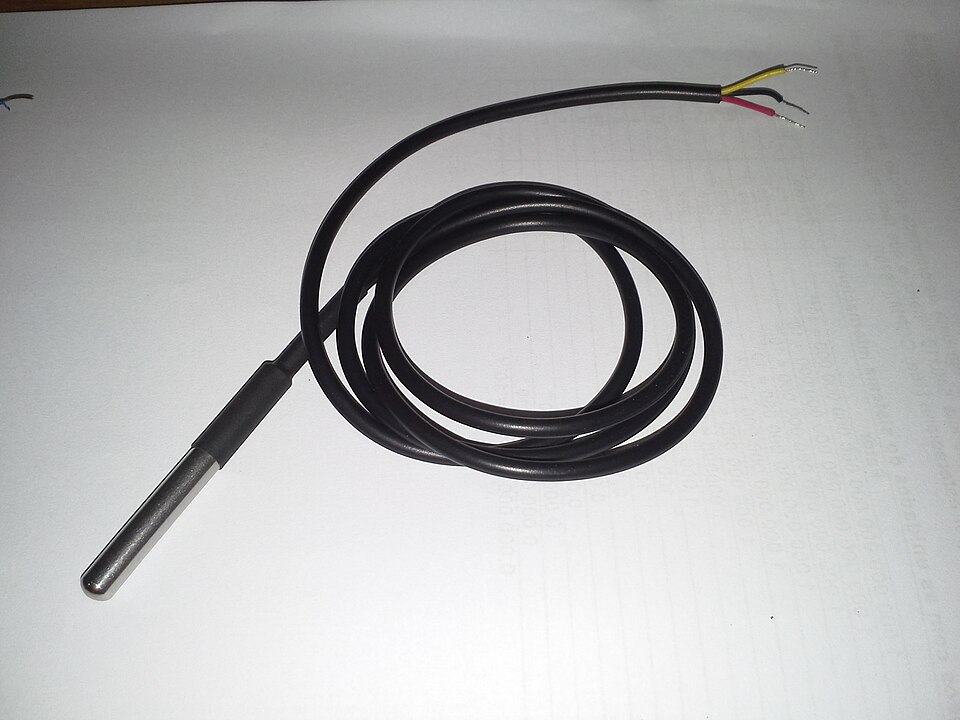

What the DS18B20 measures
The DS18B20 is a digital temperature sensor using the 1-Wire bus. Each device has a 64-bit ROM identifier, allowing multiple sensors to share a data line. It measures temperature only; for relative humidity as well, compare the SHT31 tutorial.
The specified range is −55 to +125°C. The ±0.5°C accuracy specification applies from −10 to +85°C; it is not the accuracy across the entire range. Resolution sets the numerical step, not absolute accuracy. A third-party metal probe also has cable, seal and thermal-response limits that the chip datasheet does not establish. Verify its construction and supplier documentation before immersion.
Package pins and wiring
For the DS18B20 TO-92 package, the datasheet identifies pin 1 as GND, pin 2 as DQ and pin 3 as VDD. With the flat face toward you and leads downward, they run left to right in that order. Confirm the package drawing; do not infer the colors of an encapsulated probe's wires from this pin order or a photograph.
| Connection | Arduino Uno example | ESP32 example |
|---|---|---|
| VDD | 5 V | 3.3 V |
| GND | GND | GND |
| DQ | D2 | GPIO4 if available and suitable on the actual board |
| Pull-up | 4.7 kΩ from DQ to 5 V | 4.7 kΩ from DQ to 3.3 V |
These are externally powered, three-wire connections. VDD goes to the supply, not ground. Keep ESP32 logic at a compatible voltage; do not copy the Uno's 5 V pull-up. Pin availability differs across ESP32 variants and boards.
For a longer bus, check cable capacitance, topology, common ground, pull-up strength and local bypassing. There is no universal cable-length guarantee. Begin with one sensor on a short cable, then add the intended wiring and other devices. The temperature sensor learning path gives related selection and installation guidance.
External power versus parasite power
External power gives the sensor its own VDD connection and is the simpler starting point for an ESP32 or several sensors. In parasite-power mode, VDD connects to ground as specified in the datasheet, while energy comes from the data line. A strong pull-up is needed during conversion and EEPROM copying; an ordinary resistor alone may not supply sufficient current. The non-blocking example below assumes external three-wire power, not parasite power.
Resolution and conversion time
| Resolution | Temperature step | Maximum conversion time |
|---|---|---|
| 9 bits | 0.5°C | 93.75 ms |
| 10 bits | 0.25°C | 187.5 ms |
| 11 bits | 0.125°C | 375 ms |
| 12 bits | 0.0625°C | 750 ms |
Choose the step and update rate the application needs. Twelve bits do not improve the chip's absolute accuracy. See resolution, accuracy and calibration before comparing sensors by decimal places.
1-Wire transactions and multiple sensors
A transaction starts with a reset and presence detection. Standard-speed slots and sampling instants have defined timing; use a supported library rather than inserting arbitrary delays into a driver. The datasheet describes reset, presence, read and write timing for logic-analyzer troubleshooting.
| Command | Hex | Purpose |
|---|---|---|
| Search ROM | F0 | Discover devices |
| Match ROM | 55 | Select one identifier |
| Skip ROM | CC | Broadcast an appropriate following command |
| Convert T | 44 | Start conversion |
| Read Scratchpad | BE | Read data including CRC |
| Read Power Supply | B4 | Check the power mode |
With several devices, save each ROM address and read by address rather than assuming discovery index 0 always identifies the same physical location. A broadcast conversion can start all devices, but select one device for its scratchpad read. Validate the scratchpad CRC; do not broadcast a read that causes several sensors to transmit simultaneously.
Arduino example
Install OneWire and DallasTemperature with Library Manager, wire DQ to D2 and set the serial monitor to 115200 baud. This blocking example checks the library's disconnected-device result.
#include <OneWire.h>
#include <DallasTemperature.h>

#define ONE_WIRE_BUS 2
OneWire oneWire(ONE_WIRE_BUS);
DallasTemperature sensors(&oneWire);

void setup() {
  Serial.begin(115200);
  sensors.begin();
  sensors.setResolution(12);
  Serial.print("Sensors: "); Serial.println(sensors.getDeviceCount());
}

void loop() {
  sensors.requestTemperatures();
  float c = sensors.getTempCByIndex(0);
  if (c == DEVICE_DISCONNECTED_C) {
    Serial.println("Sensor disconnected");
  } else {
    Serial.print("Temperature: "); Serial.print(c, 2); Serial.println(" C");
  }
  delay(1000);
}
ESP32 example without blocking the main loop
For an externally powered sensor, request conversion without waiting in the library, then read after 750 ms at 12-bit resolution. Other loop work can run meanwhile. The example checks for a disconnected sensor before printing a temperature. Configure the exact board's GPIO first. Source review and software checks do not establish physical sensor performance.
#include <OneWire.h>
#include <DallasTemperature.h>

constexpr uint8_t ONE_WIRE_BUS = 4;
OneWire oneWire(ONE_WIRE_BUS);
DallasTemperature sensors(&oneWire);
uint32_t conversionStarted = 0;
bool converting = false;

void setup() {
  Serial.begin(115200);
  sensors.begin();
  sensors.setResolution(12);
  sensors.setWaitForConversion(false);
}

void loop() {
  if (!converting) {
    sensors.requestTemperatures();
    conversionStarted = millis();
    converting = true;
  }
  if (converting && millis() - conversionStarted >= 750) {
    float c = sensors.getTempCByIndex(0);
    if (c == DEVICE_DISCONNECTED_C) {
      Serial.println("Sensor disconnected");
    } else {
      Serial.print("Temperature: "); Serial.print(c, 2); Serial.println(" C");
    }
    converting = false;
  }
  // WiFi, UI and other tasks can run here.
}
Download the reviewed Arduino and ESP32 examples (2026-10-17). Older full-article ZIP downloads below retain their original Persian content.
Diagnose 85°C, −127°C and intermittent readings
- 85°C: this is the power-on value of the temperature register. If it persists unexpectedly, check power and conversion completion. A genuine 85°C measurement is also possible; do not reject every such reading solely by its value.
- −127°C: DallasTemperature uses this as its disconnected-device error value, not a valid DS18B20 measurement. Check the pin, pull-up, address, supply and bus connection.
- Intermittent errors: compare a short single-sensor setup with the full cable. Check CRC, topology, power and waveforms rather than averaging failed readings.
- Wrong physical sensor: check the stored ROM-to-location mapping after replacing hardware.
For an offset against a reference, allow thermal stabilization and record both sensors' placement and conditions before changing software. Continue with troubleshooting incorrect temperature readings.
Sources and scope
- Analog Devices / Maxim DS18B20 datasheet — pinout, power modes, conversion timing, commands and CRC.
- DallasTemperature library — API and disconnected-device result.
- Sensor learning center.
No new laboratory measurements or claims about the authenticity of a purchased probe are made.
Question and answer article
Ask your technical question
Questions and answers are published after moderation. Authors can see their own pending drafts.
No confirmed questions have been registered for this article yet.