LM35 with ESP32 and Arduino: ADC Errors and Sourcing
Measuring temperature with LM35DZ, connecting to ESP32 and Uno, reading millivolts, troubleshooting ADC and reference, downloadable code and purchase link dated Iran.
Contents
Sensors Laboratory • Analog temperature • 24 September 1405
Why does LM35 show wrong temperature?
Let's make a desktop thermometer that shows the measured voltage instead of hiding the error. In this project, we will connect the LM35DZ to the classic ESP32 or Arduino Uno R3 and check the "Sensor → Voltage → ADC → Temperature" path step by step.
This tutorial is to start measuring and troubleshooting; The code does not control any heaters or relays and is not a stand-alone medical device or thermal protection device.
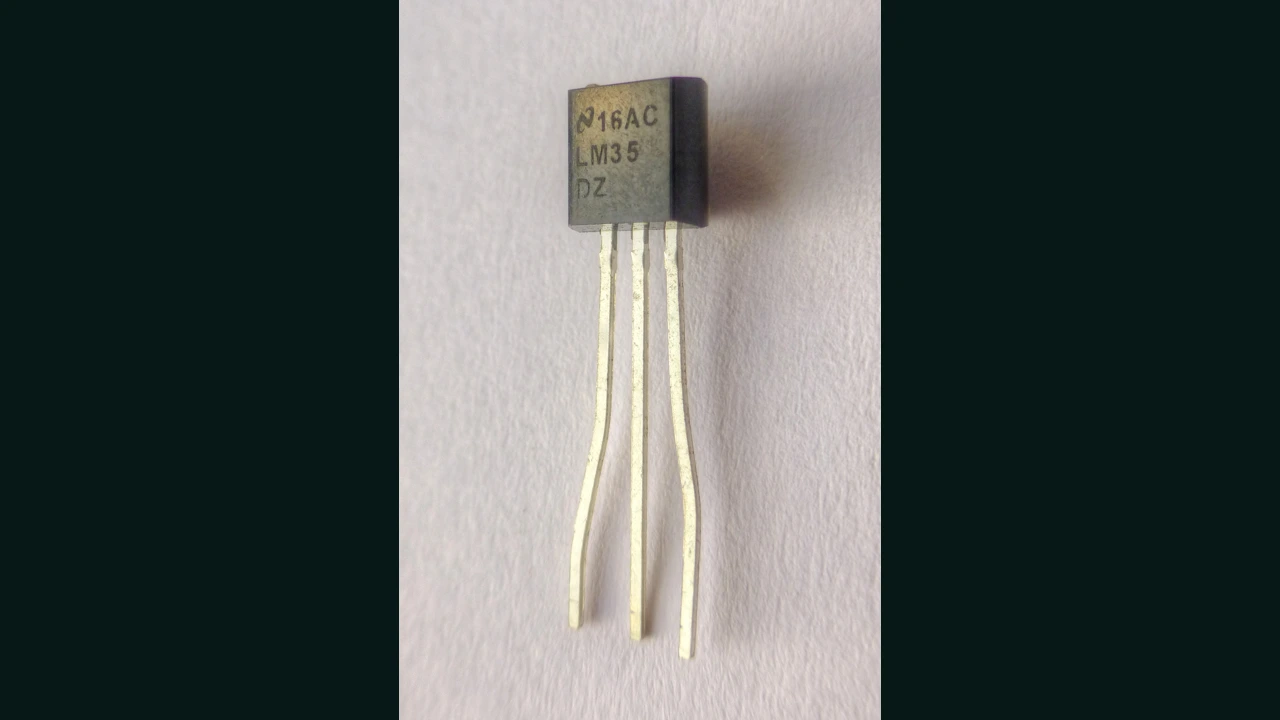

1. Project output and test scope
Our goal is to see the ambient temperature on the Serial Monitor and compare it with a multimeter and a reference thermometer. We have chosen the training window of the code from 15 to 90 degrees; This is a software choice, not a claim on the sensor's nominal accuracy or range. Only test at room temperature first; Do not use flame, uncontrolled heater or city electricity for heating.
If this is your first sensor project, from Course of sensors in 7 steps Start and then to Temperature and humidity hub come back
2. LM35DZ is not the same as all family members
Specification reference is TI datasheet: analog output with factor of 10 mV/deg, allowable supply 4 to 30 V, and nominal range of LM35D grade is 0 to 100 deg. A simple single-supply circuit is proposed for the positive region from about 2 degrees up; Subzero measurements cannot be generalized with this connection. Original part specifications cannot be guaranteed for unnamed or replica samples.
3. converting voltage to temperature; Keep the calculation auditable
After a valid voltage measurement, the conversion relationship is T = Vout_mV / 10. Calculation example: 250 mV becomes 25 degrees and 320 mV becomes 32 degrees. These are not our physical test data.
A small voltage error has a noticeable effect: a difference of 8 millivolts means a difference of 0.8 degrees in the calculation result. For this reason, only printing a few decimal places is not a sign of accuracy. Whenever the temperature number becomes unreasonable, check the voltage itself and the common ground before changing the conversion factor.
4. Necessary equipment
- Raw LM35DZ with specified manufacturer and grounding; Do not replace the finished module without checking the schematic.
- Classic ESP32 or Arduino Uno R3, safe USB cable and board.
- Regulated 5V power supply and 100 nanofarad capacitor for power bypass.
- Multimeter, short wire and reference thermometer with known accuracy.
The exact board number is important: ESP32-S3 and C3 have different ADC pins and behavior. The code intentionally gives a compile error for these models so unchecked wiring isn't accidentally used.
5. Secure connection to ESP32 and Arduino
For the LP/TO-92 package, match page 3 of the datasheet according to Bottom View: Pin 1 is supply, 2 is output, and 3 is ground. Do not confuse the view from below with the front view. Put the bypass capacitor near the power supply and ground of the sensor; This capacitor is not on the output.
| base / sector | Classic ESP32 | Uno R3 | before turning on |
|---|---|---|---|
| 1، +VS | 5 volts regulated | 5V base | Do not feed the sensor to the ADC input |
| 2، VOUT | GPIO34 | A0 | First, measure the output with a multimeter against GND |
| 3، GND | Common ground with Brad | GND | Re-adjust the poles and orientation of the package |
| 100 nF capacitor | Between +VS and GND near the sensor | Keep the output wire short | |
If you have a separate 5V supply, share the grounds; Do not connect the output of two 5V sources together. Disconnect the power before moving the wires. Do not proceed if the part becomes abnormally hot.
6. Why is raw × 3.3 ÷ 4095 not enough?
In the Espressif official API, analogRead gives the raw data and analogReadMilliVolts the calibrated conversion to millivolts. For classic ESP32, the documented range of setting ADC_2_5db is about 100 to 1250mV; The code uses the same setting and 12-bit resolution. Do not extend this model table to S3 or C3.
The 150-900 mV window for this example is our conservative choice for practice. Internal ADC calibration is not a substitute for comparing the entire system with a reference. On the Uno, the converter is 10-bit and the default reference is power-dependent; Measure the actual value of 5V with a multimeter relative to GND and under normal load. Do not connect any external source to AREF in this program.
7. Temperature display code with averaging
One sample is produced every 20 milliseconds and after 16 samples an output is produced. Reading outside the window clears the buffer; The previous number is not printed as a new measurement. Averaging is for smoothing the fluctuation and does not correct for static error.
On the Uno, first change UNO_VREF_MV from zero to the supply voltage measured in millivolts; Until then the message CONFIG_REQUIRED is normal. Download the original code, RAW code and connection guide. Serial rate: 115200.
#include <Arduino.h>

// Educational display only. No heater, relay, or safety control.
#if defined(ARDUINO_ARCH_ESP32) && defined(CONFIG_IDF_TARGET_ESP32)
constexpr uint8_t SENSOR_PIN = 34;
#elif defined(ARDUINO_AVR_UNO)
constexpr uint8_t SENSOR_PIN = A0;
// Set to measured board supply in millivolts; 0 deliberately disables temperature.
constexpr uint16_t UNO_VREF_MV = 0;
#else
#error "Select classic ESP32 or Arduino Uno R3; other boards need reviewed ADC settings."
#endif

constexpr uint8_t SAMPLE_COUNT = 16;
uint32_t lastSample = 0;
uint32_t sumMv = 0;
uint8_t count = 0;

void setup() {
  Serial.begin(115200);
#if defined(ARDUINO_ARCH_ESP32)
  analogReadResolution(12);
  analogSetPinAttenuation(SENSOR_PIN, ADC_2_5db);
#else
  analogReference(DEFAULT); // Do not connect an external voltage to AREF.
#endif
  Serial.println(F("LM35 display: application window 15..90 C; not a safety monitor."));
}

void loop() {
  const uint32_t now = millis();
  if (now - lastSample < 20) return;
  lastSample = now;
  uint32_t mv;
#if defined(ARDUINO_ARCH_ESP32)
  mv = analogReadMilliVolts(SENSOR_PIN);
#else
  if (UNO_VREF_MV < 4500 || UNO_VREF_MV > 5500) {
    if (now % 1000 < 20) Serial.println(F("CONFIG_REQUIRED: measure VCC and set UNO_VREF_MV."));
    return;
  }
  mv = (uint32_t(analogRead(SENSOR_PIN)) * UNO_VREF_MV + 512) / 1024;
#endif
  // Plausibility window, NOT reliable open-wire or short-circuit detection.
  if (mv < 150 || mv > 900) {
    count = 0; sumMv = 0;
    Serial.print(F("OUTSIDE_DEMO_WINDOW mV=")); Serial.println(mv);
    return;
  }
  sumMv += mv;
  if (++count < SAMPLE_COUNT) return;
  const float averageMv = float(sumMv) / SAMPLE_COUNT;
  Serial.print(F("mV=")); Serial.print(averageMv, 1);
  Serial.print(F(" C=")); Serial.println(averageMv / 10.0f, 1);
  count = 0; sumMv = 0;
}
The RAW sample is for separating the wiring problem from the temperature conversion. In ESP32, raw and printed mV are two separate conversions and should not be assumed to be exactly the same sample. These two programs are compiled on Uno and ESP32; Not tested on physical hardware.
8. Start the test with the multimeter
- Disconnect the power supply, match the package name and pins and check for unwanted short circuit.
- turn on the sensor; First measure VOUT without connecting to GPIO. If it is near the power rail, do not continue to connect to the ESP32.
- After power off, connect the output to ADC. Power on again, run the RAW code and compare the board voltage with a multimeter.
- Run the main code; Place the reference thermometer and the LM35 side by side away from the board regulator and wait for stabilization.
- Record multimeter voltage, program millivolts and reference temperature in several stable conditions; Do not generalize the result of one point to all temperatures.
The raw body is not waterproof; Do not submerge it in water. Touching the sensor also changes the test conditions; Do not report the touch reading as "room temperature".
9. Troubleshooting table before replacing the sensor
| sign | Next review | Correct perception |
|---|---|---|
| Correct multimeter voltage, different software number | Board model, pin, attenuation and Uno reference | First, check the ADC path |
| Oscillation with load change | Ground, bypass and wire routing | Software filter is not the only solution |
| Almost constant difference with the reference | Several stable points and installation locations | An accelerated offset hides the cause |
| OUTSIDE_DEMO_WINDOW | The real voltage and the range of 15 to 90 degrees of the sample | It is not necessarily a sensor failure |
| The output wire is separate, but the number is apparently normal | Disconnect the power and check the physical connection | A float input may return a valid number |
The filter in this example is not a definitive detection of sensor disconnection. For real control, fault detection, fault output behavior and independent protection must be designed and tested separately; This article covers measurement display only.
10. When should we go for another option?
For ADC learning and bench testing with short wires, the LM35 is a reasonable training option. If you don't want to handle the analog conversion in software, check out the DS18B20 tutorial. If you also need humidity, the SHT31 guide is a related topic. For another analog input exercise, see Light and Color Hub. The final choice must match the installation environment and the exact specifications of the sensor model.
11. shopping in Iran; Raw piece, inventory and originality
Review of links: 24 Shahrivar 1405, equal to 09/15/2026. The existence of a sales list in two stores and practical questions from buyers about temperature measurement and control is a sign of practical application in the Iranian market; Sales statistics or customer guarantee for every project. Get the specs from the datasheet, not the title or shop description.
| Store and product details | Type / ID | Status when checking |
|---|---|---|
| Buy LM35DZ from ECA | raw piece; 3051001001 | available; TI authenticity not verified |
| LM35DZ dual pack in Aftabrayaneh | raw piece; 6006-78-9704 | non-existent; Link to check the next supply |
In the ECA FAQ, an old seller's answer described the product as a "high copy". This answer does not prove the status of the current shipment, but it is reason enough not to assume authenticity. Before buying, ask the manufacturer and authenticity of the available series from the store; A traceable and documented part is required for guaranteed accuracy.
Inventory changes and we have not included a fixed price. LM35 is an analog sensor; The store title "digital" does not make it a digital sensor. The ready-made module or wired probe is not equivalent to the same raw piece without checking the circuit and insulation.
12. Common questions
Should we feed the LM35DZ with 3.3V?
In this tutorial, no; A regulated 5V supply is assumed and the output should be checked with a multimeter before connecting to the ESP32.
Why does Uno show CONFIG_REQUIRED message?
The reference value is initially zero. Measure the board supply and enter the actual millivolt value in UNO_VREF_MV; Until then, temperature conversion is intentionally disabled.
Does averaging increase the actual accuracy?
It can reduce the oscillation, but it does not eliminate the static error of the sensor, reference or mounting location. Final accuracy should be checked with reference.
Does OUTSIDE_DEMO_WINDOW mean the sensor is broken?
No; It is only reading outside the selection window of this example. First, check the voltage and connection and do not use this message to definitively diagnose the failure.
Is the code ready to turn on the heater?
No; This code is for educational purposes only and does not have adequate fault detection, power control or independent protection. Physical test has not been done either.
13. Sources and continuation path
- Texas Instruments — LM35, Datasheet Rev. H: grid reference, bases, power supply and application circuit.
- Espressif — Arduino ESP32 ADC API: raw data, millivolts and attenuation.
- Arduino — analogRead: analog converter.
- Arduino — analogReference: reference selection and AREF considerations.
Next step: make a table of your actual measurements; Do not finalize the correction factor until the ADC difference, sensor error, and mounting effect have been separated. Other tutorials are available at Sensors Lab.
Question and answer article
Ask your technical question
Questions and answers are published after moderation. Authors can see their own pending drafts.
No confirmed questions have been registered for this article yet.