SHT31 with ESP32 and Arduino: Wiring, Code and I2C Errors
Connect an SHT31 to ESP32 or Arduino, check I2C addresses and CRC, and diagnose temperature or humidity errors using the official datasheet.
Contents
The SHT31-DIS measures temperature and relative humidity over I2C. For an ESP32 starting circuit, use a compatible module at 3.3 V, common ground, SDA/SCL with pull-ups to 3.3 V, and address 0x44 or 0x45. Check the actual module schematic: a regulator does not automatically make its I2C pins safe at every voltage.
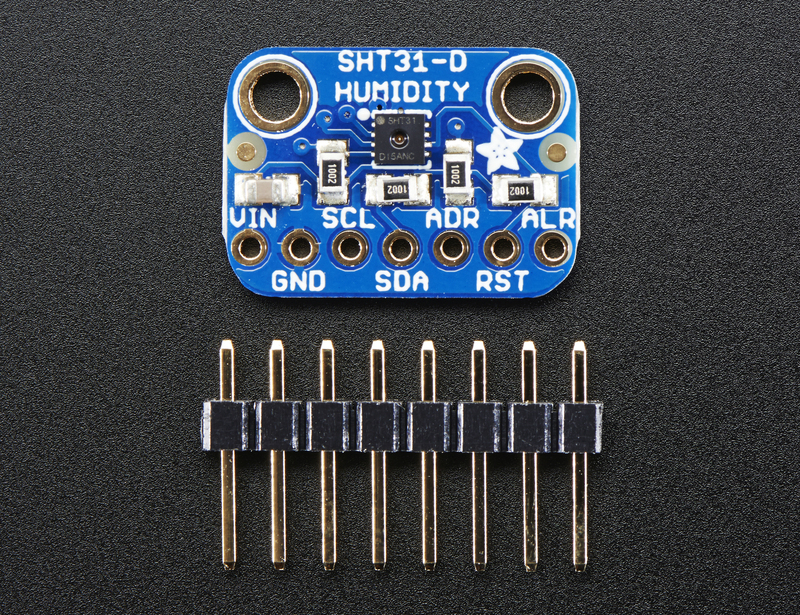
Choose the sensor and module separately
The SHT30, SHT31 and SHT35 share much of their interface but have different accuracy specifications. Check the exact order code rather than treating every board marked “SHT3x” as the same product. The bare chip's supply specification is not a guarantee for an assembled breakout board.
SHT31-DIS is useful for indoor monitoring, data logging and environmental control. It does not measure air pressure or gas concentration. For temperature only, compare the DS18B20 and its 1-Wire interface. Follow the temperature and humidity learning path for selection and installation guidance.
Accuracy is different from resolution
The familiar typical figures are ±2%RH and ±0.2°C within the relevant datasheet conditions, not guaranteed limits across the entire operating range. Read the accuracy curves for your application. Repeatability describes variation between repeated readings; extra decimal places do not establish better absolute accuracy. See accuracy, resolution and calibration.
The specified temperature range is −40 to +125°C and humidity range is 0–100%RH. For long-term stability, Sensirion identifies a normal operating region of 5–60°C and 20–80%RH. Extended exposure outside it, particularly at high humidity, can cause a temporary offset. Range and accuracy are separate questions.
Wiring and the I2C address
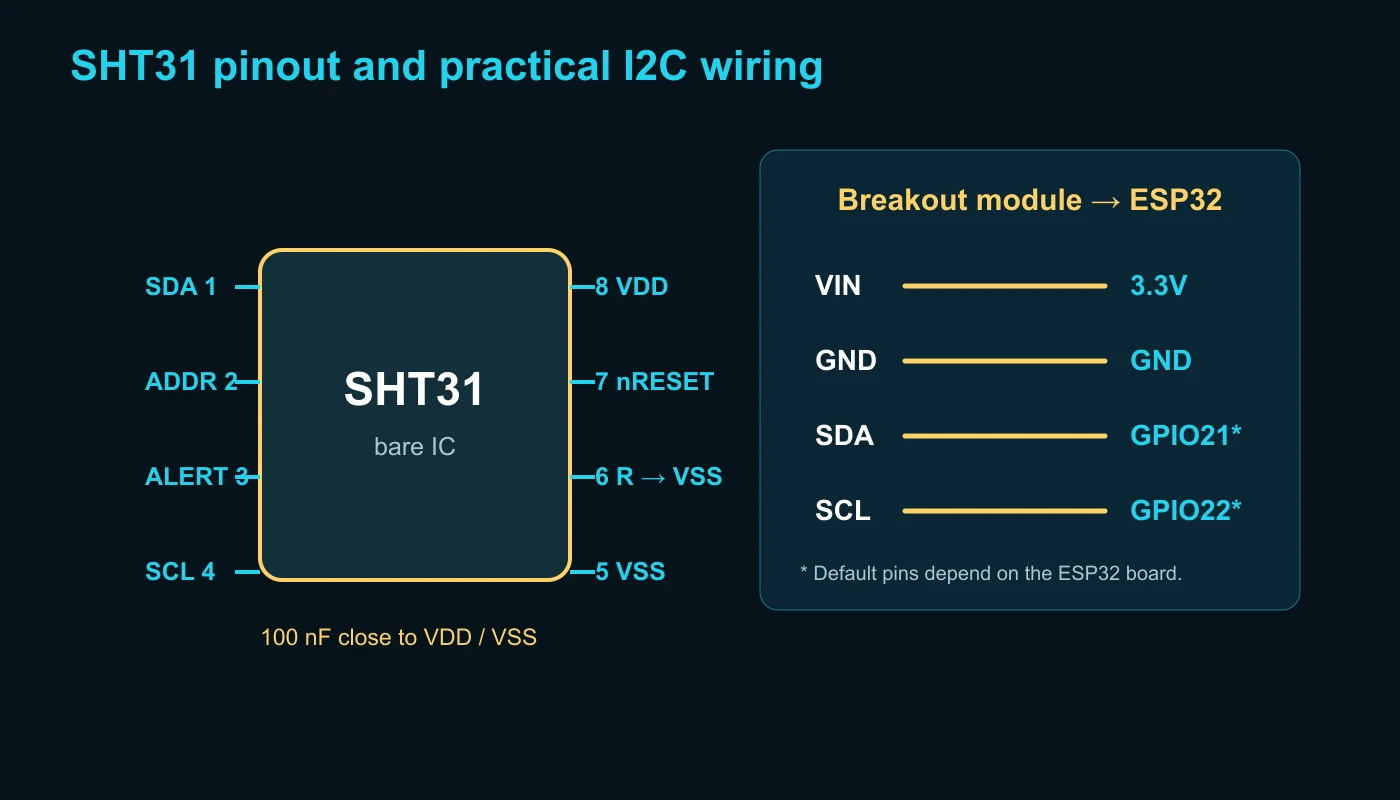
| Signal | Arduino Uno example | ESP32 example |
|---|---|---|
| Supply | According to the breakout board specification | 3.3 V on a compatible board |
| Ground | GND | GND |
| SDA | A4 | Board-selected SDA; GPIO21 is common on classic ESP32 boards |
| SCL | A5 | Board-selected SCL; GPIO22 is common on classic ESP32 boards |
These ESP32 pins are examples, not a universal mapping for ESP32-S3, C3 or every development board. Use Wire.begin(SDA_PIN, SCL_PIN) when appropriate. For the bare chip, ADDR low selects 0x44 and ADDR high selects 0x45. Follow the pin drawing for the exact package.
I2C needs pull-up resistors. Check whether the module already includes them before adding more. Parallel pull-ups lower the total resistance; their voltage, total bus capacitance and clock speed all matter. Keep a 100 nF bypass capacitor close to the chip supply pins in a custom design. An address scan confirms a response, not a valid temperature measurement. Use the ESP32 I2C troubleshooting guide if the device is missing or communication is intermittent.
Measurement commands, conversion and CRC
Single-shot mode takes one measurement on request. Periodic mode measures repeatedly and is read with a fetch command. Choose a rate that meets the application need; unnecessary repeated measurements can increase self-heating.
| Single-shot mode | High repeatability | Medium | Low |
|---|---|---|---|
| No clock stretching | 0x2400 | 0x240B | 0x2416 |
| Clock stretching | 0x2C06 | 0x2C0D | 0x2C10 |
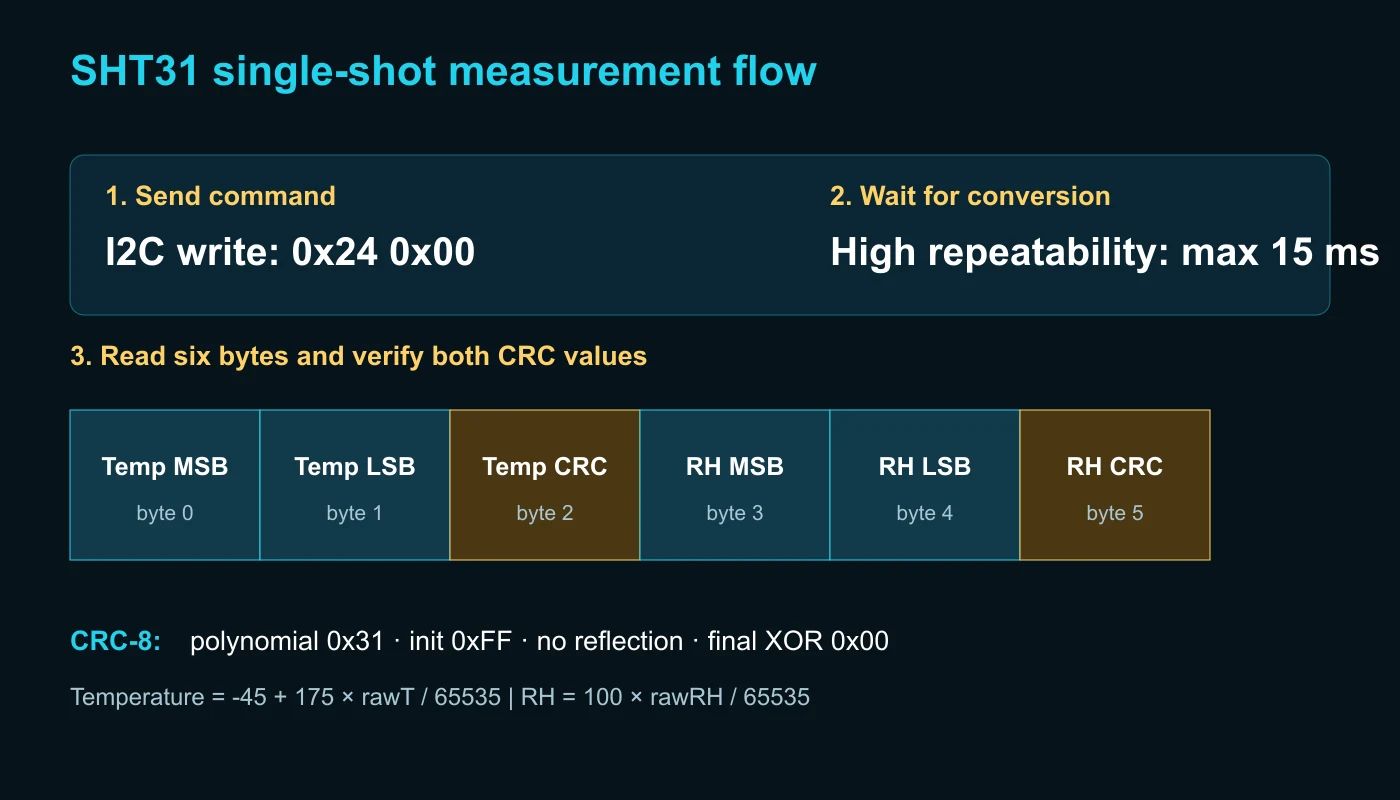
A complete read contains two temperature bytes, their CRC, two humidity bytes and their CRC. For unsigned 16-bit raw values: T = −45 + 175 × rawT / 65535 in °C and RH = 100 × rawRH / 65535 in %RH. Validate each pair with CRC-8 polynomial 0x31, initialization 0xFF. A successful I2C transfer alone does not validate the contents.
Arduino example using Adafruit SHT31
Install the Adafruit SHT31 library and its dependencies using Library Manager. Wire the board, confirm its address, and set the serial monitor to 115200 baud. The example reports a failed reading instead of printing it as new data.
#include <Wire.h>
#include <Adafruit_SHT31.h>

Adafruit_SHT31 sht31 = Adafruit_SHT31();

void setup() {
  Serial.begin(115200);
  Wire.begin();
  if (!sht31.begin(0x44)) {
    Serial.println("SHT31 not found");
    while (true) delay(10);
  }
}

void loop() {
  const float temperature = sht31.readTemperature();
  const float humidity = sht31.readHumidity();

  if (!isnan(temperature) && !isnan(humidity)) {
    Serial.print("T: "); Serial.print(temperature, 2); Serial.print(" C | RH: "); Serial.print(humidity, 2); Serial.println(" %");
  } else {
    Serial.println("Read error");
  }
  delay(2000);
}
Direct ESP32 reading with Wire
This example sends 0x2400, waits 15 ms for high-repeatability conversion, reads six bytes and checks both CRC values. The output statements belong inside the success branch. Adapt the board's I2C pins before use. The snippet has been reviewed; no physical measurement is claimed here.
#include <Wire.h>

constexpr uint8_t SHT31_ADDRESS = 0x44;

uint8_t crc8(const uint8_t *data, size_t len) {
  uint8_t crc = 0xFF;
  for (size_t i = 0; i < len; ++i) {
    crc ^= data[i];
    for (uint8_t bit = 0; bit < 8; ++bit)
      crc = (crc & 0x80) ? (crc << 1) ^ 0x31 : (crc << 1);
  }
  return crc;
}

bool readSHT31(float &t, float &rh) {
  Wire.beginTransmission(SHT31_ADDRESS);
  Wire.write(0x24);
  Wire.write(0x00);
  if (Wire.endTransmission() != 0) return false;

  delay(15);
  if (Wire.requestFrom(SHT31_ADDRESS, (uint8_t)6) != 6) return false;
  uint8_t data[6];
  for (uint8_t &byte : data) byte = Wire.read();
  if (crc8(data, 2) != data[2] || crc8(data + 3, 2) != data[5]) return false;

  const uint16_t rawT = (uint16_t(data[0]) << 8) | data[1];
  const uint16_t rawRH = (uint16_t(data[3]) << 8) | data[4];
  t = -45.0f + 175.0f * rawT / 65535.0f;
  rh = 100.0f * rawRH / 65535.0f;
  return true;
}

void setup() {
  Serial.begin(115200);
  Wire.begin();
}

void loop() {
  float temperature, humidity;
  if (readSHT31(temperature, humidity)) {
    Serial.print("T: "); Serial.print(temperature, 2); Serial.print(" C | RH: "); Serial.print(humidity, 2); Serial.println(" %");
  } else {
    Serial.println("I2C or CRC error");
  }
  delay(2000);
}
Download the reviewed Arduino and ESP32 examples (2026-10-17). Older full-article ZIP downloads below retain their original Persian content.
Why readings differ from the room
Keep the sensing opening away from the processor, regulator, display and other heat sources. Allow ambient air to reach it; a closed box changes response time. Solvents, adhesives and contamination can affect the humidity element. The internal heater warms the sensor: readings taken while it is active should not be treated as undisturbed ambient conditions. It does not replace a sound enclosure design.
| Symptom | Check first |
|---|---|
| No sensor found | Supply, common ground, swapped SDA/SCL, pull-ups and address. |
| Temperature consistently high | Board heat, heater state, mounting location and sample rate. |
| Humidity changes slowly or appears biased | Air exchange, condensation, contamination and reference conditions. |
| Random read failures | CRC, cable length, supply decoupling, bus waveform and pull-up loading. |
For a comparison, place a suitable reference nearby, allow both to stabilize, and record their location and conditions. This is a proposed procedure, not a reported test. Follow troubleshooting temperature and humidity errors before applying a software offset.
Sources and further reading
- Sensirion SHT3x-DIS datasheet, version 7 — specifications, commands, timing, data format and installation limits.
- Sensirion SHT31-DIS-B product page — exact product information and handling documents.
- Adafruit SHT31 library — API and implementation used by the library example.
- Sensor learning center.
These instructions do not certify the authenticity, waterproofing or performance of a third-party module.
Question and answer article
Ask your technical question
Questions and answers are published after moderation. Authors can see their own pending drafts.
No confirmed questions have been registered for this article yet.