ESP32 I2C Sensor Not Found? Step-by-Step Troubleshooting
When SHT31, BMP280 or BH1750 doesn't respond, start with power and bass level; Compilable limited scanner companion for classic ESP32.
Contents
Sensors Laboratory • 18 Mehr 1405
When SHT31, BMP280 or BH1750 doesn't respond, start with power and bass level; Compilable limited scanner companion for classic ESP32.
1. The scanner is not the end of the road
Address not found can be from power supply, pin selection, voltage level, address or bus status. Before replacing the library, connect a sensor with a short wire and match the actual pin picture with the documentation. The writing on two boards of the same shape may not be the same.
The scanner in this article is simple for a lab bass and runs once. Do not run it on an active device bus or a component that is sensitive to general commands without checking the documentation. The ACK response indicates the presence of a responder; The sensor model and data integrity still need to be investigated separately.
2. See power and wire routing before software
- Check the common ground and measure the supply at the actual base of the module.
- Trace SDA and SCL from the microcontroller pin to the sensor pin.
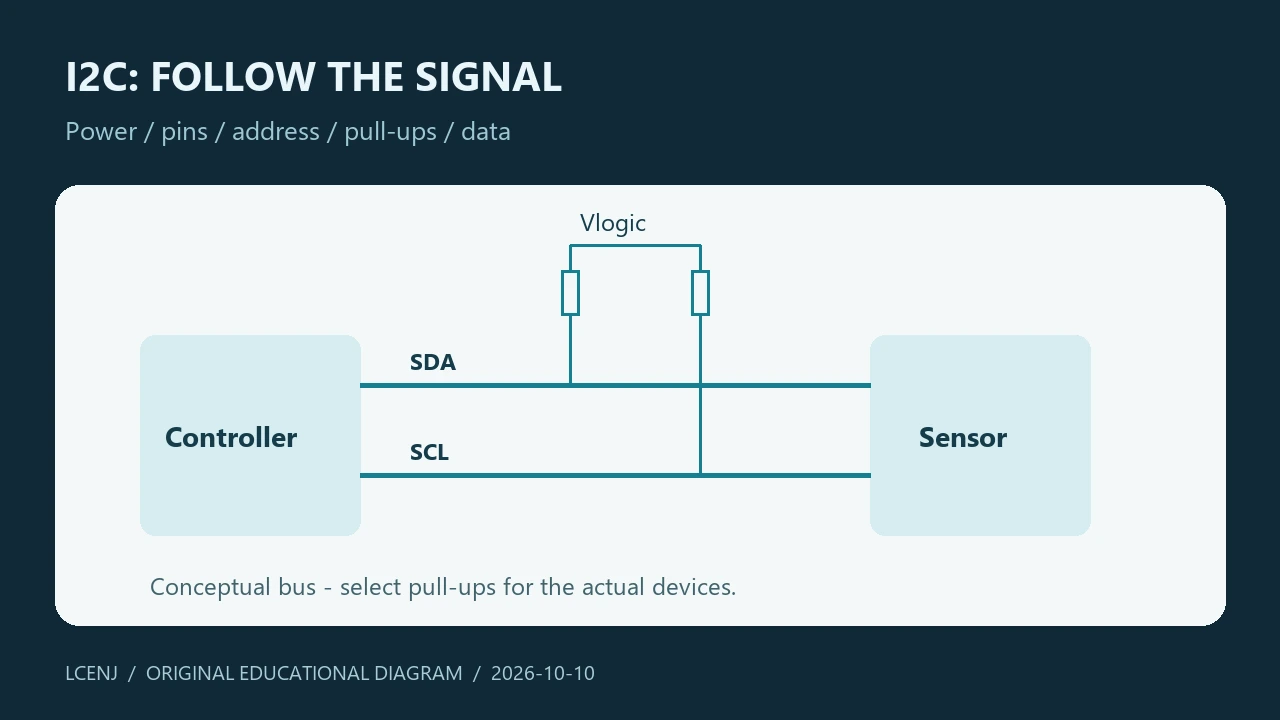
- Check the bus open-state voltage and the connection of the pull-up resistors.
- To begin, disconnect the other sensors from the test bus and keep the wire short.
In conventional I²C, the bus lines are pulled up. The pull-up voltage must be allowed for all components on the bus. The presence of a power supply regulator on the module does not mean the presence of level conversion on SDA and SCL. If the voltage is incorrect, correct the connection before continuing the test.
3. Choose the correct PIN and address
The accompanying example for the classic ESP32 DevKit selects pin 21 as SDA and pin 22 as SCL. Do not extend this choice to ESP32-C3, S3 or any other board. In those boards, select the authorized and available pin from the map of the same board and change the code.
Some datasheets show the address value in read/write bits. The standard Wire API uses a 7-bit address. If the document has two read and write values, check the address format and do not enter the 8-bit number directly. Also, the address selection base must have a specific status.
4. Limited scan code
After confirming the power supply and bass level, run the following code for the mentioned board. A start rate of 100 kHz and a timeout of 50 ms are the test choices for this example; Compatibility with all devices is not guaranteed. Do not confuse the bus error display with "address not found".
#include <Arduino.h>
#include <Wire.h>

// Classic ESP32 DevKit only. Verify your board pinout and logic voltage.
constexpr int SDA_PIN = 21;
constexpr int SCL_PIN = 22;

void setup() {
  Serial.begin(115200);
  if (!Wire.begin(SDA_PIN, SCL_PIN, 100000)) {
    Serial.println("I2C init failed");
    return;
  }
  Wire.setTimeOut(50);
  unsigned found = 0;
  for (uint8_t address = 0x08; address <= 0x77; ++address) {
    Wire.beginTransmission(address);
    uint8_t result = Wire.endTransmission();
    if (result == 0) {
      Serial.printf("ACK at 0x%02X\n", address);
      ++found;
    } else if (result != 2) {
      Serial.printf("Bus error %u at 0x%02X\n", result, address);
    }
  }
  Serial.printf("Responding addresses: %u\n", found);
}
void loop() { delay(1000); }
If the address is found, skip the scan and run the official library example or one compatible with the actual sensor model. If you see a few unexpected addresses or too many responses, first check the status of the lines and connections; Don't jump to conclusions that there are too many sensors on the bus.
5. Do not guess the top
The pull-up resistance is related to the bass capacity and the power to pull the line to the low level. The TI Calculation Guide explains how to determine the appropriate range. A fixed value is not valid for every cable length, every speed and every module set.
Multiple pull-up boards may parallel the resistors. Calculate the equivalent resistance from the actual circuit and see the waveform, if you have the tools. Slowing down can be helpful in diagnosing a timing problem, but does not replace correcting the voltage level or faulty connection.
6. Bass stuck and recovery
When a line goes down, first check for a short circuit, faulty power, and the line holding device. Do not perform a software recovery without knowing the electrical status. The NXP manual explains the Bus clear methods; The choice of method should be compatible with the part and system design.
For the product, limit the number of retries and log the error status. An endless loop of scans or resets hides the root cause and may stop the rest of the system from functioning. If the data is not received, do not make it a valid null.
7. Test result table
| the result | The next step |
|---|---|
| No ACK and healthy free lines | Pin, address and activation mode of the part |
| There is ACK, not data | Command, response length and measurement time |
| Error adding the second module | Address interference, overhead and bus capacity |
| The bass stays down after the error | Checking the line holding device and recovery method |
After each correction, just repeat the same short test and record the result in the accompanying sheet. The code of this article is checked for compilation; Performance on your wiring needs real testing.
Exercise files and the next step
Get the practice sheet and accompanying files (ZIP)
The files are prepared for the training exercise. Software testing does not take the place of testing your actual parts and wiring.
Frequently asked questions
Are pins 21 and 22 for all ESP32s?
no This example is for ESP32 Classic DevKit; Check the map of other boards.
Is the same amount of pull-up suitable for all basses?
no Bass capacity, speed and output power of parts have an effect in the selection.
What does ACK prove?
existence of a respondent at that address; It does not prove the identity and accuracy of the measurement.
Official sources
Technical resources reviewed on 10/10/2026. For hardware implementation, match the model and version of your part's documentation.
Question and answer article
Ask your technical question
Questions and answers are published after moderation. Authors can see their own pending drafts.
No confirmed questions have been registered for this article yet.