BH1750 with ESP32: Measuring Light in Lux
BH1750 Project Guide with ESP32 and Arduino; Datasheet, I2C Address, Wiring, Measurement Modes, Lux Code, Calibration and Troubleshooting.
Contents
Project-oriented training of measuring the intensity of illumination
Setting up BH1750 with ESP32 and Arduino; Light measurement in lux
BH1750 is a digital ambient light sensor with deluxe direct output and I2C interface. In this guide we will review the raw chip and ready board specifications, addresses, measurement modes, wiring, practical code, and how to build a reliable lighting controller.
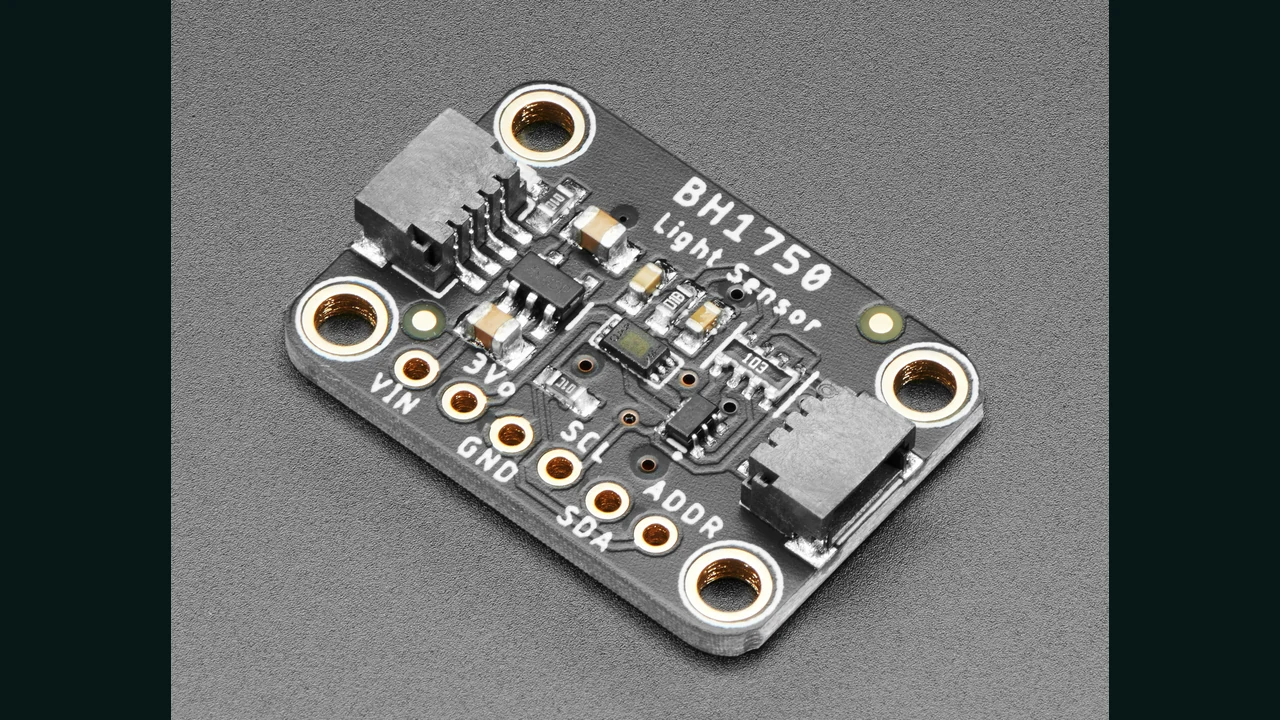
0x23 or 0x5CWhat is BH1750 and what does luxury mean?
ROHM's BH1750FVI is a 16-bit light-to-digital data converter. Its spectral response is almost close to the human eye and the infrared effect is low. Because of this, instead of a raw ADC number, it reports brightness in lux.
Lux is the received luminous flux per square meter. This number is suitable for room light control, automatic display adjustment, greenhouse lighting recording and day and night detection; But it doesn't measure light color, UV or spectrum quality.
Important numbers of BH1750FVI datasheet
| parameter | Official amount | Practical result |
|---|---|---|
| VCC raw chip | 2.4 to 3.6V | The absolute limit of 4.5V is not allowed to work normally with 5V. |
| I2C reference voltage | 1.65V to VCC | The logic level must match the actual board design. |
| Flow in measurement | typical 120µA, the maximum 190µA | Power Down mode is useful for battery draining project. |
| High Resolution | 1lx, typical 120ms, the maximum 180ms | For starters and low light, the recommended choice is the datasheet. |
| High Resolution Mode 2 | 0.5lx, typical 120ms | More resolution with the same typical time. |
| Low Resolution | 4lx, typical 16ms, the maximum 24ms | It is faster but shows small changes less. |
| raw data | 16 bits; 0 to 65535 counting | Raw number is not the same as luxury; The conversion factor and measurement mode are important. |
I2C address and measurement modes
When ADDR is low, the seven-bit address is 0x23, and when it is raised to VCC, the address becomes 0x5C. These two addresses allow to place two sensors on one bus. The Adafruit board has a pull-down resistance of ten kilo-ohms for the default pull-down mode and for SCL and SDA.
In Continuous mode, the result is updated with the interval of the selected mode. In One Time, the sensor will go to Power Down after completing the automatic measurement. The datasheet for High Resolution considers it necessary to wait up to 180ms; An immediate read may return the previous value. The hp_BH1750 library handles this scheduling with a non-blocking API.
Wiring BH1750 with ESP32 and Arduino Uno
| Adafruit BH1750 board | Generic ESP32 | Arduino Uno |
|---|---|---|
| VIN | 3V3 | 5V for documented Adafruit board only |
| GND | GND | GND |
| SDA | GPIO21 | A4 / SDA |
| SCL | GPIO22 | A5 / SCL |
| ADDR | Down for 0x23 | Down for 0x23 |
GPIO21 and GPIO22 are the common default of Generic ESP32, not the rule of all boards. In ESP32-S3, ESP32-C3 and custom design replace the actual board pins. Keep strings short and avoid repetitive pull-ups on sensitive bass.
Step-by-step setup in Arduino IDE
- Search for hp BH1750 in Library Manager and install the Stefan Armborst library.
- Wire the board without power and check the voltage level of the module.
- Run the
i2c-scanner.inocode; 0x23 or 0x5C should be seen. - Upload the original code and open Serial Monitor to 115200 baud.
- Take multiple samples and use separate round trip thresholds for control decision.
BH1750 code for ESP32 and Arduino
#include <Wire.h>
#include <hp_BH1750.h>

#if defined(ESP32)
constexpr int SDA_PIN = 21;
constexpr int SCL_PIN = 22;
#endif

hp_BH1750 lightSensor;
unsigned long measurementStarted = 0;

void startMeasurement() {
  if (!lightSensor.start(BH1750_QUALITY_HIGH, BH1750_MTREG_DEFAULT)) {
    Serial.println(F("I2C start failed; check wiring and reset."));
    while (true) delay(10);
  }
  measurementStarted = millis();
}

void setup() {
  Serial.begin(115200);
#if defined(ESP32)
  if (!Wire.setPins(SDA_PIN, SCL_PIN)) {
    Serial.println(F("Invalid I2C pins."));
    while (true) delay(10);
  }
#endif

  if (!lightSensor.begin(BH1750_TO_GROUND)) {
    Serial.println(F("BH1750 not found; check wiring and address."));
    while (true) delay(10);
  }

  Wire.setClock(100000);
  startMeasurement();
}

void loop() {
  if (lightSensor.hasValue()) {
    const float lux = lightSensor.getLux();
    // hp_BH1750 1.0.2 sets getTime() to 999 on an I2C read error.
    if (lightSensor.getTime() == 999) {
      Serial.println(F("I2C read failed; check wiring and reset."));
      while (true) delay(10);
    } else if (lightSensor.saturated()) {
      Serial.println(F("Full-scale reading: check bright light and I2C."));
    } else {
      Serial.print(F("Illuminance: "));
      Serial.print(lux, 1);
      Serial.println(F(" lx"));
    }
    startMeasurement();
  } else if (millis() - measurementStarted > 2000UL) {
    Serial.println(F("Measurement timeout; check wiring and reset."));
    while (true) delay(10);
  }
  delay(1);
}
Code analysis and address selection
BH1750_TO_GROUNDselects address 0x23; UseBH1750_TO_VCCfor ADDR connected to VCC.hasValue()checks that the conversion has timed out without suspending the loop.getLux()reads the value converted to lux andstart()starts the next instance.Wire.setPins()sets the ESP32 pins before starting the library;begin()itself initializes the Wire library and then the bus speed is set.start(BH1750_QUALITY_HIGH, BH1750_MTREG_DEFAULT)explicitly selects High mode with MTreg=69; The library's built-in default value is High2.- Measurement start error, full scale data and waiting more than two seconds have diagnostic messages. Two seconds is the software guard limit for this example, not the datasheet conversion time.
- In the version 1.0.2 implementation, the I2C receive error returns the value of
getTime()to 999. The code checks this symbol before printing the lux so that the cable break is not mistakenly displayed as "dark"; Recheck this internal behavior after changing the library version. - 100kHz is conservative for the board, although the chip supports up to 400kHz according to the datasheet.
Project: Light control with hysteresis
Connect a suitable relay or MOSFET to the output with necessary isolation and protection. Turn the light on only when several consecutive samples are below the lower threshold and turn off only after several samples pass the higher threshold. The distance between two thresholds is the same as hysteresis and prevents rapid disconnection near the border.
Optical window and calibration
If the sensor is placed behind the glass, matte frame or product cover, part of the light will be reduced. The datasheet allows to compensate for the window effect by changing the Measurement Time Register, but the coefficient cannot be guessed. A reference lux meter, fixed geometry, stable source and multiple illumination levels are required.
The datasheet accuracy table gives a "raw output to true lux" ratio of 0.96 to 1.44 with a typical value of 1.2 at 1000lx white LED light and reference conditions of VCC=DVI=3V and 25°C. So dividing by 1.2 in High mode and MTreg=69 shows the nominal deviation of about ±20%; This number does not guarantee the same accuracy in every light and environment. At the same setting, the calculated ceiling of 65535/1.2 is about 54613lx and is halved at High2. The code will warn of the full-scale value and not print as a valid measurement.
Common errors and troubleshooting
| sign | probable cause | Suggested review |
|---|---|---|
| Sensor not found | Wrong address or base, no shared land | Run the scanner and check for 0x23/0x5C. |
| Fixed or old value | Read before the end of the conversion | Use hasValue() and start the next instance. |
| Jump near the threshold | Shadow, direct light or single-threshold logic | Add multi-sample median and hysteresis. |
| The difference with the lux meter | Sensor tolerance, angle or optical coverage | Calibrate in fixed geometry with a valid reference. |
| The module on the Uno gets hot or damaged | The board does not have a regulator/level shifter | Check the module schematic and work with 3.3V and compatible logic. |
BH1750 FAQ
What is the default address of the BH1750?
With ADDR low, the seven-bit address is 0x23; Connecting ADDR to VCC changes it to 0x5C.
Can raw BH1750 be connected to 5V?
no The working VCC of the raw chip is 2.4 to 3.6V. Only a ready board that explicitly has a regulator and level shifter may accept 5V.
Does the BH1750 measure light or UV color?
no Its output is illuminance in lux, and color or UV measurement requires another sensor.
Why doesn't the value change immediately after initialization?
High Resolution conversion can take up to 180ms. A non-blocking read prevents the previous value after the data is ready.
Is GPIO21 and GPIO22 correct for all ESP32s?
no These are the common Generic ESP32 defaults; Check your actual board pins, especially S3 and C3.
Resources and the way to continue learning
- LDR light sensor tutorial
- VL53L0X training with ESP32 and Arduino
- Learning BMP280 with ESP32 and Arduino
- Free course of sensors in 7 steps
- Light Sensors Tutorial
- Sensors Learning Center at LCENJ
- ROHM BH1750FVI Datasheet, Rev.D, November 2011, pages 1 and 2 for power and specifications, pages 5 and 7 for modes and data conversion; Developer version hosted on Mouser.
- Adafruit BH1750 Board Pinouts Official Guide for VIN, Level Shifter and Address.
- Official Arduino Guide for BH1750 and library installation.
- hp_BH1750 library code and examples version 1.0.2, written by Stefan Armborst with MIT license.
- Official I2C on Arduino-ESP32 documentation for basics and API.
Summarizing and testing on the desktop
To start, connect the document board with compatible voltage, find the address with the scanner and run the High measurement with MTreg=69. Then experiment with light and shade changes, sensor front cover, high light, and disconnection on your hardware. These examples are compiled for Uno and Generic ESP32; Compilation does not take the place of actual sensor testing and product calibration.
Question and answer article
Ask your technical question
Questions and answers are published after moderation. Authors can see their own pending drafts.
No confirmed questions have been registered for this article yet.