HC-SR04 with ESP32 and Arduino: Comparison with VL53L0X
Distance meter HC-SR04 with ESP32 and Arduino: Echo secure connection, timeout code and filter, fix zero reading, compare with VL53L0X and buy in Iran.
Contents
Distance measurement • HC-SR04 • ESP32 / Arduino
read the distance; Do not confuse error with zero
In this project, we make a desktop distance meter that reports the validity of the measurement in addition to the number. HC-SR04 is suitable for learning timing and testing the distance to a target; But having a number in the series does not prove the accuracy of the measurement or the safety of the system. We'll start with a secure Echo connection, read the pulse time, and then look at a simple filter and a comparison with the VL53L0X.
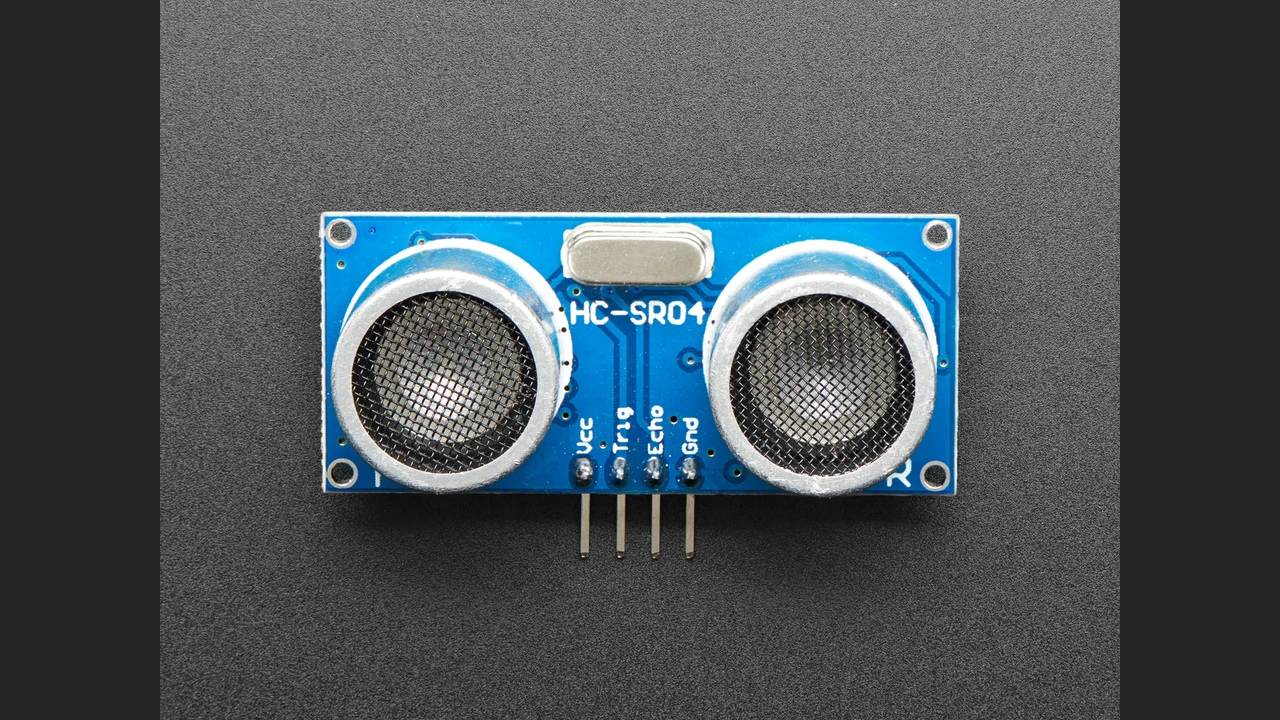
1. Application and reason for selection for the Iranian market
Measuring on a table, recording the change in distance of a screen, and practicing obstacle detection are good starting points. In the review on the date of registration of the article, ECA found this model available; The experience with the buyer's badge about working with the module and the problem of reading zero in the absence of reflections were also seen. This evidence speaks of practical use, not sales statistics or customer guarantees. The page of the same model was also checked in Aftab computer, but it was not available.
This vehicle safety circuit training does not guarantee collision prevention or automatic pump control. First just test the serial report; An invalid reading should not cause the load to move or turn on.
2. How is distance obtained from time?
In a typical Trig/Echo interface, the microcontroller sends a trigger pulse. The module transmits the sound wave and the duration of the Echo pulse represents the round trip time. Our educational affiliation is d = t × c / 2; Dividing by two removes the return path.
Assuming a speed of 340 meters per second, the conversion factor is equal 0.034 cm/µs will be For example, the hypothetical pulse of 1000 microseconds gives 17 cm in this calculation model. This is a computational example, not a hardware test result. The constant coefficient does not compensate for the change in weather conditions.
3. Specifications and datasheet reading method
| item | Reference HC-SR04 normal | Practical perception |
|---|---|---|
| feeding | 5 volts DC | Check Echo's power supply and logic level separately. |
| Pulse Trig | At least 10 microseconds HIGH | The code requests a 10 microsecond pulse. |
| send audio | Eight cycles with a frequency of 40 kHz | This number is not the same as the time interval of two measurements. |
| Introduced range | 2 to 400 cm | Outside this range is not counted in the valid example; The accuracy is not guaranteed within the range. |
| The distance between two stimulations | More than 60 milliseconds is recommended | We have chosen 100 milliseconds in the program. |
Source: HC-SR04 datasheet by ELECFREAKS, hosted on SparkFun; The same file is introduced in the download section of the official Adafruit guide. The limits contained in the file depend on the conditions and the appropriate purpose; Don't consider the advertised accuracy number as a guarantee of all anonymous market wins.
First read the board name and version, then power supply, I/O logic and timing diagram. Some new boards with similar appearance have additional interfaces; This article only teaches the standard HC-SR04 compatible Trig/Echo interface. Don't assume I2C, UART, or direct 3.3V compatibility from looks.
4. Required parts
- HC-SR04 module with version and label specific pins, classic ESP32 board or Arduino Uno.
- 5V regulated supply compatible with module, board and short wire.
- For ESP32: 10 kOhm and 15 kOhm resistors, preferably 1%, to divide the Echo voltage.
- ruler and a relatively large flat surface for repeatable testing; Multimeter for power and preferably oscilloscope for pulse level.
Disconnect the power before moving the wires. If the USB and external power supply are connected at the same time, check the power supply path of the expansion board so that the two sources are not connected to each other.
5. Safe wiring to ESP32 and Uno
| module base | Classic ESP32 in the example | Arduino Uno in the example |
|---|---|---|
| VCC | 5 V regulated, according to the module version | |
| GND | The common ground of source, sensor and microcontroller | |
| Trig | GPIO26 | D9 |
| Echo | from resistive division to GPIO27; Direct connection is prohibited | D10 for Uno with 5V logic |
Echo is the normal version, output with 5V logic. Do not connect it directly to ESP32. The Adafruit Pinouts guide explains lowering the Echo level and accepting a Trig with 3 or 5V logic for its example. Control the actual sample.
HC-SR04 Echo ---- 10k (1%) ----+---- GPIO27 (ESP32)
                             |
                           15k (1%)
                             |
                            GND
HC-SR04 GND ------------------+---- ESP32 GND
In this division, the resistance of 10 kOhm is between Echo and the input node and the resistance of 15 kOhm is between the same node and the ground. For Echo exactly 5V, the calculated output is 5 × 15 / (10 + 15) = 3.0 V. This design is an example, not a guarantee of the level of all modules. Actual HIGH level, resistance tolerance, feed and pulse edges should be checked.
In ESP32 datasheet, DC Characteristics table the minimum HIGH is 0.75 × VDD; At 3.3V, it becomes 2.475V. Therefore, it is not enough to be "less than 3.3" and the voltage must be higher than the HIGH limit. 5V input voltage is not allowed. The average multimeter on the pulse is not the place to measure the amplitude with an oscilloscope.
The number of GPIOs is the choice of this example; For C3, S3 or a board with used pins, they must be replaced. Read the GPIO documentation along with the board. Determine the physical order of the pins from the names printed on the board, not from the wire color.
6. Step-by-step setup
- Control pins, common ground, and voltage divider with disconnect power.
- Open the raw program of the downloaded file and select the correct board. No additional library is required.
- Set Serial Monitor to 115200. First, just view the Echo time and error message.
- Place a flat surface in front of the sensor and test at several measurable distances.
- remove the target or change its angle; The invalid message must be separated by a space.
- After verifying the raw signal, run the original program with the filter and compare the two raw and filtered outputs.
Do not display previous values as fresh readings on error. If you still have numbers after removing the target, it is possible that the reflection of another object was received; Change the environment test and isolate the cause.
7. Practical code with timeout and median filter
The code below makes one attempt every 100 milliseconds. Three consecutive valid samples are required for the filter and any error clears the filter. This program is not completely non-blocking: pulseIn waits until the end of the pulse or timeout. For time-sensitive synchronous operation, the edge register or timing hardware must be designed separately.
#include <Arduino.h>

#if defined(ARDUINO_ARCH_ESP32)
const uint8_t TRIG_PIN = 26, ECHO_PIN = 27; // Classic ESP32 only
#else
const uint8_t TRIG_PIN = 9, ECHO_PIN = 10;   // Arduino Uno
#endif
const uint32_t PERIOD_MS = 100;     // Application choice; >60 ms between triggers
const unsigned long TIMEOUT_US = 30000;
const float SOUND_CM_PER_US = 0.0340f; // 340 m/s approximation, not compensated
float windowCm[3];
uint8_t validCount = 0, nextSlot = 0;
uint32_t lastSample = 0;
bool nearState = false;

void invalidReading(const __FlashStringHelper *reason) {
  validCount = nextSlot = 0;
  nearState = false; // Internal reset; output is UNKNOWN, not CLEAR.
  Serial.print(F("INVALID,")); Serial.println(reason);
}

float median3(float a, float b, float c) {
  if (a > b) { float t = a; a = b; b = t; }
  if (b > c) { float t = b; b = c; c = t; }
  if (a > b) { float t = a; a = b; b = t; }
  return b;
}

void setup() {
  Serial.begin(115200);
  pinMode(TRIG_PIN, OUTPUT);
  digitalWrite(TRIG_PIN, LOW);
  pinMode(ECHO_PIN, INPUT); // ESP32: external voltage divider is mandatory.
  Serial.println(F("HC-SR04: invalid does NOT mean zero distance or clear path."));
}

void loop() {
  uint32_t now = millis();
  if ((uint32_t)(now - lastSample) < PERIOD_MS) { delay(1); return; }
  lastSample = now;
  if (digitalRead(ECHO_PIN) == HIGH) { invalidReading(F("ECHO_ALREADY_HIGH")); return; }
  digitalWrite(TRIG_PIN, LOW); delayMicroseconds(3);
  digitalWrite(TRIG_PIN, HIGH); delayMicroseconds(10);
  digitalWrite(TRIG_PIN, LOW);
  unsigned long us = pulseIn(ECHO_PIN, HIGH, TIMEOUT_US);
  if (us == 0) { invalidReading(F("NO_COMPLETE_ECHO")); return; }
  float cm = us * SOUND_CM_PER_US / 2.0f;
  if (cm < 2.0f || cm > 400.0f) { invalidReading(F("OUTSIDE_EXAMPLE_RANGE")); return; }
  windowCm[nextSlot] = cm;
  nextSlot = (nextSlot + 1) % 3;
  if (validCount < 3) ++validCount;
  Serial.print(F("echo_us=")); Serial.print(us);
  Serial.print(F(",raw_cm=")); Serial.print(cm, 1);
  if (validCount < 3) { Serial.println(F(",WARMING_FILTER")); return; }
  float filtered = median3(windowCm[0], windowCm[1], windowCm[2]);
  if (filtered < 30.0f) nearState = true;
  else if (filtered > 35.0f) nearState = false;
  Serial.print(F(",median_cm=")); Serial.print(filtered, 1);
  Serial.println(nearState ? F(",NEAR") : F(",NOT_NEAR"));
  // Educational indicator only: no safety, braking or automatic pump control.
}
Download the main program, raw program and connection guide. Place each ino file in its own folder. The test of this package is limited to software compilation; Not tested on physical sensor.
8. Code analysis and status meaning
ECHO_ALREADY_HIGH: Before triggering, the input was HIGH; Instead of retriggering, an invalid measurement is reported.NO_COMPLETE_ECHO: The function returned zero. This mode is not zero cm or empty track.OUTSIDE_EXAMPLE_RANGE: The conversion result is outside the accepted example range.WARMING_FILTER: We don't have three valid examples in a row yet; The filtered decision will not be published.NEARandNOT_NEAR: result of training comparison only, not safe obstacle detection.
According to the Arduino documentation for pulseIn, the pulse time is returned in microseconds and the timeout is explicitly configurable. We have chosen 30,000 microseconds; This is a software expectation, not a guaranteed characteristic of the sensor.
The median filter selects the middle value from the three values and can reduce a single outlier; Fixed error does not cure improper target and wrong wiring. Thresholds of 30 and 35 cm are deliberately different so that there is less fluctuation in the decision boundary. These distances are educational choices and should be tested for the actual project. After an error, previously valid output is not retained; The app again asks for three valid samples.
9. Test accuracy, repeatability and temperature effect
For a suggested test, record 10 readings at each point at distances of 20, 50, and 100 cm from a fixed base. Write down the reference number, minimum, maximum and number of errors. These intervals and the number of repetitions are the suggested test program; We do not claim any results in advance for them.
If all the numbers are close but far from the reference, good repeatability does not necessarily mean good precision. Check origin error, installation geometry and conversion factor. In contrast, do not hide high scatter by changing the target angle with a fixed calibration factor.
The speed of sound changes with temperature. The Adafruit About Speed of Sound guide has an example of temperature dependent compensation. The current code deliberately works with a constant assumption of 340 m/s; If more accuracy is required, first measure the representative temperature of the audio path and validate the compensation method separately. To get started reading temperatures, the DS18B20 tutorial is available.
10. Common errors and troubleshooting
| sign | Practical review |
|---|---|
| Always invalid | Control common ground, Trig/Echo pins, input level after split and test target. |
| The distance becomes zero when the target is removed | Fix the code that converts function zeros to spaces; Zero function means we don't have a valid reading. |
| The number jumps as the angle changes | Repeat the test with a flat and facing target; Check the lateral reflection. |
| By adding the engine, the behavior changes | First, remove the motor from the test and check the power supply and ground; Averaging is not the place to fix the cause. |
| Some sensors give uncertain results | Activate only one and then develop a turn-based schedule with a real test. |
| Echo is HIGH by default | Check wiring and board version; If necessary, restart the test by safely disconnecting the power supply. |
Use an oscilloscope or compatible logic analyzer input with the same voltage level to see the Trig and Echo pulses. Inputting 5 volts to the 3.3-volt instrument input is not allowed.
11. HC-SR04 or VL53L0X?
| Criterion | Normal HC-SR04 | VL53L0X |
|---|---|---|
| The principle of measurement | Sound reciprocation | light flight time; 940 nm transmitter |
| The interface of this comparison | Trig/Echo and pulse timing | I2C and read the processed result |
| Connection tip | For ESP32 the Echo level must be adapted. | check the power supply and level converter on the interface board; The raw chip is not the same as the module. |
| Decision method | Try it with your own target and real environment. | For the same purpose, leave the result and the error condition aside from the first test. |
The VL53L0X feature reference is ST Official Page. See VL53L0X Standalone Tutorial for wiring and code. A mere comparison of maximum nominal range does not determine the winner of all applications. First, specify the size of the target, the environment, the required distance and the behavior when the error occurs.
12. Design and development tips
Install the board firmly and do not cover the front of the two transducers. The target shape and installation location should be part of the test plan. Do not assume that the standard module is suitable for underwater or wet environments; For tank surface, environmental protection and application limitation must be confirmed separately. In a multi-sensing project, check for interference by alternately triggering and recording the results, rather than assuming all pulses are independent.
If you send the report with BLE, in addition to the distance, also send the validity and the time of the last measurement; The BLE Beginner Projects tutorial is a good start. For motion detection alone, PIR solves a different problem, and its output is not a space.
13. shopping in Iran; Survey on September 19, 1405
The following status was checked on September 10, 2026 / 19 September 1405 and is not a guarantee of future availability. We do not include a fixed price. Both links are to the HC-SR04 page; Please confirm the exact version of the board before ordering.
- Buy HC-SR04 from ECA — code 3011009001
When checking out: In stock and can be added to cart. Questions and experiences with the buyer's badge, witness practical use; We have not extracted sales statistics from them.
- Page HC-SR04 in computer sun — code 104-82-1047
When checking: Not available. To follow the same introduced model, not immediate purchase of the existing product.
In the market, the arrangement of the parts behind the board and the capabilities of the versions change. The name HC-SR04 alone does not guarantee that all vendors have the same image, voltage or additional interfaces. We have not introduced the link US-100, SRF05 or waterproof model instead of this product. Store resources are used only for purchase status and market evidence.
14. Frequently asked questions
Should I connect the Echo directly to the ESP32?
No for regular HC-SR04; Echo is 5V logic and must be converted to a compatible level with a voltage divider or suitable converter.
Does zero pulseIn mean zero distance?
no In this program, a zero function means that the full pulse was not received during the wait time and the reading is invalid, not a zero distance or empty path.
Is the code completely non-blocking?
no The program controls the sample interval, but pulseIn can stop loop execution until timeout when waiting for a pulse.
Does the median filter provide absolute accuracy?
no Filtering can reduce the effect of an outlier, but it does not correct static error, improper geometry, and misconnection.
Is the HC-SR04 always better than the VL53L0X?
no The principle of measurement and the interface of these two are different; The choice should be made by the purpose, the environment and the testing of project errors, not just the maximum nominal range.
15. Summary and original sources
A useful rangefinder doesn't just generate numbers; It should also have a clear behavior when there is no valid data. First check the echo level and raw time, then add filtering and decision making. You can continue related topics in Distance and Level Path and Sensors Guide.
- ELECFREAKS HC-SR04 Main Datasheet: Specifications and Timing Chart.
- Adafruit Official Guide: Version Breakdown and Connection.
- ESP32 datasheet and GPIO API: logic level and basics.
- Arduino pulseIn: unit and timeout.
- Adafruit: speed of sound: the need to pay attention to temperature.
- ST VL53L0X: Basis for technology comparison.
Text and educational example: LCENJ. The code is checked for compilation on the classic ESP32 and Arduino Uno; Hardware testing is not performed and actual measurement results are not claimed.
For a neat path from the basics to sensor selection and testing, Course of sensors in 7 steps follow the
Question and answer article
Ask your technical question
Questions and answers are published after moderation. Authors can see their own pending drafts.
No confirmed questions have been registered for this article yet.