MPU6050 with ESP32: Wiring, Code and Calibration
MPU6050 Project Guide with ESP32 and Arduino; Datasheets, ranges, I2C addressing, wiring, hex code, gyro bias and troubleshooting.
Contents
Six-axis motion sensor project-based training
Setting up MPU6050 with ESP32; From datasheet to gyroscope calibration
In this guide, we'll introduce the MPU6050 as a true six-axis IMU, clarify the difference between a raw chip and a ready-made board, and step-by-step through I2C addressing, measurement ranges, wiring, practical code, output analysis, and troubleshooting. All technical values are adapted from TDK/InvenSense official documentation and Adafruit library API.
0x68 or 0x69What is the MPU6050 and what does it measure?
The MPU6050 is an inertial measurement unit, or IMU, with six degrees of freedom: it measures linear acceleration and the effect of gravity on the X, Y, and Z axes, and reports angular velocity on the same three axes. All six ADC channels have sixteen bits. This piece does not have a magnetometer; Therefore, the absolute direction to the north cannot be obtained from its raw data alone.
Robot balance control, tilt detection, motion recording, motion controller, vibration monitoring and roll and pitch estimation are suitable applications. For a stable angle, gyroscope and accelerometer data should be combined with an algorithm such as Complementary or Kalman. Simple integration of the gyroscope drifts over time due to bias and noise.
Appropriate applications and important limitations
Balancing robot
A long-term gravity reference accelerometer and gyroscope provide fast roll response. The controller must have a fixed sampling rate, filter and bias calibration.
Slope detection
When the linear motion is low, the direction of the gravity vector can be used for Roll and Pitch. In extreme acceleration, this assumption is temporarily invalid.
Motion and vibration monitoring
The measurement range and bandwidth should be chosen according to the amplitude and frequency of the phenomenon; Choosing a filter that is too slow can remove important parts of the motion.
Compass and Heading
The MPU6050 does not measure magnetic north by itself. Absolute Heading requires proper magnetometer, calibration and Sensor Fusion.
How to read the MPU6050 datasheet correctly?
First, see the difference between MPU-6000 and MPU-6050: MPU-6000 has I2C and SPI interface, but MPU-6050 only supports I2C and has a separate VLOGIC pin. The numbers below are for the raw MPU6050 chip, not necessarily the power input of a ready-made module.
| Official parameter | amount | Practical result |
|---|---|---|
| Supply VDD chip | 2.375 to 3.46V | Do not connect raw chip directly to 5V. |
| VLOGIC logic reference | 1.71V to VDD | The I2C level must be compatible with the host and circuit board. |
| working temperature | -40 to +85°C | Bias calibration at one temperature is not sufficient for all temperatures. |
| The main interface | I2C Fast Mode up to 400kHz | Start at 100kHz for boards and short wires. |
| Output resolution | 16-bit ADC for each axis | Code resolution does not equal true precision or zero noise. |
| FIFO buffer | 1024 byte | Useful for reading Burst and reducing host load. |
| Six axis flow + DMP | typical 3.9mA | The datasheet number is defined for the chip and conditions. |
A 16-bit output does not imply angular accuracy of 1/65536 of a revolution. Noise, initial bias, temperature-dependent bias, scale-factor error, mechanical mounting and vibration all affect the result. The gyroscope datasheet specifies initial zero-rate output tolerance and its temperature variation, so measuring bias at the start of a project is essential.
Ranges, sensitivity and filter selection
| Sensor | Full Scale | Datasheet raw code sensitivity |
|---|---|---|
| accelerometer | ±2g، ±4g، ±8g، ±16g | 16384, 8192, 4096 and 2048 LSB/g respectively |
| Gyroscope | ±250، ±500، ±1000، ±2000 °/s | 131, 65.5, 32.8 and 16.4 LSB/(°/s), respectively. |
Smaller range gives more numerical sensitivity but saturates in large movement. For the training sample, ±4g and ±500°/s are suitable balance; This is not a fixed version choice for all projects. If your bot has a hard hit or fast spin, record the actual Peak before increasing the range.
The Adafruit library offers bandwidth choices of 260, 184, 94, 44, 21, 10, and 5 Hz. The 21Hz filter in the sample code reduces noise on the table, but may be slow to capture fast motion. Design bandwidth, sampling rate and control delay together.
The difference between raw chip, GY-521 and Adafruit board
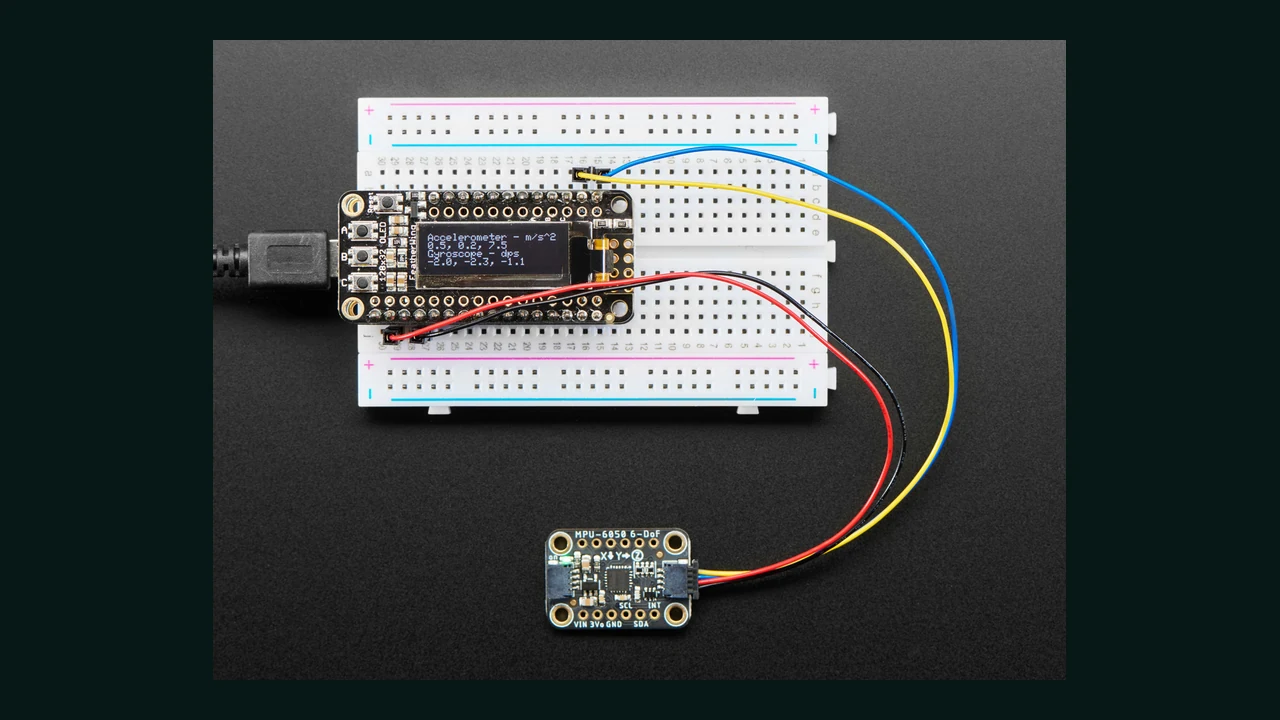
The VDD limit of 2.375 to 3.46 volts belongs to the chip itself. The Adafruit board shown in the picture has a regulator and level shifter according to the official manual, its Vin operates at 3-5V and it has a tenk ohm pull-up resistor on SDA and SCL. This specification should not be extended to any GY-521 blue board or unnamed module.
Some GY-521s have a feed regulator, but Level Shifting and Pull-up may be different. Before applying 5V, check the schematic of the same version and the actual SDA/SCL voltage. A safe and simple connection for the ESP32 is to power the document board with 3.3V and keep the I2C logic at 3.3V.
Pins, I2C Address and Key Registers
| The base of the board is ready | Application | Tip |
|---|---|---|
| VIN / VCC | win feed | Read the limit from the documentation of the same module; For Adafruit board it is 3 to 5V. |
| GND | common land | The ground of ESP32 and the sensor must be common. |
| SDA | I2C data | Open-drain line with appropriate pull-up to logic level. |
| SCL | I2C clock | Start with the short wire. |
| AD0 | Select the least significant bit of the address | Bottom: 0x68, Top: 0x69. |
| INT | Interrupt output | Can be used for Data Ready, Motion and set events. |
The official Register Map defines the register SMPLRT_DIV in 0x19, CONFIG in 0x1A, GYRO_CONFIG in 0x1B, and ACCEL_CONFIG in 0x1C. Acceleration, chip temperature, and gyro continuous data are from 0x3B to 0x48. PWR_MGMT_1 is in 0x6B and WHO_AM_I is in 0x75.
Wiring MPU6050 with ESP32 and Arduino Uno
| Documented MPU6050 board | Generic ESP32 | Arduino Uno |
|---|---|---|
| VIN | 3V3 | 5V only for documented Adafruit board; Otherwise, the module specification |
| GND | GND | GND |
| SDA | GPIO21 | A4 / SDA |
| SCL | GPIO22 | A5 / SCL |
| AD0 | GND for 0x68 | GND for 0x68 |
| INT | In this example, it is not connected | In this example, it is not connected |
GPIO21 and GPIO22 are just default Generic ESP32. On ESP32-S3, C3 and custom boards, replace the actual pins on your board. The official Arduino-ESP32 documentation recommends using Wire.setPins before begin or the proper form of Wire.begin(SDA,SCL) to change pins.
Step-by-step setup in Arduino IDE
- From the Library Manager, install the Adafruit MPU6050, Adafruit Unified Sensor and Adafruit BusIO libraries.
- Select the correct ESP32 or Arduino Uno board and port.
- Do the wiring with power off and then check the module voltage and I2C line level.
- Run the
i2c-scanner.inofile;0x68should be seen with AD0 down. - Place the sensor on a fixed surface, upload the original code and open the Serial Monitor at 115200 baud.
- Do not touch the sensor until the end of 500 calibration samples; Then slowly move each axis and check the units.
MPU6050 practical code for ESP32 and Arduino
#include <Wire.h>
#include <Adafruit_MPU6050.h>
#include <Adafruit_Sensor.h>

#if defined(ESP32)
constexpr int SDA_PIN = 21;
constexpr int SCL_PIN = 22;
#endif

constexpr uint8_t MPU6050_ADDRESS = 0x68;
constexpr uint16_t CALIBRATION_SAMPLES = 500;
Adafruit_MPU6050 mpu;
float biasX = 0, biasY = 0, biasZ = 0;

void calibrateGyro() {
  sensors_event_t a, g, t;
  for (uint16_t i = 0; i < CALIBRATION_SAMPLES; ++i) {
    mpu.getEvent(&a, &g, &t);
    biasX += g.gyro.x;
    biasY += g.gyro.y;
    biasZ += g.gyro.z;
    delay(5);
  }
  biasX /= CALIBRATION_SAMPLES;
  biasY /= CALIBRATION_SAMPLES;
  biasZ /= CALIBRATION_SAMPLES;
}

void setup() {
  Serial.begin(115200);
#if defined(ESP32)
  Wire.begin(SDA_PIN, SCL_PIN);
#else
  Wire.begin();
#endif
  Wire.setClock(100000);

  if (!mpu.begin(MPU6050_ADDRESS, &Wire)) {
    Serial.println(F("MPU6050 not found"));
    while (true) delay(10);
  }
  mpu.setAccelerometerRange(MPU6050_RANGE_4_G);
  mpu.setGyroRange(MPU6050_RANGE_500_DEG);
  mpu.setFilterBandwidth(MPU6050_BAND_21_HZ);
  calibrateGyro();
}

void loop() {
  sensors_event_t a, g, t;
  mpu.getEvent(&a, &g, &t);
  Serial.print(F("aX=")); Serial.print(a.acceleration.x, 3);
  Serial.print(F(" aY=")); Serial.print(a.acceleration.y, 3);
  Serial.print(F(" aZ=")); Serial.print(a.acceleration.z, 3);
  Serial.print(F(" | wX=")); Serial.print(g.gyro.x - biasX, 4);
  Serial.print(F(" wY=")); Serial.print(g.gyro.y - biasY, 4);
  Serial.print(F(" wZ=")); Serial.println(g.gyro.z - biasZ, 4);
  delay(100);
}
Code analysis and output unit
- The condition
#if defined(ESP32)specifies the Generic ESP32 pins; Uno uses Wire hardware foundations. Wire.setClock(100000)is a conservative board to start with and stays below the 400kHz datasheet ceiling.mpu.begin(0x68, &Wire)checks the WHO_AM_I ID through the library and performs initialization.- The acceleration output of the library is in m/s² and the gyroscope output is in rad/s; These are not LSB raw code.
- The average of 500 samples only estimates the gyroscope bias at rest and the instantaneous temperature. This method does not correct for scale factor, misalignment, or temperature variations.
- The constant bias of the accelerometer is not reduced, because even in the stationary state, the axis parallel to gravity sees approximately one g, and it is wrong to blindly remove it.
What is the use of the internal temperature sensor?
Temperature registers sit between the accelerometer and gyroscope data, and the datasheet gives the Temperature = TEMP_OUT / 340 + 36.53 relation to convert the raw code to Celsius. This temperature is related to the inside of the chip and does not take the place of the accurate ambient temperature sensor.
Its useful application is recording the temperature of the IMU itself along with the gyroscope bias. For accurate product, one can measure the bias at several controlled temperatures and build a compensation model; An offset is not guaranteed at room temperature for the entire -40 to +85 degree range.
Common errors and troubleshooting of MPU6050
| sign | probable cause | Suggested review |
|---|---|---|
| 0x68 is not seen | SDA/SCL shift, ground not common, improper power supply or pull-up | Measure the voltage and run the scanner with a short wire and 100kHz. |
| Only 0x69 is visible | AD0 is at High level | Change the code address to 0x69 or lower AD0 as per design. |
| The gyroscope is not zero at rest | Zero-rate natural bias or movement during calibration | Keep the range constant, repeat the average and record the temperature. |
| The angle slowly deviates | Gyroscope Bias Integral | Fix bias and sample rate and add Sensor Fusion. |
| Z acceleration is not close to zero | The effect of gravity | On a horizontal surface, the axis parallel to gravity should show an absolute value near one g. |
| The numbers are loud while the engine is running | Mechanical vibration, ground/feed or bad bandwidth | Test the mechanical installation, decoupling, ground path and filter separately. |
| The output is stuck on the limit | Small Full Scale and Saturation | Record a larger range of selection and peak real motion. |
| Multiple modules respond together | Both have the same address | For up to two pieces, set AD0 one down and one up. |
PCB design tips, power supply and mechanical installation
- Place the decoupling capacitors and feed path according to the Typical Operating Circuit datasheet near the chip.
- Install the IMU near the rigid part of the PCB; Board bending and screw tension can change MEMS bias.
- Avoid placing the IMU next to a motor, power inductor, or local heat source without testing.
- document the axes printed on the module with the product coordinate device; Apply software 90 degree rotation explicitly.
- For long cable, check bus capacitance, pull-up and SDA/SCL waveform with oscilloscope; 400kHz is an interface ceiling, not a requirement.
- Use fixed timing or Data Ready interrupt for real-time control;
delay(100)is for educational display only. - Perform the final calibration after assembly in the actual frame and within the product's temperature range.
conclusion
A reliable setup of the MPU6050 is not just about connecting four wires. You should consider chip and module difference, AD0 address, measurement range, bandwidth, output unit, gyro bias and mechanical installation at the same time. The code in this article is a repeatable baseline for six-axis reading; The next step is to estimate the angle, design the Sensor Fusion and calibrate it to fit the actual product.
Frequently asked questions
MPU6050 address is equal to 0x68 or 0x69?
Both are correct. When the AD0 pin is low, the seven-bit address is 0x68 and when AD0 is high, it is 0x69. An I2C scanner is the best way to detect the actual status of the board.
Can the MPU6050 be connected directly to 5V?
The raw chip only accepts VDD of 2.375 to 3.46 volts. Only power a module with 5V for which the manufacturer of the same board has documented the presence of a regulator and logic compatibility; The Adafruit board has this capability.
Why does the gyroscope not show accurate zero at rest?
The gyroscope has zero-rate bias and noise, and the bias changes with temperature. Hold the sensor steady, average a few hundred samples, and perform temperature compensation for an accurate product.
Can MPU6050 give accurate yaw angle or north direction?
Not alone. The MPU6050 does not have a magnetometer; Yaw resulting from the integral of the gyroscope drifts over time. Absolute direction requires external reference and Sensor Fusion.
Is the temperature of the MPU6050 the same as the ambient temperature?
no The temperature output shows the state inside the chip and is more useful for monitoring and compensating the behavior of the IMU; Do not use it instead of an accurate air temperature sensor.
Detailed sources and follow-up
- TDK Official Page for MPU-6050 and Obsolete Status
- MPU-6000/MPU-6050 Official Datasheet, Revision 3.4
- Official MPU-6000/MPU-6050 Register Map in Documents section of TDK page
- Adafruit MPU6050 Board Official Manual
- Official BSD-licensed Adafruit MPU6050 library
- Official documentation for I2C on Arduino-ESP32
- Photo Credit: Bryan Siepert, License CC BY-SA 3.0
- VL53L0X training with ESP32 and Arduino
- SHT31 training with ESP32 and Arduino
- Free course of sensors in 7 steps
- motion and position training category
- Sensors Learning Center at LCENJ
Raw chip numbers are taken from PS-MPU-6000A-00 Rev.3.4 and registers from RM-MPU-6000A-00 Rev.4.2. The 3-5V and 10kOhm pull-up specifications are extended to the Adafruit documentation board only. Obsolete status is monitored from the current TDK Product Center page.
Question and answer article
Ask your technical question
Questions and answers are published after moderation. Authors can see their own pending drafts.
No confirmed questions have been registered for this article yet.