BME680 with ESP32: Gas, Temperature, Humidity and Pressure
BME680 Project Guide with ESP32 and Arduino; Datasheet, I2C address, wiring, temperature and humidity code and gas pressure and resistance, IAQ limit and troubleshooting.
Contents
Project-oriented training of indoor air monitoring
Setup BME680 with ESP32; From the data sheet to the resistance of the gas sensor
BME680 collects four quantities of temperature, relative humidity, pressure and resistance of the gas sector in one chip. In this guide, we will go through step-by-step the difference between raw chip and ready board, I2C address, wiring, practical code, gas sensor heater and output interpretation limit. All technical numbers are adapted from Bosch official datasheet and Adafruit library API.
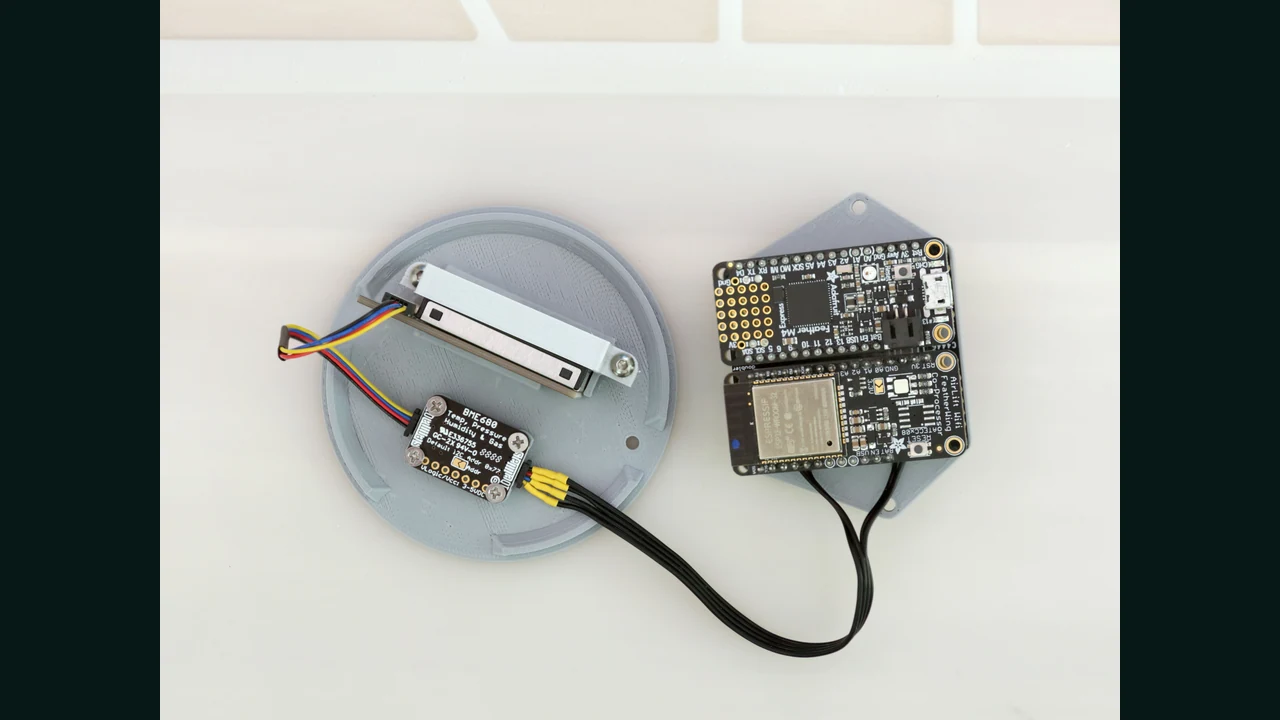
0x76 or 0x77What is the BME680 and what does it measure?
BME680 is a four-in-one environmental sensor from Bosch Sensortec. Its three channels measure temperature, relative humidity and air pressure, and the fourth channel is a heated metal oxide sensor whose electrical resistance changes in the presence of volatile organic compounds and some reducing or oxidizing gases.
This sensor is suitable for indoor air trend monitoring, smart ventilation, environmental station, warehouse condition recording and IoT projects. However, the raw output of the Adafruit library is just "gas resistance in ohms"; This number alone is not the concentration of a specific gas, actual CO2, ppm, or standard IAQ index.
Appropriate and inappropriate uses
Smart ventilation
Record the change of gas resistance, humidity and temperature over time and control the fan based on baseline and environmental trend; Don't make a decision based on a single snapshot.
Peripheral station
Pressure, humidity and temperature, along with a VOC-sensitive outlet, give a more complete view of the indoor environment. The installation location should be away from direct heat and stagnant air.
Compare events
The effect of opening the window, using detergents, or increasing the presence of people can be checked with a timer; This is trend analysis, not chemical identification of the substance.
Gas alarm
It is inappropriate. The MOX sensor does not have full selectivity and the raw output does not tell which gas is present at what concentration.
How to read the BME680 datasheet correctly?
First, determine whether the number corresponds to a raw chip or a ready-made board. The Bosch datasheet for the chip itself defines VDD as 1.71 to 3.6V and VDDIO as 1.2 to 3.6V. The Adafruit board has a regulator and level shifter and accepts 3-5V Vin and logic according to the manual of the same board. This property should not be extended to any anonymous module.
| Official parameter | quantity or condition | Practical result |
|---|---|---|
| VDD chip | 1.71 to 3.6V | Do not feed the raw chip directly with 5V. |
| VDDIO chip | 1.2 to 3.6V | The logic level of the interface must be within the allowed range. |
| Operating temperature | -40 to +85°C | Being operational with perfect accuracy is not the same at all ranges. |
| Pressure range with full accuracy | 300 to 1100 hPa | The absolute pressure accuracy is defined in the datasheet for this range. |
| Absolute pressure accuracy | ±0.6hPa | The calculated altitude depends on the reference pressure of the day and location. |
| Humidity accuracy | ±3%RH in 20 to 80% RH and 25°C | Quote the measurement condition along with the accuracy number. |
| Heater flow at 320°C | typical 12mA, the maximum 13mA In terms of the table | The heater is the dominant part of consumption when measuring gas. |
| Low level modes | Sleep and Forced | In Forced, a TPHG cycle is performed and then the sensor returns to Sleep. |
The term "Operational Range" only says that the chip is operable in that range. For example, the datasheet lists the gas section as operating from -40 to 85 degrees and 10 to 95% humidity, but actual performance depends on sensor history, temperature, humidity, airflow, warm-up time, and heater setting.
What is the difference between gas resistance, VOC and IAQ?
MOX sensitive surface is heated in BME680. The absorption and reaction of gases changes the conductivity of the surface and turns its internal circuit into gas resistance. Adafruit explains that increasing VOC concentration typically lowers resistance, but the absolute number is not directly comparable between different sensors and environments.
Bosch datasheet mentions BSEC software for IAQ production. BSEC takes measurement history and the effect of temperature and humidity into the calculation and produces outputs such as IAQ in the range of 0 to 500. The simple code in this article does not use BSEC; Therefore, it displays the value of gas_resistance only as raw resistance and for building a baseline and trend analysis.
I2C address, pins and interface selection
According to the datasheet, the seven-bit address of the BME680 is constructed from the pattern 111011x: connecting SDO to GND gives the address 0x76 and connecting it to VDDIO gives the address 0x77. SDO should not be left floating, as the address becomes undefined. On the Adafruit board, the default address is 0x77 and is changed to 0x76 with the SDO to GND jumper.
| Adafruit board base | Application in I2C | Tip |
|---|---|---|
| Vin | win feed | In the Adafruit document board equal to 3 to 5V; Use 3.3V for ESP32. |
| GND | common land | Ground board and ESP32 must be common. |
| SCK | SCL | I2C clock; Also used in board naming for SPI. |
| SDI | SDA | I2C data; Also used in board naming for SPI. |
| SDO | Choose an address | bottom: 0x76, top: 0x77; Do not float. |
| CS | Select SPI | For I2C connection, the ready board remains unconnected according to Adafruit's guide. |
BME680 also supports 3-wire and 4-wire SPI interface, and the SPI input clock is allowed up to 10MHz according to the datasheet. For an on-board sensor, I2C requires fewer wires; For some BME680s where two I2C addresses are not enough, SPI with a separate CS is an easier choice.
Wiring BME680 with ESP32 and Arduino Uno
| Documented BME680 board | Generic ESP32 | Arduino Uno |
|---|---|---|
| Vin | 3V3 | 5V for documented Adafruit board only |
| GND | GND | GND |
| SCK / SCL | GPIO22 | A5 / SCL |
| SDI / SDA | GPIO21 | A4 / SDA |
| SDO | Default board state for 0x77 | Default board state for 0x77 |
| CS | No connection in I2C | No connection in I2C |
GPIO21 and GPIO22 are just default Generic ESP32. The official Arduino-ESP32 documentation says that the default pins are board dependent; Replace the actual pins of your board on ESP32-S3, ESP32-C3 or custom design. I2C lines require pull-up, and the appropriate amount depends on voltage, wire length, bus capacity, and speed.
Step-by-step setup in Arduino IDE
- Install the Adafruit BME680 Library, Adafruit Unified Sensor and Adafruit BusIO libraries from the Library Manager.
- Select the correct ESP32 or Arduino Uno board and port.
- Do the wiring in unpowered mode and check the specifications of the same module.
- Run the
i2c-scanner.inocode; 0x77 or 0x76 should be seen. - Upload the original code and open Serial Monitor to 115200 baud.
- Run the sensor at a fixed setting for a few minutes and allow more time to stabilize and build a baseline for trend analysis.
BME680 practical code for ESP32 and Arduino
#include <Wire.h>
#include <Adafruit_Sensor.h>
#include <Adafruit_BME680.h>

#if defined(ESP32)
constexpr int SDA_PIN = 21;
constexpr int SCL_PIN = 22;
#endif

constexpr uint8_t BME680_ADDRESS = 0x77;
Adafruit_BME680 bme(&Wire);

void setup() {
  Serial.begin(115200);
#if defined(ESP32)
  Wire.begin(SDA_PIN, SCL_PIN);
#else
  Wire.begin();
#endif
  Wire.setClock(100000);

  if (!bme.begin(BME680_ADDRESS)) {
    Serial.println(F("BME680 not found; check wiring and address."));
    while (true) delay(10);
  }

  bme.setTemperatureOversampling(BME68X_OS_8X);
  bme.setHumidityOversampling(BME68X_OS_2X);
  bme.setPressureOversampling(BME68X_OS_4X);
  bme.setIIRFilterSize(BME68X_FILTER_SIZE_3);
  bme.setGasHeater(320, 150);
}

void loop() {
  if (!bme.performReading()) {
    Serial.println(F("BME680 reading failed."));
    delay(1000);
    return;
  }

  Serial.print(F("T="));
  Serial.print(bme.temperature, 2);
  Serial.print(F(" C | RH="));
  Serial.print(bme.humidity, 2);
  Serial.print(F(" % | P="));
  Serial.print(bme.pressure / 100.0, 2);
  Serial.print(F(" hPa | Gas="));
  Serial.print(bme.gas_resistance / 1000.0, 2);
  Serial.println(F(" kOhm"));

  delay(3000);
}
Code analysis and output unit
- The condition
#if defined(ESP32)specifies the Generic ESP32 pins; Uno uses Wire hardware foundations. Wire.setClock(100000)is conservative to start with on the board. After stability, the speed and waveform can be evaluated according to the real bass.bme.begin(0x77)Finds the sensor at the selected address. If the scanner shows only 0x76, change the address constant.performReading()executes a measurement cycle and checks for success or failure; Invalid data will not be printed without control.- Temperature is in °C, humidity is in %RH and pressure is in Pa; Dividing by 100 converts it to hPa.
- The resistance of the library gas is in ohms; Dividing by 1000 only changes the display unit to kΩ and does not produce IAQ or ppm.
- Setting the heater to 320°C for 150ms uses the Adafruit sample API. The heater setting and sampling rate should remain the same in all comparison data.
Creating a baseline and recording comparable data
- Place the sensor in its final location, away from direct steam, momentarily open windows, and heat from the regulator.
- Keep the heater setting, sampling interval and power supply constant.
- Save time, temperature, humidity, pressure and gas resistance together.
- Instead of an absolute number, take the median or mean of the stable interval as a baseline and check the ratio of change.
- For the control decision, define Hysteresis and the minimum dwell time condition so that the fan does not turn on and off with momentary noise.
The Adafruit manual says the gas resistor can take up to 30 minutes to initialize. Bosch's datasheet also considers gas performance dependent on the sensor's operating history and defines laboratory specifications after a few days of operation. So "the first number after turning on" is not a product criterion.
BME680 common errors and troubleshooting
| sign | probable cause | Suggested review |
|---|---|---|
| Sensor not found | Wrong address, SDA/SCL shift, no common ground | Run the scanner and match between 0x76 and 0x77. |
| No address can be found | Power supply, cable, pull-up or wrong pins on the ESP32 board | Measure the voltage and continuity and check the actual board pins. |
| Gas resistance is constantly changing | Initial heating, change in humidity or air flow | Keep the setting and installation location constant and record multivariate data. |
| You have assumed the gas number to be ppm | Incorrect interpretation of the raw output | Keep the unit ohm; For actual concentration, calibration and selected sensor are required. |
| The temperature is slightly higher than the ambient | Sensor self-heating, heater and host board heat | Check airflow, distance from heat sources, and duty cycle. |
| The calculated height is incorrect | Reference sea level pressure is not updated | Enter same day local reference pressure or just report raw pressure. |
| Data is sometimes interrupted | Long wire, improper pull-up or unstable power supply | With a short wire and 100kHz start and check the power supply with an oscilloscope. |
| Two BME680s will not respond at the same time | Both have the same address | Make one 0x76 and the other 0x77; For more numbers use SPI with separate CS. |
PCB design tips, power supply and housing
- For the raw chip, place the datasheet's suggested 100nF capacitors near VDD and VDDIO and choose the pull-up value based on the bus load; 4.7kΩ is just a commonly suggested value in the sample circuit.
- Do not cover the metal vent of the sensor and do not block the air exchange path with glue, protective cover or frame wall.
- Keep the sensor away from the regulator, processor, display, and power paths that heat up the PCB.
- Condensed water vapor, direct spray, thick solvent, and adhesive particles can alter sensor response; Test assembly and aging process.
- If the device is battery-powered, measure the heater consumption in the actual energy budget and at the selected sampling rate.
- To compare multiple devices, baseline each sensor separately and save the serial number, firmware and heater settings to the data.
- For production use, cover long-term temperature and humidity changes and contamination with reference testing; A short desktop test is not enough.
conclusion
The BME680 is suitable for making a small and versatile environmental monitor, provided that the gas resistance is not confused with actual ppm or CO2. Reliable setup starts with correct module and address detection, continues with constant heater setting and sampling, and makes sense with gas resistance temperature and humidity recording. The code in this article gives a reproducible baseline for ESP32 and Arduino; The next step is the long-term storage of data and the design of the ventilation logic based on the process of the same device.
Frequently asked questions
Is the I2C address of the BME680 sensor equal to 0x76 or 0x77?
Both are valid. The low SDO gives the seven-bit address 0x76 and the high SDO gives the address 0x77. On the Adafruit board the default address is 0x77; The I2C scanner shows the actual status.
Is the Gas output in BME680 CO2 or ppm?
no Adafruit's simple library reports the resistance of the gas section in ohms. The sensor responds to a range of VOCs and gases and does not determine the raw output, type or concentration of a specific gas.
Why is the gas resistance not constant after lighting?
MOX surface heating, sensor history, temperature, humidity, and airflow affect the output. Keep the settings constant and after the stabilization time, make the baseline of the same device.
Can the BME680 be connected directly to 5V?
The raw chip VDD has a maximum of 3.6 volts. Only feed a ready board with 5V that has a documented regulator and level shifter; The Adafruit Vin board supports 3-5V logic.
Is BME680 suitable for gas leak or carbon monoxide alarm?
no The BME680 is not a selective safety sensor for a specific gas and should not be used in a life-saving system. For alarms, sensors and circuits with the same standard and approval, the same application is required.
Detailed sources and follow-up
- Bosch BME680 Official Datasheet, Revision 1.9, February 2024
- Official Arduino Guide and Adafruit BME680 Board Wiring
- Adafruit Board Pinouts, Regulator and Level Shifter Official Documentation
- Official BSD-licensed Adafruit BME680 library
- Official documentation for I2C on Arduino-ESP32
- Photo Source, Ruiz Brothers, License CC BY-SA 3.0
- Learning BMP280 with ESP32 and Arduino
- SHT31 training with ESP32 and Arduino
- Free course of sensors in 7 steps
- Gas and air quality training group
- Sensors Learning Center at LCENJ
Raw chip specifications are taken from BST-BME680-DS001-09 Rev.1.9. The 3-5V, Regulator, Level Shifter and Default Address specifications are extended to the Adafruit documentation board only. The output of the resistance code is raw and has no ppm, actual CO2 or IAQ claims without BSEC.
Question and answer article
Ask your technical question
Questions and answers are published after moderation. Authors can see their own pending drafts.
No confirmed questions have been registered for this article yet.