MCP9600 project review: from thermocouple wires to trustworthy temperature
SparkFun’s open-source MCP9600 board turns thermocouple voltage and local junction temperature into data. Its circuit, thermal layout, power path and library error handling reveal what a dependable instrument needs.
Contents
This project does more than read a temperature number. It measures a thermocouple’s very small voltage, accounts for the temperature where its wires meet the board, and sends a temperature reading through a two-wire data connection called I²C. SparkFun’s open-source MCP9600 board needs few components, but the result still depends on placement, wiring and communication errors. Following those paths explains what the circuit solves and what a dependable instrument still needs.
This review covers the SEN-16295 screw-terminal board, not the SEN-16294 PCC-connector version. SparkFun Electronics created the design. The hardware revision and the separate Arduino library version 1.0.6 are pinned for this analysis. This is a review of the files; no board was built or physically tested.
Buying the board and identifying the model
The direct SparkFun SEN-16295 product page identifies the reviewed board. It displayed “In stock” on 27 October 2026; that is a seller observation, not a promise of availability when an order is placed. The design uses an MCP9600 in a 20-lead MQFN package. Microchip’s product page separates the family specifications and ordering options. The library name does not establish the full ordering code of an assembled chip.
Regional availability in Iran: a direct listing with verifiable stock for this exact SparkFun board was not established. Generic MCP9600 or CJMCU boards need not share its circuit, connector or protection. Exact-model availability in Iran remains unverified; no search page is presented as a product link and no price is quoted.
What does a thermocouple measure?
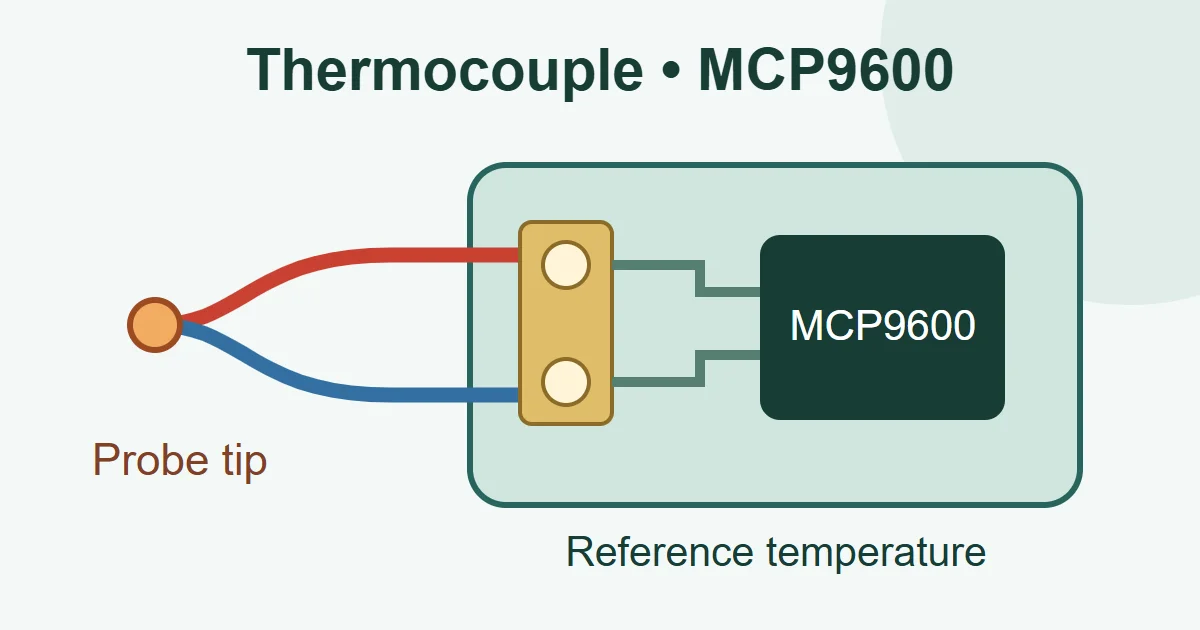
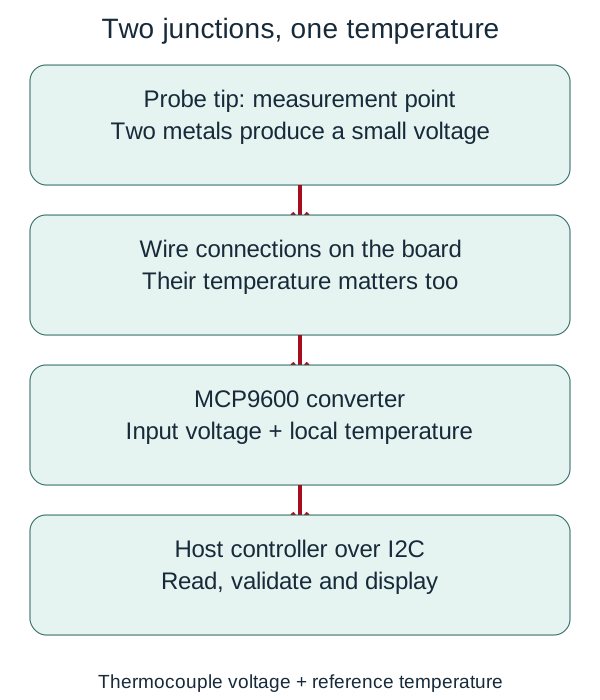
A thermocouple uses two wires made from different metals, joined at the sensing tip. The temperature difference between the tip and the wire connections at the instrument produces a small voltage. A microvolt is one millionth of a volt, so this input cannot be read like a simple on/off switch. The circuit board holds the components and copper connections; the MCP9600 chip on it converts the input into temperature data.
The reference connections are commonly called the “cold junction,” although they need not be cold. The chip measures its local temperature to compensate for the reference-junction temperature. If the terminals and chip are at different temperatures, that assumption becomes less accurate. The analog and digital sensor lesson explains the distinction between a physical quantity and the data representing it.
Why use this architecture?
The MCP9600 combines input conditioning, conversion, temperature calculation, cold-junction compensation and four configurable temperature alerts. The host controller, such as an Arduino board running the application, does not have to measure the microvolt signal with a general-purpose converter and implement the thermocouple tables itself. I²C uses SDA and SCL to exchange data; separate supply and ground wires provide power.
Integration does not remove the physical limits. The configured thermocouple type must match the wires: type K and type J are not interchangeable without changing the configuration. A thermocouple type’s conversion range does not guarantee the temperature rating of the probe, insulation, connector or board. Keep the board and chip away from the hot measurement point. The circuit also provides no electrical isolation; contact with an energized circuit requires a separately designed isolation system.
Following the input, supply and interface
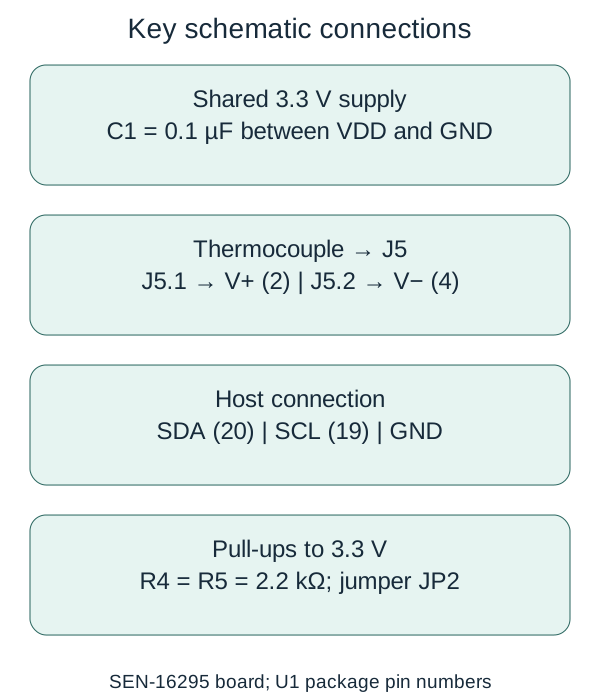
In the pinned schematic, J5 pin 1 connects directly to the chip’s V+ input, package pin 2; J5 pin 2 connects to V−, package pin 4. Identify polarity from the documentation for the actual probe. Wire colors differ between standards. Reversed wires can produce an unexpected temperature trend when the tip is warmed.
Ground, or GND, is the circuit’s shared voltage reference. A jumper is a small connection bridge: opening or closing its trace changes a hardware setting. JP labels identify these points in the design.
| Component | File evidence | Practical purpose |
|---|---|---|
| U1, MCP9600, MQFN-20 | VDD pin 8, SDA pin 20, SCL pin 19; ground includes the exposed pad | Converts the input and provides data. A PCB design must account for all ground pins and the package pad. |
| C1, 0.1 µF | Between 3.3V and GND | A short path for rapid changes in current; it does not replace sound supply design. |
| R4 and R5, 2.2 kΩ each | SDA and SCL pull-ups connected through JP2 | Raise the I²C lines; they combine in parallel with other boards’ pull-ups. |
| R3, 10 kΩ, and JP1 | ADDR network; default jumper connection to ground | Default address 0x60. Address changes require checking the jumper and resistor-divider arrangement. |
| D1, R1 and JP3 | Red power LED, 1 kΩ resistor and supply jumper | Power indication with a way to disconnect the LED branch. |
| J4 | ALERT1 through ALERT4 | Threshold notifications, not an independently validated thermal safety system. |
This is a list of important schematic components, not a procurement BOM with complete ordering codes. The design also provides an R2 footprint for address selection. A footprint is a place to solder a component; its presence alone does not establish that the component is populated on every sold board.
Power: the board has no supply regulator
A regulator keeps a supply voltage within its designed range. A logic-level translator makes the digital signal voltages compatible between circuits; these are separate functions.
The schematic’s Qwiic 3.3V net goes directly to U1 and the LED branch. No regulator or logic-level translator appears in that path. The MCP9600 chip supports a 2.7–5.5 V operating supply, but that does not authorize 5 V on a shared Qwiic rail or other 3.3 V boards. Use a 3.3 V supply and host logic for this connection and check the actual host’s specifications.
For a hypothetical red LED drop of 1.8 V, a 3.3 V supply and R1=1 kΩ give about (3.3−1.8)/1000 = 1.5 mA. That branch takes approximately 3.3 × 1.5 = 4.95 mW from the supply. The actual value depends on the LED and temperature; this is a calculation, not a measurement of the board. Opening JP3 can remove this branch’s consumption in a battery-powered design, while the chip and host still draw current.
Two sets of 2.2 kΩ pull-ups on one bus produce an equivalent resistance of 1.1 kΩ. Ignoring the output’s residual low voltage, one low line then draws about 3.3/1100 ≈ 3 mA. Before cutting jumpers, count the pull-ups and check every device’s sink-current capability. Lower resistance does not always improve communication.
PCB placement is part of the temperature measurement
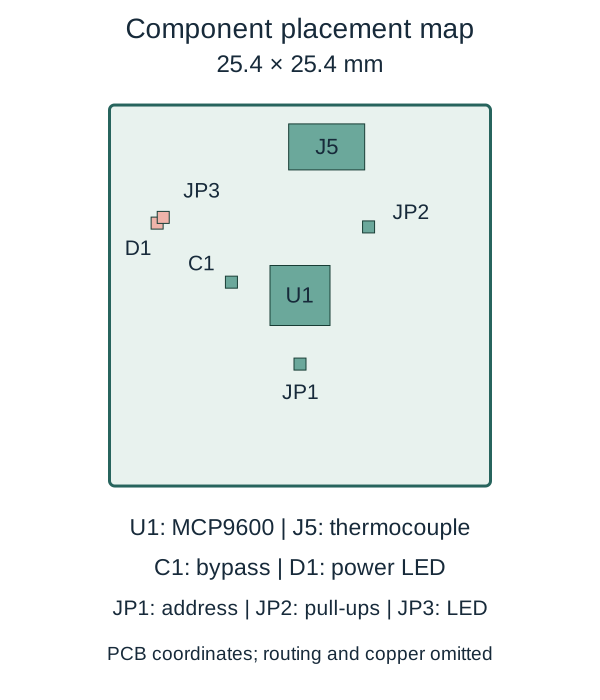
The board file has a 25.4 × 25.4 mm outline and ground polygons on both copper layers. U1 is centered at (12.7,12.7) mm and J5 at (14.478,22.606) mm, giving approximately 10.06 mm between their centers. Distance alone does not determine thermal error: terminal temperature, copper, airflow and the enclosure also matter.
Section 6.1 of the project’s supplied datasheet emphasizes thermal conduction between the thermocouple connections and the chip’s exposed pad. The aim is for those locations to approach the same temperature, so a blanket rule to separate all analog copper is insufficient here. Conversely, a regulator, processor or hot enclosure must not heat one side unevenly. The map below shows placement only. A ground polygon in the file is not proof of a qualified return path or measured thermal performance.
Worked examples: resolution is not accuracy
The library interprets a temperature register as a signed 16-bit value with a scale of 0.0625 °C per count. In a hypothetical example, 0x0640 equals 1600, so 1600 × 0.0625 = 100 °C. The signed value of 0xFF60 is −160, yielding −10 °C. This scale applies to the temperature register, not directly to every thermocouple input voltage.
A display step of 0.0625 °C does not guarantee an error smaller than that step. For a local linear illustration only, assume a sensitivity of 40 µV/°C: a 10 °C mismatch between terminals and chip corresponds to approximately 400 µV of reference mismatch. This simplified model illustrates thermal balance, not the chip’s actual calculation, which uses the nonlinear relationship for the configured thermocouple type. Probe, cable and installation errors also contribute to the system error. The accuracy and resolution lesson develops this distinction.
What the firmware does—and what it does not establish
Example1_BasicReadings at the pinned commit sets the serial port to 115200 baud and I²C to 100000 Hz. It checks device presence and identity, then prints the thermocouple, local and differential temperatures when data is ready. Its 20 ms delay after reading does not, by itself, establish a 50-sample-per-second conversion rate. Conversion settings and the data-ready indication govern fresh measurements.
In readDoubleRegister, a two-byte request is accepted if the returned byte count is nonzero, rather than explicitly equal to two. After retries are exhausted, the function returns zero. Its interface therefore does not distinguish a valid zero register value from a failed read. This is an observation about the code, not a claim that every board experiences a failure.
A specific improvement is to return both status and value: accept success only after checking the transmission and receiving exactly two bytes. On failure, label any previous reading as stale and keep it out of decisions requiring a fresh temperature. Software tests should inject zero-byte, one-byte and two-byte responses and repeated failures. This requires changes to the library and application; checking available() alone does not supply that guarantee.
Three hardware improvements and how to evaluate them
- Thermal balance: keep the board away from localized heat sources. In a new layout, examine the thermal path from the terminals to the exposed pad using the manufacturer’s guidance. Hold a reference probe stable while changing enclosure heating and airflow separately, then record the error. Reducing distance alone does not guarantee improvement.
- Protection for an external cable: J5 connects directly to V+ and V− in this schematic, without a dedicated input filter or transient-clamping network on those lines. Datasheet sections 6.3.4 and 6.3.5 provide starting points for filters, ferrites and protection diodes. Leakage, imbalance and input drops can spoil the measurement, so an arbitrary TVS is not a guaranteed remedy. Compare measurement error and transient behavior before and after a change.
- Broken-probe detection: the Input Range status bit alone does not establish reliable detection of every disconnected probe. Section 6.3.3.1 describes an external bias network for that purpose; that network is not present at the direct inputs in this schematic. Any addition must respect input limits and loading. Test connected, disconnected, shorted and out-of-range inputs separately.
An ordered bring-up and troubleshooting process
- With power off, check the board model, probe polarity, supply shorts and jumper settings. Start with a low-risk temperature source within the probe’s rating.
- Connect 3.3 V and a shared ground. Connect SDA and SCL by pin name, not cable color. Do not attach a 5 V host without checking logic levels.
- In Arduino IDE, select SparkFun MCP9600 library version 1.0.6 and its basic example. Select your actual board and port. This review does not claim successful compilation or flashing on a particular device.
- Match the default 0x60 address to the ADDR wiring. If detection fails, check power, wires and pull-ups before changing the software. The I²C troubleshooting lesson provides a structured path.
- Set the thermocouple type and configuration explicitly. Log the local and probe temperatures together. Gently warm the probe tip to check the direction of change; assess accuracy against a suitable reference at several points.
- Test a disconnected probe separately from failed communication. Until failure and recovery behavior are established, do not use the output as a direct heater command or the sole thermal protection.
Sources and the next design problem
The project’s strength is separating sensitive signal conversion from the host’s application. Its broader lesson is that receiving data does not establish a valid temperature: reference-junction temperature, input condition and transport status all matter. For long-term recording, the Qwiic OpenLog review examines the next problem: retaining the data reliably.
- SparkFun hardware repository, commit 17363932880175787ef9ed4d1c1540a5647180c7, dated 12 March 2020; reviewed 27 October 2026.
- Separate library repository, commit 399d721629fc5f10fc8a02883ba9206c3a46a584, dated 8 November 2025. These pins belong to two distinct repositories.
- Microchip datasheet supplied with the project, DS20005426E, 2019; sections 6.1–6.3 cover layout and input considerations.
- Hardware and code license information. Hardware and adapted diagrams use CC BY-SA 4.0 with attribution to SparkFun; code files also carry their individual notices.
Question and answer article
Ask your technical question
Questions and answers are published after moderation. Authors can see their own pending drafts.
No confirmed questions have been registered for this article yet.