Inside OpenScale: reviewing an HX711 USB weighing system
OpenScale combines a load-cell interface, calibration and USB reporting. Its schematic and firmware reveal useful power-path, filtering and timing tradeoffs—and several concrete opportunities to improve the design.
Contents
A weighing system needs more than a sensor. It must read a very small electrical output, turn that reading into a useful number, and account for mounting, power and calibration. SparkFun’s open-source OpenScale puts these functions on one board. Following its schematic and firmware shows why a few resistors and a power connection can matter as much as the software.
This review examines the project at commit 7c0e0191c6e8, dated May 15, 2019. The original project is by SparkFun Electronics. The worked numbers below are hypothetical calculations. The unmodified firmware was compiled, but no board was built or physically tested for this review.
Where to buy: the board and the chip are different products
| Exact product | Direct links and observed status | What it includes |
|---|---|---|
| SparkFun OpenScale board, SEN-13261 | SparkFun product page; Digi-Key listing, manufacturer number 13261. SparkFun’s page displayed both an in-stock indication and a backorder option, so delivery is uncertain. An exact, directly listed Iranian source for this board was not verified. | Load-cell interface, microcontroller and USB interface; the load cell is separate. |
| Bare HX711 IC, SOP-16 — regional option for Iran | Aftab Rayaneh’s HX711 product page displayed 34 units on October 24, 2026. | A chip requiring a circuit and assembly, not an OpenScale board or a ready-to-use module. |
Product pages were checked on October 24, 2026. A seller’s stock indication does not establish stock or authenticity. You do not need to buy hardware to follow the analysis.
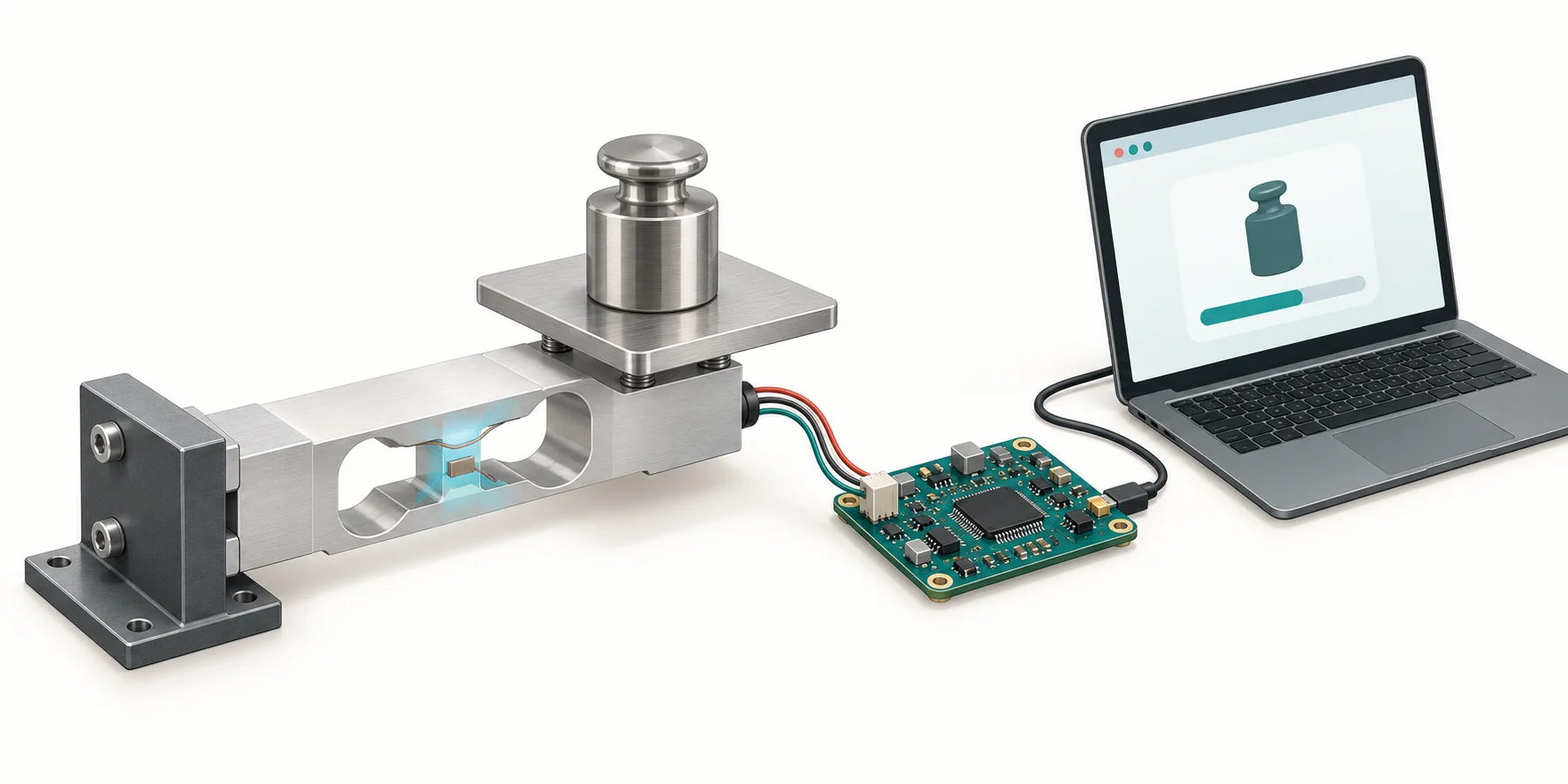
What problem does the load cell solve?
Suppose we want to log how much material leaves a small container during the day. The sensor must sit in the mechanical load path: the container’s force has to pass through it. A load cell is a mechanical part that responds to force. Its metal deforms slightly under load, and attached resistive elements turn that deformation into a voltage change. That voltage is the signal: an electrical quantity carrying information about the force.
In a full-bridge load cell, four resistive elements form a bridge circuit. Two wires supply it with excitation power, while two carry a small voltage difference to the measuring circuit. This difference is typically measured in millivolts; one millivolt is one thousandth of a volt. A processor is a programmable component that executes software instructions; connecting these wires directly to a general-purpose processor does not produce an accurate weight reading. The HX711 first amplifies the difference and converts it to a digital number, acting as an analog-to-digital converter, or ADC. The processor then applies a zero offset and a calibration factor to estimate mass. Calibration here means adjusting that conversion using a known mass.
The sensor measures force; the scale displays kilograms after calibration with a known mass in its installed conditions. The platform’s own mass still uses some of the sensor’s mechanical capacity even after the display is zeroed. For a simpler wiring and calibration exercise, start with the load-cell and HX711 tutorial.
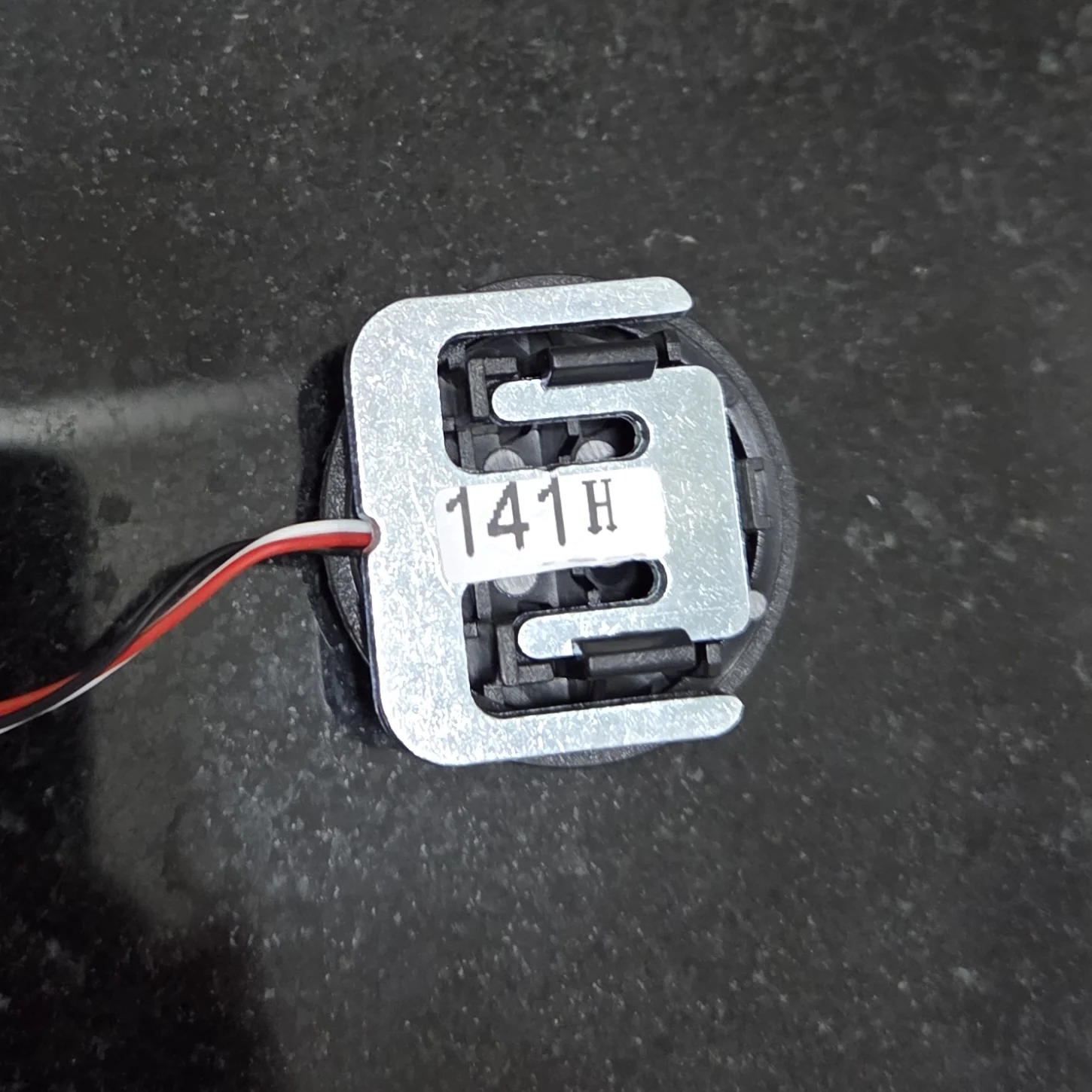

Do not treat three-wire and four-wire products as interchangeable simply because both are sold as weight sensors. Some three-wire sensors provide only part of a bridge and need other elements to complete it. Wire colours are not universal either; use the documentation for the actual sensor.
Following the data from the sensor to USB
A chip contains many tiny electronic elements in one package. Schematic labels such as U1 and R3 identify individual components. A resistor limits current; a capacitor stores electrical charge and responds to voltage changes; an inductor responds to changes in current. A transistor allows current flow to be controlled. Below, a supply rail means a shared power connection, while gain describes how much a signal is amplified.
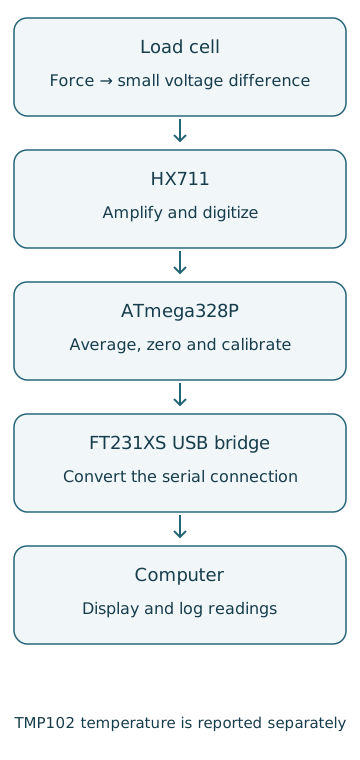
| Schematic component | Purpose | Design consequence |
|---|---|---|
| U1: HX711, 16-pin package | Amplifies the bridge voltage difference and converts it to a signed 24-bit number. | Channel A supports gain 128 or 64; channel B uses 32. Bit count alone does not establish scale accuracy. |
| U4: ATmega328P, TQFP-32 | Runs acquisition, calibration, settings and reporting. | A 16 MHz clock reference provides the timing basis for executing instructions. |
| U6: FT231XS, SSOP-20 | Bridges the processor’s serial connection to computer USB. Serial communication sends data bits in sequence. | The HX711 connection and the USB connection are separate stages. |
| U3: TMP102, SOT563 | Measures temperature near the board. | It uses the 3.3 V rail. Recording its temperature does not automatically correct mass readings. |
| Q3 and R16/R17 | Provide regulated analog power for acquisition and bridge excitation. | The resistor ratio and available input-to-output voltage margin matter. |
| R3/R4 and C8 | Attenuate some fast differential input interference. | This network alone is not a 50 Hz rejection filter. |
These connections come from the pinned schematic. Its matching PCB file is also public. The PCB is the physical board carrying the components and their copper connections.
Why is the bridge excitation about 4.3 V?
The HX711 regulates its analog supply using an external MMBT4403 PNP transistor. The 20 kΩ and 8.2 kΩ feedback resistors set the nominal voltage. Using the datasheet’s typical 1.25 V reference:
Vanalog ≈ 1.25 V × (1 + 20 kΩ / 8.2 kΩ)
Vanalog ≈ 4.299 V
This is a nominal calculation, not a measured voltage. Component tolerances, bridge loading and input droop can change the result. The regulated output reaches the bridge through L1, a 3.3 µH inductor. The schematic names the upstream net RIPUP@ and the filtered excitation net AVDD; a net label should not be confused with the name of an IC pin.
The converter’s analog supply and the bridge excitation share this supply chain. When bridge output scales with excitation, a common supply change can partly cancel in the measurement ratio. This is called ratiometric measurement. It does not make power quality irrelevant: large droop, saturation, cable voltage drops and interference that is not common to both paths still matter. The regulator relationship and operating conditions are given in the HX711 datasheet.
A worked example: 10 kg becomes a few millivolts
Consider a hypothetical 20 kg full-scale load cell rated at 2 mV/V, excited at a nominal 4.30 V. The sensitivity means a full-scale load changes bridge output by about 2 mV per volt of excitation. Assuming a linear response and ignoring initial offset, the unloaded output:
Full load: 2 mV/V × 4.30 V = 8.60 mV
At 10 kg: (10 / 20) × 8.60 mV = 4.30 mV
At gain 128 and a 4.30 V analog supply, the HX711’s nominal differential input limit is approximately ±16.8 mV, from ±0.5 × AVDD / gain. The example’s 8.60 mV full-load signal fits within that range. Input common-mode voltage and sensor offset must also meet the datasheet limits. Fitting the range does not establish accuracy in grams.
If the platform touches the enclosure, some force bypasses the sensor. If the load cell drifts as it warms, the zero reading moves. Printing more decimal places fixes neither problem. The distinction between accuracy, resolution and calibration helps set a defensible measurement target.
What does the input filter actually remove?
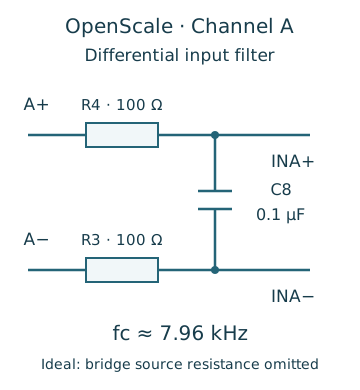
Each input line contains a 100 Ω resistor, with a 0.1 µF capacitor between the lines. For a differential signal, both resistors contribute to the resistance seen by the capacitor. Temporarily ignoring the bridge’s own source resistance gives:
fc ≈ 1 / [2π × (100 Ω + 100 Ω) × 0.1 µF]
fc ≈ 7.96 kHz
Frequency counts how often a change repeats per second: 50 Hz means 50 cycles per second. The cutoff frequency marks the approximate onset of substantial attenuation in this simple filter. A value near 8 kHz tells us not to attribute 50 Hz mains rejection to these three parts alone. The bridge’s source resistance changes the actual pole. The HX711’s internal filtering and output-rate choice are separate considerations, alongside cable routing and ground-current paths.
The PCB file contains routing on the top and bottom copper layers and ground polygons on both. That observation does not establish noise performance or electromagnetic compliance. In a redesign, the bridge inputs and their filter should stay close together, with USB and switching-current return paths kept away from the sensitive input loop. A continuous ground reference should not be split arbitrarily.
Checking the connectors against the code
On load-cell terminal JP11, pin 1 carries positive excitation, pin 2 is ground/negative excitation, pin 3 is A−, pin 4 is A+, and pin 5 is ground. The fifth connection can serve a cable shield, the conductive covering used to manage interference; it is not a pair of remote-sense inputs for a six-wire load cell. Identify the physical pin-1 position from the actual board file or marking. This logical pin list is not a reason to guess terminal orientation from a photograph.
The HX711 interface is not I2C and has no device address. Its DOUT signal connects to processor PD2 / Arduino D2, while PD_SCK connects to PD3 / D3. The definitions in openscale.h agree: DAT=2, CLK=3. However, the wiring comment at the top of the main sketch reverses them. The executable definitions and schematic agree; the comment is the inconsistent part.
The TMP102 uses I2C, a different two-wire interface. BSS138 transistors translate its lines between the processor’s 5 V side and the sensor’s 3.3 V side. When connecting a different processor, check each signal’s actual voltage domain. A jumper labelled 3.3 V does not make every connection on the board ESP32-compatible. See the logic-level conversion tutorial for the underlying distinction.
How the firmware turns counts into kilograms
At startup, the processor loads settings from EEPROM, memory that retains data when power is removed. It applies the stored zero offset and calibration factor to the HX711 library. In the main loop, scale.get_units(setting_average_amount) averages readings and applies those values. The code’s default averaging count is four.
For a synthetic example, suppose the empty platform reads 100,000 counts and a known 5 kg mass reads 530,000. We can calculate the factor and a later reading without a board:
factor = (530000 - 100000) / 5 kg
factor = 86000 counts/kg
mass = (315000 - 100000) / 86000 = 2.5 kg
These are invented teaching values, not captured project data. Set zero with an empty, stable platform and calibrate with a known mass in a stated unit. Then test other masses and load positions. Agreement at one calibration point does not prove linearity across the range.
When raw reporting is enabled, the code calls read_average again. Consequently, the calibrated mass and raw count printed on one line do not necessarily come from the same group of conversions. A better data-logging design would acquire one group and derive the raw value, mass, timestamp and validity status from that same group.
Report interval is not measurement speed
The HX711’s RATE pin selects 10 or 80 samples per second. R7 pulls that line high, while closed jumper SJ2 grounds it; a low level selects 10 samples per second. Changing a menu setting alone does not change this physical connection.
At 10 samples per second, fresh conversions are about 100 ms apart. A four-reading average spans roughly 0.4 seconds of acquisition; initial readiness, serial output and temperature reads also affect the loop. Enabling the separate raw read adds further acquisition time. This delay matters when following rapid force changes or considering a fast control loop.
The datasheet lists output settling times of about 400 ms at 10 samples per second and 50 ms at 80 samples per second after startup or relevant configuration changes. Settling time is different from the interval between reports. More averaging can make a display steadier while slowing its response; the sensor filtering lesson explores that tradeoff.
Three findings from reading the guide alongside the source
Two 5 V supplies need a deliberate power path
USB power passes through resettable fuse F1 to the 5 V rail. The external 5 V header connects to that same rail. The schematic does not show source selection or reverse-current blocking between them. A resettable fuse limits excessive current; it is not a one-way diode. Simultaneous supplies can therefore feed one another. The current and consequences depend on the supplies and cables and were not measured here.
Use one source for a basic setup. If simultaneous USB and external power are required, a suitable reverse-blocking power path is a reasonable redesign. Adding a diode without checking its voltage drop is incomplete: it may reduce the margin needed for the roughly 4.3 V analog rail. F1’s exact current rating is not specified in its part record in this file, so procurement and protection design need a completed part specification.
Recording temperature is not automatic compensation
The firmware reports board temperature and an optional external DS18B20 reading, but neither is used in its mass conversion formula. Compensation would require measurements of this sensor and mechanical installation at known temperatures, followed by an appropriate model. Improved mass accuracy cannot be inferred merely from the presence of a TMP102.
The external temperature function starts a DS18B20 conversion and waits only 100 ms. Its datasheet allows up to 750 ms at the default 12-bit resolution and 93.75 ms at 9 bits. No command configuring 9-bit operation was found in this version. A fresh result after 100 ms is therefore not guaranteed in every configuration. The scratchpad CRC is not checked either. CRC is a check value used to detect corrupted data.
A correction should wait appropriately for the selected resolution or check conversion completion in a way compatible with the sensor’s power mode, then validate CRC and report faults. The TMP102 path should also check the number of received bytes before conversion. An invalid temperature should not silently become zero degrees or a supposedly valid sample.
Power-saving behaviour must exist in the execution path
The product guide describes cycling the converter for report intervals above 500 ms. In the reviewed firmware, powerDownScale() is defined but no call to it appears in the program flow; powerUpScale() is called during startup. The guide’s cycling behaviour and associated consumption should therefore not be assumed for this pinned version. A battery-powered design needs measured current and post-wakeup settling time on its actual hardware.
A practical route from assembly to useful measurements
- Start with mechanics. Include the platform’s mass when choosing capacity. Follow the sensor’s mounting and load-direction instructions, prevent contact with the enclosure, and provide appropriate overload stops.
- Check wiring before power. Match the bridge connections and terminal orientation to the exact sensor and board documents. Check for shorts. Wire colour is not a pinout specification.
- Use one supply. Start with a suitable USB source. Measure rails and signal levels before changing supply arrangements or connecting another processor.
- Establish communication. This firmware defaults to 9600 baud, 8-N-1. Select the correct serial port and settings, then use
xto open the settings menu. Stored settings may differ from defaults. - Zero and calibrate. Select the unit, zero a stable empty platform, and enter a known reference mass. Check additional masses rather than only the calibration point.
- Record performance. Examine variation under a fixed load, return to zero, load-position effects, warming and cable proximity to interference sources. These are proposed tests, not results produced for this review.
Building from the repository also requires complete component specifications, a matched PCB revision, connection checks, manufacturing files and mechanical constraints. An industrial installation may additionally need cable-input protection, shielding, enclosure design and environmental validation. This review is not manufacturing approval or industrial certification.
What was actually compiled?
The pinned version 1.2 firmware compiled without code changes for arduino:avr:uno, using Arduino CLI 1.5.1 and Arduino AVR core 1.8.8. It used 15,900 bytes of program storage and 463 bytes of global-variable memory. Compiler warnings remained, including signed/unsigned comparisons. This was a compile check, not execution, simulation, noise measurement or accuracy testing.
The external dependencies were HX711 library 0.7.5 and OneWire 2.3.8. The original repository does not pin their exact versions. This result therefore establishes compatibility with the recorded combination, not reproduction of the manufacturer’s original binary. The command and revisions are in the build reproduction note.
What would improve the next revision?
First specify allowable error and required response time. For slow container logging, mounting stability and temperature may matter more than a higher output rate. For rapidly changing loads, four-sample averaging and repeated acquisition become important limits. The next priorities are a deliberate dual-source power path, explicit sensor-fault reporting and a shared sample group for raw and calibrated values. Correcting the D2/D3 comment and pinning dependencies would also make reconstruction less error-prone.
OpenScale’s useful lesson is that selecting an ADC does not finish a measurement system. Force transfer, excitation voltage, analog inputs, timing and calibration all have to solve the same problem. Continue through the sensor learning path and the practical HX711 lesson. This article studies a particular project’s design; it does not replace testing the scale you build.
Original files and references
- SparkFun OpenScale: pinned repository, circuit files and firmware.
- Official OpenScale hookup guide; differences from the pinned source are identified above.
- AVIA HX711: input range, regulator and interface timing.
- Texas Instruments TMP102: supply and temperature data format.
- Analog Devices DS18B20: conversion timing and CRC.
Question and answer article
Ask your technical question
Questions and answers are published after moderation. Authors can see their own pending drafts.
No confirmed questions have been registered for this article yet.