What Is SDR? I and Q Samples Explained Simply
In an SDR, software works with numerical samples of a received wave. A simple example shows what I/Q means and why one sample needs two numbers.
Contents
A radio receiver turns a wave arriving through its antenna into useful information, such as sound. We call the changing waveform a signal. In a software-defined radio, or SDR, a program calculates with numbers obtained from that signal to do jobs such as selecting a channel. An I/Q sample is a pair of numbers that describes a signal at one moment. A moving point on a simple plot will show why both numbers are useful.
In a hypothetical class, a teacher could give everyone the same synthetic sample file and ask whether their program correctly identifies a simple waveform. The file can be examined repeatedly. Our exercise does exactly that: it processes a synthetic file on a computer.
What does the software actually replace?
An antenna turns a radio wave into an electrical input. The receiver circuit—a group of connected components—strengthens that weak input and reduces unwanted parts. The second task is called filtering. An analog-to-digital converter, or ADC, reads the input at regular intervals and turns each reading into a number. This turns a continuous input into separate measurements. Depending on the design, preparing this data and forming I/Q may involve circuitry, software, or both.
Software can then select a channel, apply another filter, or recover information from the waveform. That last task is called demodulation. SDR therefore does not remove the need for an antenna, input filtering or suitable circuitry. The PySDR introduction explains this distinction between a radio device and its software processing.

Think of I and Q as two coordinates
In this lesson, one sample is one I/Q pair recorded at one moment. A point on a map needs both a horizontal and a vertical coordinate. An I/Q sample works similarly: I is the horizontal coordinate and Q is the vertical coordinate. The distance from the origin represents amplitude; the angle represents phase. Here, phase means the signal’s position in its cycle relative to a comparison pattern created within the receiver.
I stands for in-phase and Q for quadrature. A conventional quadrature receiver uses two reference patterns for comparison, separated by 90 degrees, or a quarter-turn. These are not left and right audio channels. Nor must the resulting I and Q of an arbitrary signal always be two sinusoids with a fixed phase difference. We can write the pair as I + jQ; j labels the second axis. This is called a complex representation: we treat the two coordinates as one sample.
A simple example: what does the second coordinate preserve?
Frequency is the number of repetitions per second, measured in hertz (Hz). One kilohertz (kHz) is 1,000 Hz; one megahertz (MHz) is one million Hz. In our synthetic example, a point travels around a circle of radius 0.5. We generate 8,000 sample pairs per second and make the point complete 1,000 revolutions per second. That gives eight samples per revolution, or a 45-degree advance per sample. A few coordinates are:
| Sample number | I | Q |
|---|---|---|
| 0 | 0.5 | 0 |
| 1 | 0.353553 | 0.353553 |
| 2 | 0 | 0.5 |
| 4 | −0.5 | 0 |
| 6 | 0 | −0.5 |
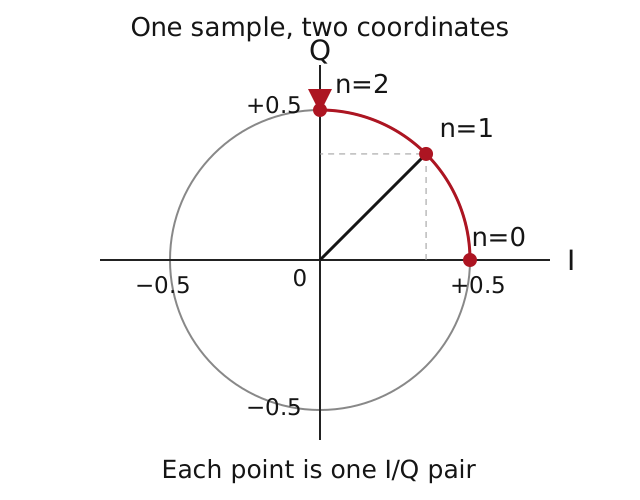
If we keep only I, upward and downward rotation produce the same horizontal values in this example. Q distinguishes those directions. Negating every Q value reverses the rotation. In this exercise, we call the first direction a positive frequency and the second a negative frequency.
A negative value here describes the direction of phase change relative to the center. In a hypothetical receiver centered on 100 MHz, a +1 kHz offset can represent 100.001 MHz, while −1 kHz can represent 99.999 MHz. Check the sign convention and I/Q order in a real tool. The exercise’s 8,000-sample rate describes data after frequency conversion, not direct sampling of a 100 MHz RF waveform.
Sample rate and tuning frequency are different settings
A spectrum displays a signal by frequency. The center frequency selects the part of that display we are looking at. Sample rate tells us how many I/Q pairs reach the program each second. A rate of 2 MS/s means two million complex samples per second. Each sample contains an I and a Q; that does not make it four million complex samples.
Baseband means representing the signal relative to its center frequency, with that center placed at zero. An ideal complex-baseband representation at that rate spans 2 MHz, roughly from −1 MHz to +1 MHz relative to the center. Real filters need transition space at the edges, so usable bandwidth can be smaller. A signal outside the permitted range may become indistinguishable from one inside it. This ambiguity is called aliasing. Increasing a sample-rate setting alone cannot fix inadequate filtering or hardware limits.
How large is an I/Q file, and how do you read it?
In float32, a format for storing decimal-valued numbers, I and Q each occupy four bytes. One pair therefore takes eight bytes. At an assumed 2 MS/s, raw data takes 16 MB per second or 960 MB for 60 seconds. One MB means one million bytes here; space used for anything beyond the samples is excluded.
Do not guess the format from the filename. Integer versus floating-point representation, number size, I/Q order and byte order all matter. The official UHD manual distinguishes several complex data types. Our exercise specifically writes I0,Q0,I1,Q1,… using two float32 values per pair, in little-endian byte order. That name specifies how the bytes of each number are arranged in the file; the reader must use the same setting. The file stores only sample values, without settings at the beginning. Its settings are written in the accompanying metadata.json.
Optional exercise: create a file and inspect the result
You can open the supplied tone.csv table just to inspect the numbers. To run the calculation yourself, you need Python 3, a programming language. No receiver or component purchase is needed. The offline I/Q exercise ZIP contains the code, sample files, English and Persian instructions, and tests.
- Extract the ZIP into a separate directory and open a terminal there. A terminal is an application in which you enter text commands.
- Run the commands below. The program writes files only in its generated subdirectory; it does not connect to a radio or a network.
python iq_demo.py
python -m unittest -v test_iq_demo.py
The program creates 1,024 sample pairs representing 0.128 seconds. Open tone.csv as a table if you want to inspect the coordinates. The binary tone.cf32le should be 8,192 bytes. The reported estimated_offset_hz is approximately 1,000; offset_after_negating_Q_hz is approximately −1,000. Changing the sign of Q has reversed the relative frequency direction.
What was checked: the code ran, and all 10 software tests passed. They cover reading the saved file, frequency direction, discarding Q and an aliasing example. The frequency estimator is intended for one noiseless, unmodulated tone inside the allowed interval. It is not a general detector for multiple signals. No receiver, antenna or radio transmission test was performed.
Three common mistakes
- Treating I/Q as finished audio: raw samples still need the appropriate channel selection and demodulation.
- Discarding Q to shrink a file: our example loses direction information and creates symmetric frequency components.
- Assuming every spectral line is a real incoming signal: mismatch between I and Q paths can create a mirror image. Analog Devices explains where that effect comes from. Noise—random unwanted variations—and an input that is too strong can also spoil the result.
A news claim about “raw I/Q access” should now be easier to interpret. It means a program can access signal samples; it does not automatically mean finished audio or a complete receiver for every communication format. Continue with the embedded systems learning path and our guide to measurement accuracy and calibration.
See these concepts in context in our report on an experiment with raw I/Q access and report on an ESP32-S3 SDR project. Those reports describe projects; this page supplies the foundation.
Sources
- PySDR introduction: the device and software-processing distinction.
- PySDR IQ sampling: complex coordinates, sample rate and aliasing.
- Official UHD manual, data-type sections: processing and transport formats.
- Analog Devices on I/Q imbalance and image rejection.
Question and answer article
Ask your technical question
Questions and answers are published after moderation. Authors can see their own pending drafts.
No confirmed questions have been registered for this article yet.