Robot simulation: learning, control and the real-world gap
A virtual robot follows its model. Moving a box one metre shows how speed errors, measurement bias and stopping delays can change the result.

Contents
Robot simulation uses a computer model to explore a robot's movement and surroundings. It can reveal mistakes before a machine moves. A virtual robot follows the model's assumptions, though: success in simulation does not prove that a real robot will move a box correctly or safely.
Here, a robot means a machine whose movement is controlled by a program. Imagine an arm picking up a box and placing it one metre away. The program needs to know where the box is, what movement to make and whether the box remains in its grip. A simulator can reproduce parts of that situation; it is more than a film of a predetermined movement.
The model, controller and sensor
A model is a simplified description of how something behaves. A basic movement model asks how far an object travels in one second at a given speed. A more detailed model can include mass, friction between surfaces and contact. No model contains every detail of the world.
A controller is the program that chooses the next action, such as moving towards a target. A sensor measures something: a distance sensor, for example, turns a distance into a number. A simulated sensor also returns numbers, but the computer generates them from its model. If those numbers are perfect, the controller is being developed with better information than real hardware may provide. The sensor introduction explains measurement and how programs use it.
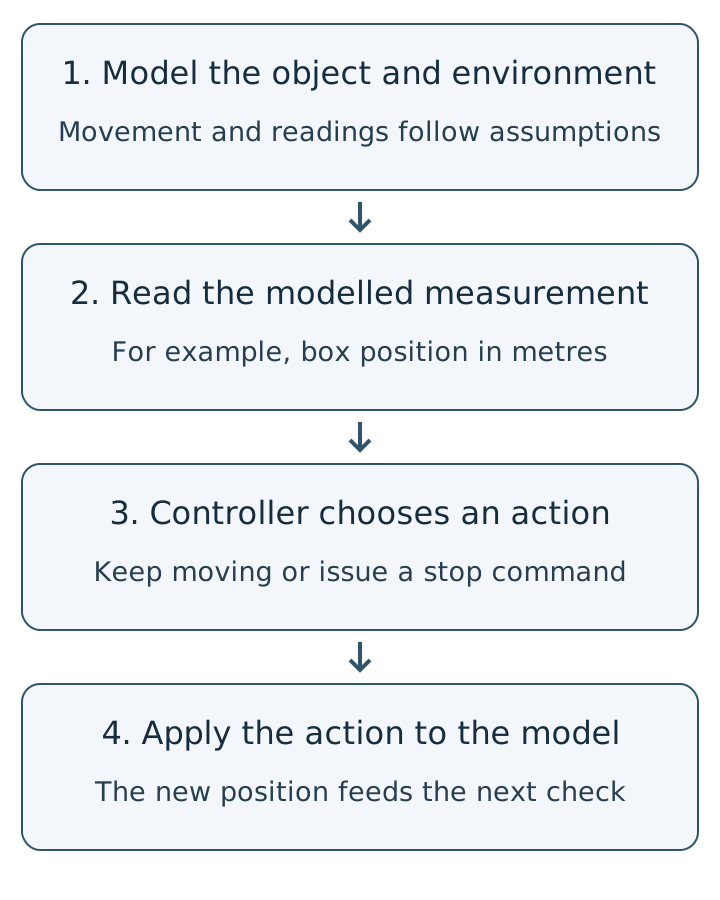
A one-metre move: what does the simple calculation leave out?
Set aside gripping and lifting the box for a moment. Consider only horizontal travel. Assume movement starts and stops instantly and speed stays constant. This simple model does not account for mass, slipping, collisions or motor capability. A speed of 0.20 m/s means travelling 20 centimetres each second.
At that speed, the time needed to move one metre is:
time = distance / speed
time = 1.00 m / 0.20 m/s = 5.00 s
A command to “move for five seconds” is open-loop control: the program does not measure the result while moving. Suppose the actual speed is only 0.18 m/s. After the same five seconds, the box travels 0.18 × 5 = 0.90 m, leaving it 10 centimetres short. The command has not changed; the speed assumption has.
Feedback helps, but measurements can be wrong
With feedback, the program reads position and decides what to do from the remaining distance. If position is measured perfectly and stopping is instantaneous, a lower speed simply takes longer: 1/0.18 ≈ 5.56 s. But suppose the sensor always reports a position two centimetres ahead of the actual position. The program reads one metre when the box has reached only 0.98 m, and stops early.
Now remove that measurement error and instead assume a 0.20-second stop delay. If the box continues at 0.20 m/s throughout the delay, it travels another 0.20 × 0.20 = 0.04 m, or four centimetres. This is only the extra distance due to the assumed delay. It excludes braking distance caused by gradual deceleration.
| Hypothetical case | Model result | What it shows |
|---|---|---|
| 0.20 m/s for five seconds | 1.00 m | The program and model assumptions agree. |
| 0.18 m/s for the same time | 0.90 m | A timed command does not correct a speed error. |
| Feedback with a positive 2 cm position error | Stop at 0.98 m | The controller trusts an inaccurate measurement. |
| 0.20-second stop delay at 0.20 m/s | 0.04 m extra travel | The model and stopping decision need to account for delay. |
These results follow from the stated assumptions, not measurements of an arm. Moving and releasing a real box safely requires further checks. The sensor accuracy and calibration lesson explains why extra display digits do not remove a consistent measurement error.
Simulation and learning are different jobs
A simulator supplies an environment for investigation. The controller might follow a written rule or use a learned method. Our distance-divided-by-speed calculation is a written rule; it has not trained anything. In learning from demonstrations, a person performs a task while the system records observations and actions. A learning process then uses these examples to produce a way of choosing actions. For a box task, the records might pair camera images with arm movements during pickup and placement. LeRobot documents a practical version of that workflow.
In reinforcement learning, the program tries actions and receives rewards or penalties according to a defined objective. Moving closer to a destination might earn a reward, while a collision incurs a penalty. If the objective rewards speed but ignores dropping the box, the learned behaviour may miss the actual purpose. A simulator does not automatically provide good data, an appropriate objective or a safe controller.
Investigating the gap between model and reality
Change the conditions instead of repeating one favourable case. Move the starting box position, introduce measurement errors, delay stopping or vary surface friction. Deliberately varying model parameters can expose a controller's dependence on optimistic assumptions. MuJoCo models movement and contact; Gazebo provides sensor models with configurable noise. Their usefulness still depends on appropriate modelling and configuration.
When evaluating a learned controller, hold back some examples and situations from training and use them only for evaluation. Success on the training examples does not establish performance in new conditions. Report the number of cases, the definition of success, collisions and remaining errors. One successful video is not a success rate across all tasks.
Hardware evaluation after simulation needs a procedure suited to the machine's hazards. Movement limits, supervision, emergency stopping and the mechanism's capabilities are part of that work. This lesson is not a procedure for commissioning a real arm or certifying its safety.
An optional exercise without a robot
The movement calculation file computes the same cases as the table. If you can run Python, the following command needs no additional library. You can understand the calculations without running it.
python motion_exercise.pyThe output includes 0.90 m travel, approximately 5.56 seconds, a 0.98 m stopping position and 0.04 m extra travel. This is a simple numerical model, not an execution of MuJoCo or Gazebo, a trained learning model or a hardware test. The embedded systems learning path shows how programs, sensors and testing fit into a project.
Sources
Question and answer article
Ask your technical question
Questions and answers are published after moderation. Authors can see their own pending drafts.
No confirmed questions have been registered for this article yet.