Schematic, PCB Layout and Manufacturing Files: A Simple LED Example
A schematic describes terminal connections; a PCB layout places components and copper tracks. A simple LED example explains manufacturing outputs and why a software check is not proof that a circuit works.
Contents
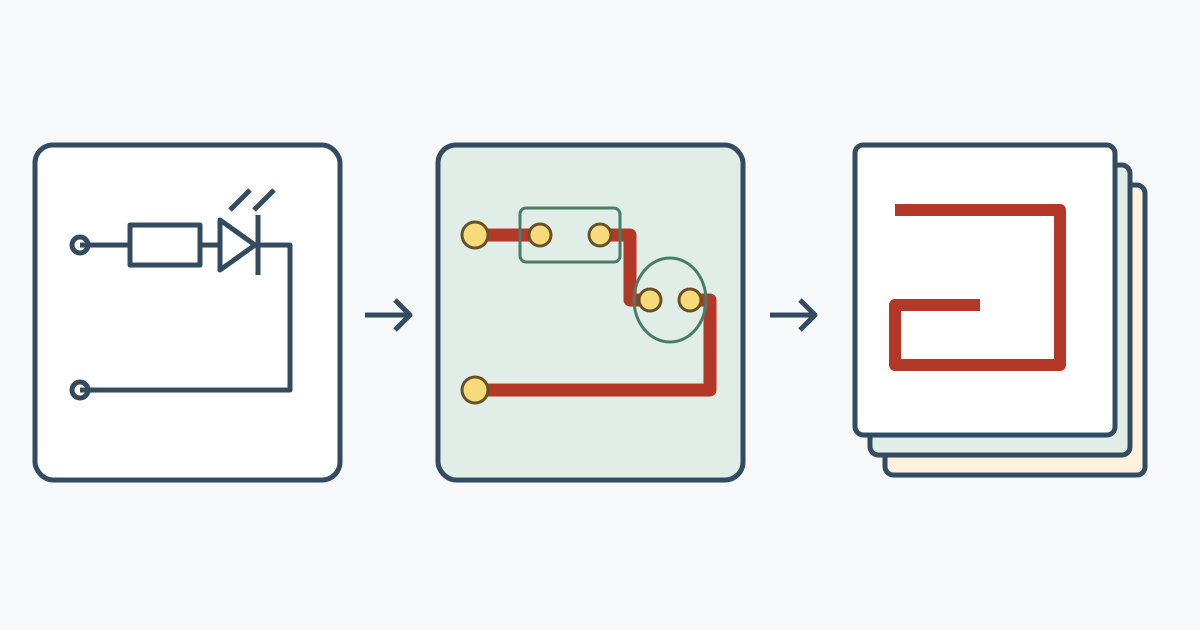
A schematic shows which component terminals should connect. A PCB layout determines where the components sit and how those connections become physical tracks. Manufacturing files are outputs used to produce the reviewed board. One does not replace the others, and a design with no software warnings can still fail to work correctly.
A printed circuit board, or PCB, supports electronic components and connects them with copper paths. A circuit is a group of components and connections that does a particular job, such as lighting an indicator. That simple light is enough to explain the difference between a connection diagram and a board.
1. A schematic describes connections
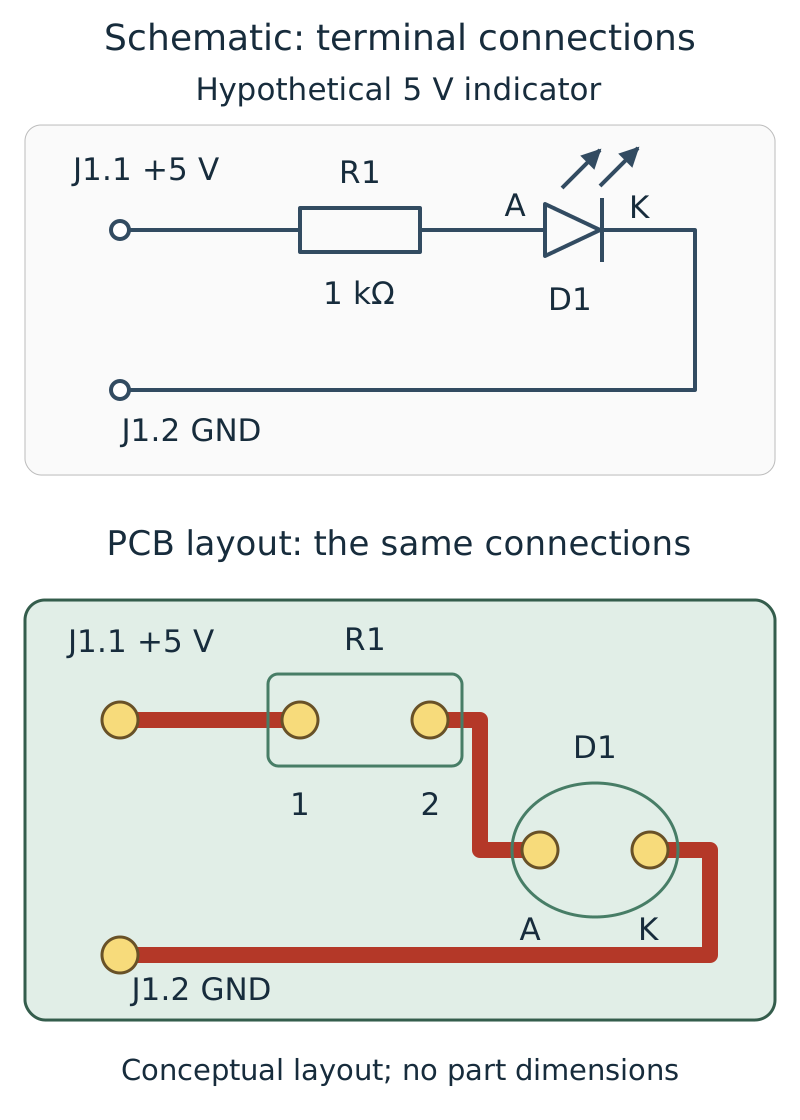
A schematic uses symbols instead of photographs. A resistor usually appears as a rectangle or zigzag. A resistor opposes current flow; in our example, it limits the current through the light. The light is an LED, a component that emits light when current passes through it in the appropriate direction.
The lines show which terminals connect. A terminal is an electrical connection point on a component. Labels such as R1 and D1 identify the same component across the drawing, board and parts list. R1 is a reference label, not a commercial part number.
A symbol's position on the page does not necessarily show the component's location on the board. Moving the resistor symbol can make the drawing easier to read without changing its connections. The KiCad getting-started guide explains this distinction between a connection drawing and its physical implementation.
2. A 5 V indicator: establish the path and resistor value first
Our hypothetical example uses a 5 V direct-current supply. Voltage is the electrical difference between two points, measured in volts. Current is the rate of flow of electric charge, measured in amperes; one milliampere is one thousandth of an ampere. Current needs a complete outgoing and return path.
The intended connection is supply positive to the resistor, the other resistor terminal to the LED input, and the LED output back to supply negative. The LED terminals are called anode, A, and cathode, K; conventional current flows from anode to cathode when it is lit. The transverse bar on the diode symbol marks the cathode. Small outward arrows beside the LED symbol represent emitted light.
Assume a 2 V LED forward drop at the intended current and a 1000 ohm resistor, written 1 kΩ. A voltage drop is the voltage difference across a component while current flows. Of the supply's 5 V, 2 V appears across the LED and the remaining 3 V across the resistor:
V_R = 5 V - 2 V = 3 V
I = V_R / R = 3 V / 1000 Ω = 0.003 A = 3 mA
P_R = V_R × I = 3 V × 0.003 A = 0.009 W = 9 mW
The calculated current is 3 mA, and the resistor converts 9 mW into heat. These are results of the stated assumptions, not measurements of a built indicator. A real LED's forward voltage and allowed current must come from its specific datasheet; colour, temperature and current affect its behaviour. ROHM's LED circuit explanation describes the series resistor and forward-voltage variation.
3. A symbol must map to a footprint and a real component
A footprint is the component's mounting pattern on the board: copper connection areas, holes where needed and related geometry. A copper area to which a component terminal is soldered is a pad. One resistor symbol could represent a large part with wire leads or a tiny surface-mount part. The symbol alone does not define its mounting size.
For the indicator, both R1 terminals and the anode and cathode of D1 must map to the correct pads. The drawing's A and K labels identify terminal roles; the real pad numbers need checking against the selected component's datasheet and library entry. An incorrect mapping can reverse the LED even when the intended connection diagram is sound. The KiCad schematic editor manual has a separate section on assigning footprints.
A bill of materials, or BOM, identifies the parts to obtain and fit. “1 kΩ resistor” is not a complete purchasing specification: size, power rating, resistance tolerance and mounting method also matter. Our datasheet reading guide explains nominal values, limits and operating conditions. This example does not select a particular model to buy.
4. A PCB needs physical paths
After choosing mounting patterns, place the components within the actual board outline. Then join the required pads with copper tracks. In the illustration, supply positive reaches R1, the next track joins R1 to the LED anode, and the cathode returns to supply negative. Here, GND names the circuit reference and return; it does not require a connection to building earth.
Each connected group of terminals is a net. A netlist records those connections: effectively, a list of which terminal joins which. A guide line showing a required connection in the editor is not yet a routed copper track.
Two boards can implement the same schematic connections while using different track lengths, widths and component spacing. In a real circuit, these differences affect voltage loss, heating and noise. Design rules must suit the current, circuit and manufacturer's capabilities. An attractive 3D rendering does not establish that suitability.
5. What software checks can and cannot establish
Electrical rules checking, ERC, finds certain defined inconsistencies in a schematic, such as incompatible pin-type connections. Design rules checking, DRC, compares board connections and geometry with configured rules, including copper spacing and minimum track width. Its scope and settings limit what the result means. The KiCad PCB manual describes these checks and comparison with the schematic.
Suppose we mistakenly specify a 100 ohm resistor in both the schematic and parts list, and the board faithfully follows that schematic. Keeping the example's assumed 2 V LED drop, the calculated current becomes:
I = (5 V - 2 V) / 100 Ω = 0.03 A = 30 mAThat is ten times the 1000 ohm example and must be compared with the real component's rating. A checker examining only connectivity and spacing will not necessarily flag the mistaken value. “No DRC errors” does not mean “correct LED current.”
Simulation calculates circuit behaviour using software models. Its result depends on those models and assumptions. A hardware test examines an actual built sample using a defined procedure and real instruments. Keep these three outcomes distinct: passing rule checks, obtaining a simulation result and measuring a prototype.
6. Which files are needed to make the board?
Generate manufacturing outputs from the same reviewed design revision. Gerber is a common format for transferring board-layer data; Ucamco, the Gerber format authority, explains the layer information and associated data. A common workflow supplies copper, protective solder-mask and printed-legend outputs together with drilling and board-outline information. Confirm the exact file set and naming with the chosen manufacturer.
| Information | What it describes | What it does not replace |
|---|---|---|
| Editable project files | Schematic, layout and design settings | Final reviewed manufacturing outputs |
| Layer and drilling outputs | Geometry to be made on the board | Component selection, purchasing or proof of circuit function |
| BOM and assembly information | Part identities, locations and orientations | The bare board or a prototype test result |
Making a bare board and assembling components onto it are different jobs. Assembly may require component placement files, assembly drawings and further information. Before ordering, reopen the exported layers and drilling data in a separate viewer to inspect layer selection, outline and hole positions. GerbView is one example. Viewing the files does not replace engineering review.
7. A short exercise: follow one connection to the outputs
Start at supply positive and follow the path through the resistor, LED anode, cathode and supply return. Find the same path in the board view. Now imagine an LED fitted backwards: did the schematic change, was terminal-to-pad mapping wrong, or did assembly differ from the design? Each is a distinct possibility requiring different evidence.
If the resistor value changes, reconcile the project revision, parts list and affected outputs. Keeping an old ZIP next to a new schematic does not make them the same revision. For the underlying current, power and return-path concepts, continue with the Electronics Tutorials learning path.
Question and answer article
Ask your technical question
Questions and answers are published after moderation. Authors can see their own pending drafts.
No confirmed questions have been registered for this article yet.